Don't miss your chance to take the Fabric Data Engineer (DP-700) exam on us!
Learn moreNext up in the FabCon + SQLCon recap series: The roadmap for Microsoft SQL and Maximizing Developer experiences in Fabric. All sessions are available on-demand after the live show. Register now
Hey all,
I have the following data structure:
| ID | TotalDistance | StartTime | EndTime |
| 1 | 1000 | 10:00 | |
| 1 | 1100 | ||
| 1 | 1300 | ||
| 1 | 1400 | 12:00 | |
| 1 | 1400 | 12:20 | |
| 2 | 2000 | 14:00 | |
| 2 | 2200 | ||
| 2 | 2300 | 14:30 | |
| 2 | 2400 | 15:00 | |
| 2 | 2400 | 15:10 | |
| 3 | 500 | 9:00 | |
| 3 | 550 | ||
| 3 | 600 | 9:20 | |
| 3 | 600 | 9:25 | |
| 3 | 630 | ||
| 3 | 650 | 9:50 |
Now, I want to calculate the distance travelled between each start and end time for each ID. How would I go about doing this? If possible in a measure!
Ralph
Solved! Go to Solution.
Hi @RalphO
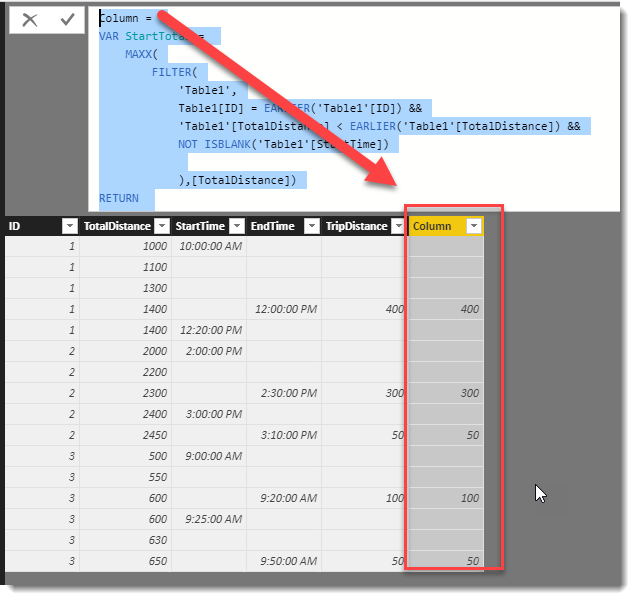
Here is how you can do it with a calculated column. I have attached a PBIX file
Column =
VAR StartTotal =
MAXX(
FILTER(
'Table1',
Table1[ID] = EARLIER('Table1'[ID]) &&
'Table1'[TotalDistance] < EARLIER('Table1'[TotalDistance]) &&
NOT ISBLANK('Table1'[StartTime])
),[TotalDistance])
RETURN
IF(
NOT ISBLANK('Table1'[EndTime]),
'Table1'[TotalDistance] - StartTotal
)
HI @RalphO
Can you please provide what your expected output would be for that sample set of data. This will help clarify your requirement.
Cheers,
Phil
I should look something like this (A TripDistance value for the other rows should also be fine):
| ID | TotalDistance | StartTime | EndTime | TripDistance |
| 1 | 1000 | 10:00 | ||
| 1 | 1100 | |||
| 1 | 1300 | |||
| 1 | 1400 | 12:00 | 400 | |
| 1 | 1400 | 12:20 | ||
| 2 | 2000 | 14:00 | ||
| 2 | 2200 | |||
| 2 | 2300 | 14:30 | 300 | |
| 2 | 2400 | 15:00 | ||
| 2 | 2450 | 15:10 | 50 | |
| 3 | 500 | 9:00 | ||
| 3 | 550 | |||
| 3 | 600 | 9:20 | 100 | |
| 3 | 600 | 9:25 | ||
| 3 | 630 | |||
| 3 | 650 | 9:50 | 50 |
Basically I want the total distance travelled in each trip, with trip defined as the time between starttime and endtime.
Hi @RalphO
Here is how you can do it with a calculated column. I have attached a PBIX file
Column =
VAR StartTotal =
MAXX(
FILTER(
'Table1',
Table1[ID] = EARLIER('Table1'[ID]) &&
'Table1'[TotalDistance] < EARLIER('Table1'[TotalDistance]) &&
NOT ISBLANK('Table1'[StartTime])
),[TotalDistance])
RETURN
IF(
NOT ISBLANK('Table1'[EndTime]),
'Table1'[TotalDistance] - StartTotal
)
@Phil_Seamark That works, thank you!
For bonus points: do you think it would also be possible to do this with a measure instead of a calculated column?
Hi @RalphO
Yes this would be possible, however a calculated measure needs to know what fields you are using in an axis to help ensure you get the right values.
Would you be using a Table/Matrix visual with the measure?
@Phil_Seamark I will probably be using a line graph visual for it, with timestamps as the x-axis (one stamp for every 2 seconds, not included in the sample data). Would a measure work for this, or solely for an actual matrix/table?
If you have recently started exploring Fabric, we'd love to hear how it's going. Your feedback can help with product improvements.
A new Power BI DataViz World Championship is coming this June! Don't miss out on submitting your entry.
Share feedback directly with Fabric product managers, participate in targeted research studies and influence the Fabric roadmap.
| User | Count |
|---|---|
| 50 | |
| 44 | |
| 42 | |
| 19 | |
| 19 |
| User | Count |
|---|---|
| 70 | |
| 68 | |
| 33 | |
| 32 | |
| 32 |