cancel
Showing results for 
Search instead for 
Did you mean: 

The Power BI Data Visualization World Championships is back! Get ahead of the game and start preparing now! Learn more

Reply
runnerpaul
Regular Visitor

Display number of enquiries

Hi,


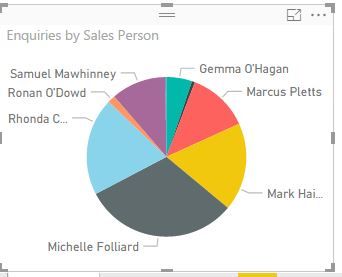
 I have the below pie chart:

 pie.JPG

As you can see it shows the sales person name beside their particular slice. Is it possible to have the name and the number of enquiries  per slice displayed?


Currently both will pop up if I hover over each slice but I'd like these to be visible all the time.


Cheers

Paul


1 ACCEPTED SOLUTION
JoHo_BI
Responsive Resident
Responsive Resident

Hi Paul.


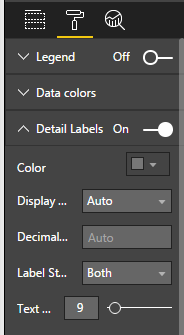
In the format tab (the paintbrush above the fields), there's a Detail Labels section. If you expand that list, you will see label style. From here, you can select both, and voila! (See below screenshot)

PowerBI_SS.png

View solution in original post

1 REPLY 1
JoHo_BI
Responsive Resident
Responsive Resident

Hi Paul.


In the format tab (the paintbrush above the fields), there's a Detail Labels section. If you expand that list, you will see label style. From here, you can select both, and voila! (See below screenshot)

PowerBI_SS.png

Helpful resources

Announcements
November Power BI Update Carousel

Power BI Monthly Update - November 2025

Check out the November 2025 Power BI update to learn about new features.

Fabric Data Days Carousel

Fabric Data Days

Advance your Data & AI career with 50 days of live learning, contests, hands-on challenges, study groups & certifications and more!

FabCon Atlanta 2026 carousel

FabCon Atlanta 2026

Join us at FabCon Atlanta, March 16-20, for the ultimate Fabric, Power BI, AI and SQL community-led event. Save $200 with code FABCOMM.

Top Solution Authors
Top Kudoed Authors