
This time we’re going bigger than ever. Fabric, Power BI, SQL, AI and more. We're covering it all. You won't want to miss it.
Learn moreDid you hear? There's a new SQL AI Developer certification (DP-800). Start preparing now and be one of the first to get certified. Register now
Hi,
I have a matrix with the categories on rows (blacked out in the below image for security reasons) and the week of the year number (1..52) on the columns, with some dates in the values.
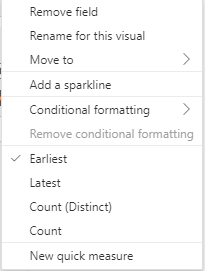
But powerBI automatically restricts the values to take the earliest date in each week, and the only other options I have are latest date or simply count of dates in each week, as part of the summarization:
But I want to display all the dates in the week (there 2/3 dates in each week that needs to come through as values).
Is this possible to do?
Thanks in advance!
Solved! Go to Solution.
@Anonymous , You can not do that in case of matrix visual
Max you can do that you create a measure
concatenatex(Table, Table[Date], " , ")
Yes. You can either use double quotes with a carriage return in between, or just use CHAR(10) in place of ",".
Pat
@amitchandak Thanks for your response.
That's unfortunate that this is not possible in PowerBI. But the work around you suggested does work.
Is there a way to use a "new line" (Similar to \n) as a delimiter in PowerBI instead of ","?
Yes. You can either use double quotes with a carriage return in between, or just use CHAR(10) in place of ",".
Pat
Check out the April 2026 Power BI update to learn about new features.
If you have recently started exploring Fabric, we'd love to hear how it's going. Your feedback can help with product improvements.
| User | Count |
|---|---|
| 36 | |
| 32 | |
| 31 | |
| 21 | |
| 15 |
| User | Count |
|---|---|
| 68 | |
| 57 | |
| 31 | |
| 29 | |
| 22 |