FabCon is coming to Atlanta
Join us at FabCon Atlanta from March 16 - 20, 2026, for the ultimate Fabric, Power BI, AI and SQL community-led event. Save $200 with code FABCOMM.
Register now!- Power BI forums
- Get Help with Power BI
- Desktop
- Service
- Report Server
- Power Query
- Mobile Apps
- Developer
- DAX Commands and Tips
- Custom Visuals Development Discussion
- Health and Life Sciences
- Power BI Spanish forums
- Translated Spanish Desktop
- Training and Consulting
- Instructor Led Training
- Dashboard in a Day for Women, by Women
- Galleries
- Data Stories Gallery
- Themes Gallery
- Contests Gallery
- QuickViz Gallery
- Quick Measures Gallery
- Visual Calculations Gallery
- Notebook Gallery
- Translytical Task Flow Gallery
- TMDL Gallery
- R Script Showcase
- Webinars and Video Gallery
- Ideas
- Custom Visuals Ideas (read-only)
- Issues
- Issues
- Events
- Upcoming Events
Get Fabric Certified for FREE during Fabric Data Days. Don't miss your chance! Request now
- Power BI forums
- Forums
- Get Help with Power BI
- Desktop
- Re: Display lowest Hierarchy slicer field selected
- Subscribe to RSS Feed
- Mark Topic as New
- Mark Topic as Read
- Float this Topic for Current User
- Bookmark
- Subscribe
- Printer Friendly Page

- Mark as New
- Bookmark
- Subscribe
- Mute
- Subscribe to RSS Feed
- Permalink
- Report Inappropriate Content
Display lowest Hierarchy slicer field selected
Hi everyone,
I am new to power bi and DAX, I have a hierarch slicer and a card to display what I have selected in the slicer how do I do this in DAX?
here is a screenshot of what I want to achieve
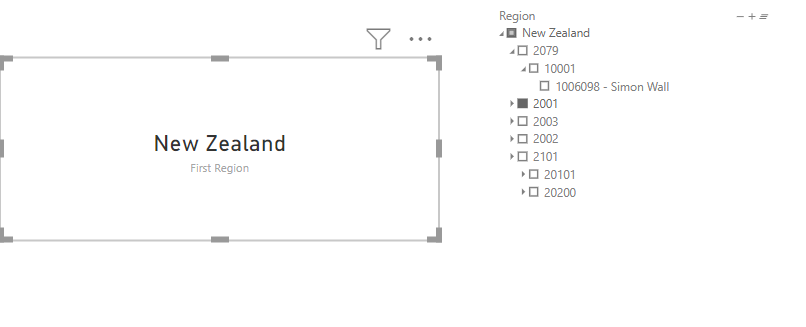
once I select on new zealand it should display new zealand, when I select 2079 it should only display 2079, when I select an employee is should display only the employee for example 1006098 - Simon Wall
Thanks in advance for your responses
Solved! Go to Solution.


- Mark as New
- Bookmark
- Subscribe
- Mute
- Subscribe to RSS Feed
- Permalink
- Report Inappropriate Content
@Anonymous
May be.. something like this.
Checking if the lowest level is filtered>>then next upper level>>then next
See the attached sample file as well
Measure =
SWITCH (
    TRUE (),
    ISFILTERED ( Table1[Level3] ), CONCATENATEX ( VALUES ( Table1[Level3] ), [Level3], "," ),
    ISFILTERED ( Table1[Level2] ), CONCATENATEX ( VALUES ( Table1[Level2] ), [Level2], "," ),
    ISFILTERED ( Table1[Level1] ), CONCATENATEX ( VALUES ( Table1[Level1] ), [Level1], "," )
)
Regards
Zubair
Please try my custom visuals
- Mark as New
- Bookmark
- Subscribe
- Mute
- Subscribe to RSS Feed
- Permalink
- Report Inappropriate Content
@Anonymous
I see that order of levels 2 and 3 in your MEASURE was not correct.
Use this MEASURE
Selectedslicer =
SWITCH (
    TRUE (),
    ISFILTERED ( FACT_UTE[Employee] ), SELECTEDVALUE ( FACT_UTE[Employee] ),
    ISFILTERED ( FACT_UTE[SG_Code] ), SELECTEDVALUE ( FACT_UTE[SG_Code] ),
    ISFILTERED ( FACT_UTE[OC] ), SELECTEDVALUE ( FACT_UTE[OC] ),
    ISFILTERED ( FACT_UTE[Region] ), SELECTEDVALUE ( FACT_UTE[Region] ),
    "Select a value"
)
Regards
Zubair
Please try my custom visuals
- Mark as New
- Bookmark
- Subscribe
- Mute
- Subscribe to RSS Feed
- Permalink
- Report Inappropriate Content
@Anonymous
May be.. something like this.
Checking if the lowest level is filtered>>then next upper level>>then next
See the attached sample file as well
Measure =
SWITCH (
    TRUE (),
    ISFILTERED ( Table1[Level3] ), CONCATENATEX ( VALUES ( Table1[Level3] ), [Level3], "," ),
    ISFILTERED ( Table1[Level2] ), CONCATENATEX ( VALUES ( Table1[Level2] ), [Level2], "," ),
    ISFILTERED ( Table1[Level1] ), CONCATENATEX ( VALUES ( Table1[Level1] ), [Level1], "," )
)
Regards
Zubair
Please try my custom visuals
- Mark as New
- Bookmark
- Subscribe
- Mute
- Subscribe to RSS Feed
- Permalink
- Report Inappropriate Content
Hi @Zubair_Muhammad ,
I tried your formula and tweaked it, I came up with a problem.
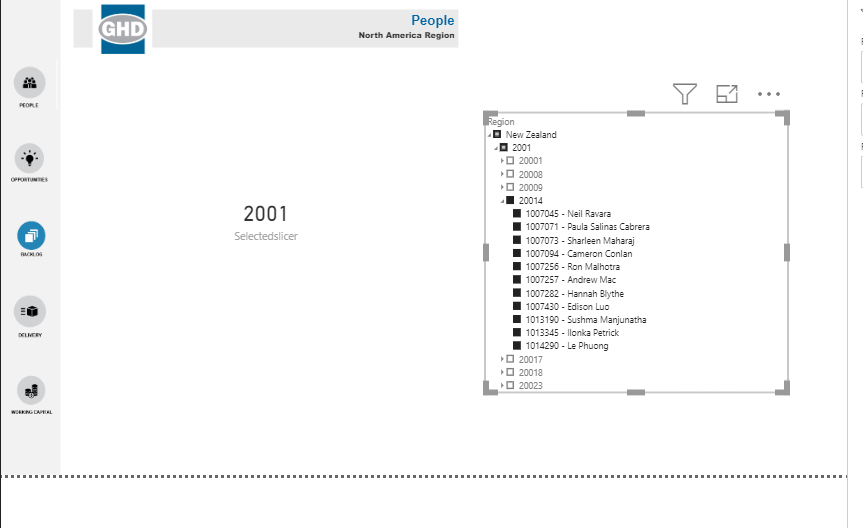
it works when I select region, and the following hierarchy but when I select 20014 it doesn't appear, but when I select employee it does appear
- Mark as New
- Bookmark
- Subscribe
- Mute
- Subscribe to RSS Feed
- Permalink
- Report Inappropriate Content
@Anonymous
Could you share your file?
Did you include all four levels in the formula?
Regards
Zubair
Please try my custom visuals
- Mark as New
- Bookmark
- Subscribe
- Mute
- Subscribe to RSS Feed
- Permalink
- Report Inappropriate Content
Yes I included all the levels
I will share you the file now, I can't share files right now because I am still new but here is the access to the google drive I saved it in
https://drive.google.com/file/d/1WzIcG_ouKfWHKp3s6eotE99-GKgvrofm/view?usp=sharing
- Mark as New
- Bookmark
- Subscribe
- Mute
- Subscribe to RSS Feed
- Permalink
- Report Inappropriate Content
@Anonymous
I see that order of levels 2 and 3 in your MEASURE was not correct.
Use this MEASURE
Selectedslicer =
SWITCH (
    TRUE (),
    ISFILTERED ( FACT_UTE[Employee] ), SELECTEDVALUE ( FACT_UTE[Employee] ),
    ISFILTERED ( FACT_UTE[SG_Code] ), SELECTEDVALUE ( FACT_UTE[SG_Code] ),
    ISFILTERED ( FACT_UTE[OC] ), SELECTEDVALUE ( FACT_UTE[OC] ),
    ISFILTERED ( FACT_UTE[Region] ), SELECTEDVALUE ( FACT_UTE[Region] ),
    "Select a value"
)
Regards
Zubair
Please try my custom visuals
- Mark as New
- Bookmark
- Subscribe
- Mute
- Subscribe to RSS Feed
- Permalink
- Report Inappropriate Content
Wow! Thank you so much @Zubair_Muhammad you're a life saver, it worked great I failed to see my mistake thank you!


- Mark as New
- Bookmark
- Subscribe
- Mute
- Subscribe to RSS Feed
- Permalink
- Report Inappropriate Content
I am looking for help with similar case, I need to create a measure which will return selected value from hierarchy slicer but only when there is only one selected.
When there is more than one value selected it should return BLANK.
In this example it should return BLANK :
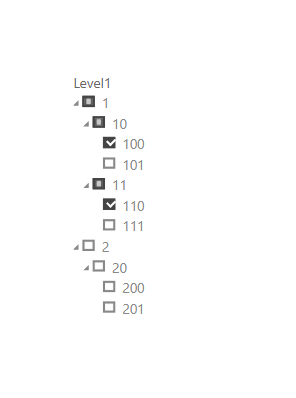
In this selection it shoudl return 20 :

In this example it should return 110:

I wil be grateful for help.
- Mark as New
- Bookmark
- Subscribe
- Mute
- Subscribe to RSS Feed
- Permalink
- Report Inappropriate Content
Thank you for the reply,
It worked perfectly thank you!
Helpful resources

Power BI Monthly Update - November 2025
Check out the November 2025 Power BI update to learn about new features.

Fabric Data Days
Advance your Data & AI career with 50 days of live learning, contests, hands-on challenges, study groups & certifications and more!

FabCon Atlanta 2026
Join us at FabCon Atlanta, March 16-20, for the ultimate Fabric, Power BI, AI and SQL community-led event. Save $200 with code FABCOMM.


