cancel
Showing results for 
Search instead for 
Did you mean: 

Level up your Power BI skills this month - build one visual each week and tell better stories with data! Get started

Reply
svarghese
Advocate I
Advocate I

Display labels for dates

Hi


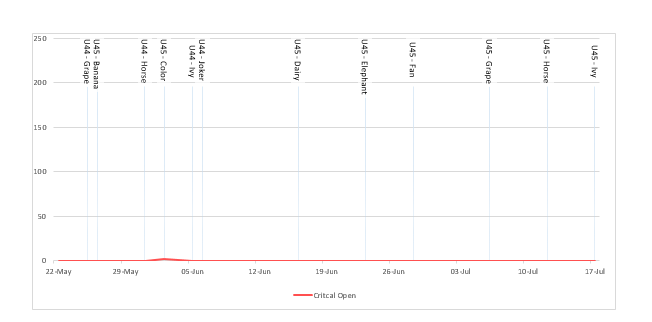
I would like to plot labels(milestone names) against dates in powerBI like below.

I have the dates and corresponding milestones in a table . The below graph is from excel. Here Apple, Banana, Color, Joker etc are all milestones names for dates.


image.png


Any help is apreciated.

Thanks

4 REPLIES 4
danextian
Super User
Super User

hi @svarghese,


Data labels in Power BI are dependent upon measures used.  You may format how the measures appear but showing as label other than the measure values is currently not possible. You may create measures  to be used as tooltips as an alternative  - they appear when hovering a data point in your visual - althought this may not be what you want. 


The measure below will return concatenated texts from a column. 


milestones =
CONCATENATEX ( VALUES ( [column] ), [column], ", " )


Dane Belarmino | Microsoft MVP | Proud to be a Super User!

Did I answer your question? Mark my post as a solution!


"Tell me and I’ll forget; show me and I may remember; involve me and I’ll understand."
Need Power BI consultation, get in touch with me on LinkedIn or hire me on UpWork.
Learn with me on YouTube @DAXJutsu or follow my page on Facebook @DAXJutsuPBI.

Thanks @danextian. I would prefer to have somthig to be static on the graph and not only when hovering. The concatentae definetly seems like a good option for now. Would be better if I could actually have milestone dates marked like in the graph i had attached.


Hi @svarghese


You may post this idea on https://ideas.powerbi.com

Would also love to have an option to place a static label other than the actual measure. Let me know the link so I can also vote  for it.


Dane Belarmino | Microsoft MVP | Proud to be a Super User!

Did I answer your question? Mark my post as a solution!


"Tell me and I’ll forget; show me and I may remember; involve me and I’ll understand."
Need Power BI consultation, get in touch with me on LinkedIn or hire me on UpWork.
Learn with me on YouTube @DAXJutsu or follow my page on Facebook @DAXJutsuPBI.

Done 🙂

https://ideas.powerbi.com/forums/265200-power-bi-ideas/suggestions/20297173-labels-for-dates


I couldnt attach a sample graph, so hopefully the description makes sense.

Helpful resources

Announcements
April Power BI Update Carousel

Power BI Monthly Update - April 2026

Check out the April 2026 Power BI update to learn about new features.

Fabric SQL PBI Data Days

Data Days 2026 coming soon!

Sign up to receive a private message when registration opens and key events begin.

New to Fabric survey Carousel

New to Fabric Survey

If you have recently started exploring Fabric, we'd love to hear how it's going. Your feedback can help with product improvements.

Power BI DataViz World Championships carousel

Power BI DataViz World Championships - June 2026

A new Power BI DataViz World Championship is coming this June! Don't miss out on submitting your entry.