cancel
Showing results for 
Search instead for 
Did you mean: 

Get Fabric Certified for FREE during Fabric Data Days. Don't miss your chance! Request now

Reply
UBComma
Helper III
Helper III

Display items not selected in a slicer

Does anyone have a clever suggestion on how to show a dynamically rendered list of items showing what has been filtered out by a slicer? For example:


I have a list of items where the full list is this

ITEMS

Item 1

Item 2

Item 3

Item 4


Now apply a slicer to the ITEMS table and select Item 2 and Item 4


From this action I want to display two tables, one with the selection, and one with the items not selected, like this:


SELECTED ITEMS

Item 2

Item 4


UNSELECTED ITEMS

Item 1

Item 3


Any thoughts on how to do this?

1 ACCEPTED SOLUTION
Jihwan_Kim
Super User
Super User

Hi,

I tried to create a sample pbix file like below.

Please check the below picture and the attached pbix file.

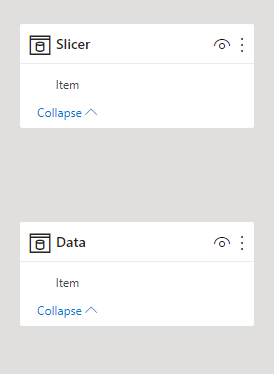
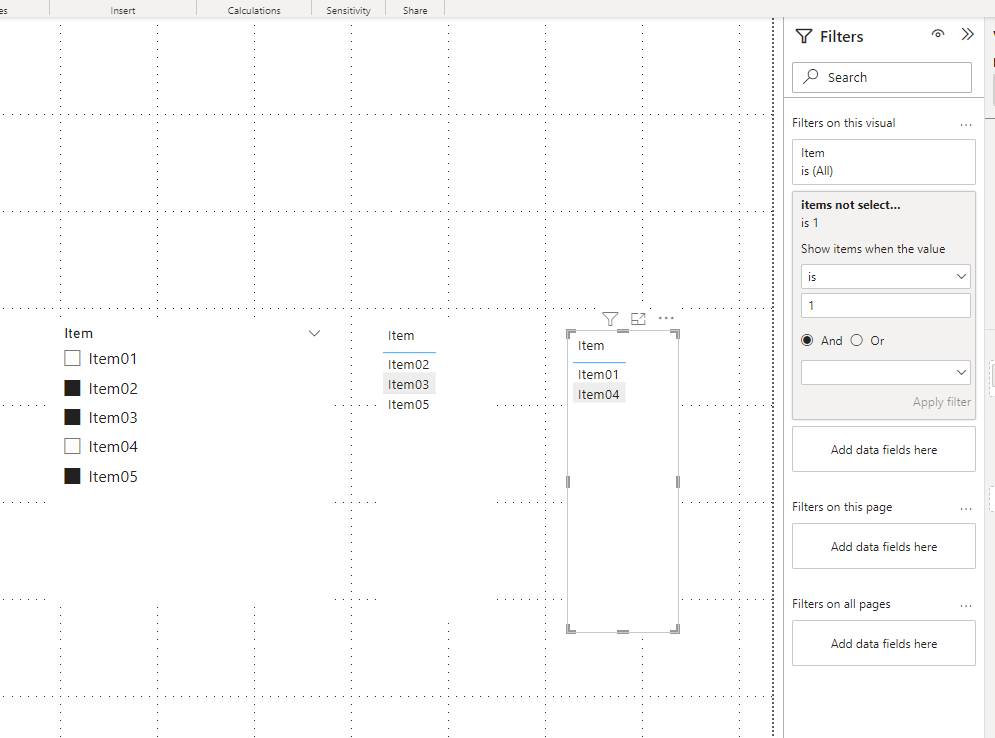
I suggest having a disconnected slicer like the sample pbix file, and add a condition measure into Visual Level filter pane.


Jihwan_Kim_0-1667225284731.png


Jihwan_Kim_1-1667225684094.png


items selected: = 
SWITCH (
    TRUE (),
    NOT ISFILTERED ( Slicer[Item] ), 0,
    COUNTROWS ( FILTER ( Data, Data[Item] IN DISTINCT ( Slicer[Item] ) ) ) >= 1, 1,
    0
)


items not selected: = 
SWITCH (
    TRUE (),
    NOT ISFILTERED ( Slicer[Item] ), 0,
    COUNTROWS ( FILTER ( Data, Data[Item] IN DISTINCT ( Slicer[Item] ) ) ) = 0, 1,
    0
)


If this post helps, then please consider accepting it as the solution to help other members find it faster, and give a big thumbs up.


Click here to visit my LinkedIn page

Click here to schedule a short Teams meeting to discuss your question.

View solution in original post

2 REPLIES 2
Jihwan_Kim
Super User
Super User

Hi,

I tried to create a sample pbix file like below.

Please check the below picture and the attached pbix file.

I suggest having a disconnected slicer like the sample pbix file, and add a condition measure into Visual Level filter pane.


Jihwan_Kim_0-1667225284731.png


Jihwan_Kim_1-1667225684094.png


items selected: = 
SWITCH (
    TRUE (),
    NOT ISFILTERED ( Slicer[Item] ), 0,
    COUNTROWS ( FILTER ( Data, Data[Item] IN DISTINCT ( Slicer[Item] ) ) ) >= 1, 1,
    0
)


items not selected: = 
SWITCH (
    TRUE (),
    NOT ISFILTERED ( Slicer[Item] ), 0,
    COUNTROWS ( FILTER ( Data, Data[Item] IN DISTINCT ( Slicer[Item] ) ) ) = 0, 1,
    0
)


If this post helps, then please consider accepting it as the solution to help other members find it faster, and give a big thumbs up.


Click here to visit my LinkedIn page

Click here to schedule a short Teams meeting to discuss your question.

Very good! I think that's going to work. Thanks so much for your help!

Helpful resources

Announcements
November Power BI Update Carousel

Power BI Monthly Update - November 2025

Check out the November 2025 Power BI update to learn about new features.

Fabric Data Days Carousel

Fabric Data Days

Advance your Data & AI career with 50 days of live learning, contests, hands-on challenges, study groups & certifications and more!

FabCon Atlanta 2026 carousel

FabCon Atlanta 2026

Join us at FabCon Atlanta, March 16-20, for the ultimate Fabric, Power BI, AI and SQL community-led event. Save $200 with code FABCOMM.

Top Solution Authors
Top Kudoed Authors