Join us in Barcelona for FabCon and SQLCon, September 28 - October 1, 2026.
This is best Fabric, Power BI, SQL and AI community event. How do we know? The last event sold out! Save €200 with code FABCMTY200.
Register now- Power BI forums
- Get Help with Power BI
- Desktop
- Service
- Report Server
- Power Query
- Mobile Apps
- Developer
- DAX Commands and Tips
- Custom Visuals Development Discussion
- Health and Life Sciences
- Power BI Spanish forums
- Translated Spanish Desktop
- Training and Consulting
- Instructor Led Training
- Dashboard in a Day for Women, by Women
- Galleries
- Data Stories Gallery
- Themes Gallery
- Contests Gallery
- QuickViz Gallery
- Quick Measures Gallery
- Visual Calculations Gallery
- Fabric Apps Gallery
- Notebook Gallery
- Translytical Task Flow Gallery
- TMDL Gallery
- R Script Showcase
- Webinars and Video Gallery
- Ideas
- Custom Visuals Ideas (read-only)
- Issues
- Issues
- Events
- Upcoming Events
The Fabric community is upgrading! Read all of the details including the timeline and what you can expect. Learn more
- Power BI forums
- Forums
- Get Help with Power BI
- Desktop
- Display empty values in area chart
- Subscribe to RSS Feed
- Mark Topic as New
- Mark Topic as Read
- Float this Topic for Current User
- Bookmark
- Subscribe
- Printer Friendly Page


- Mark as New
- Bookmark
- Subscribe
- Mute
- Subscribe to RSS Feed
- Permalink
- Report Inappropriate Content
Display empty values in area chart
I've given up trying to define a measure that returns the bank account balance and cash flow, even for days when there are no movements. After lots of different combinations, I realized it's not worth the effort.
Therefore, I'm living with BLANK for those days, which in a matrix is OK.
However, in a Area Chart, I'd like to show the balance for all the days within the dates range. But this is showing empty values for thoses days with no movements:
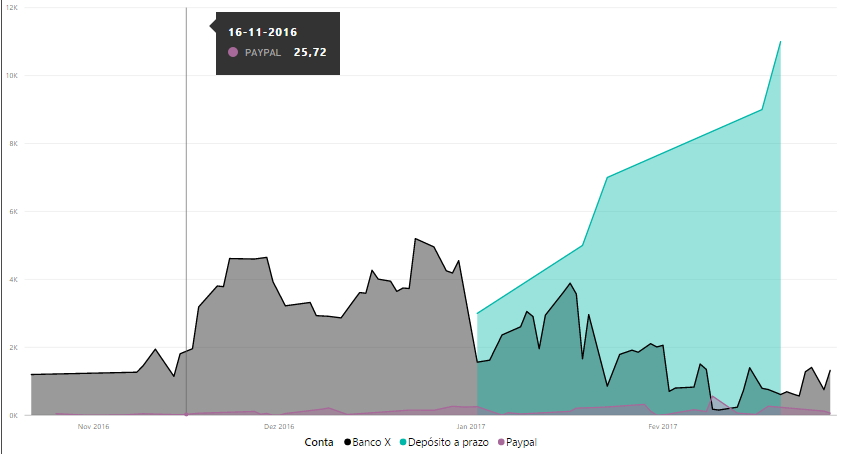
This doesn't look good with empty spots...
Also, why are the three series not accumulating? That's the whole idea of this chart, right?
Thanks for helping!
Solved! Go to Solution.
- Mark as New
- Bookmark
- Subscribe
- Mute
- Subscribe to RSS Feed
- Permalink
- Report Inappropriate Content
Hi,
I've figured out I must have a value for each day in my dates range for the ending balance.
Otherwise, charts and visuals in general will look terrible.
This is the expression I've managed to find:
Saldo em EUR =
IF (
    AND (
        'Consolidado'[DataCorrente] <= 'Consolidado'[DataMáxima];
        'Consolidado'[DataCorrente] >= 'Consolidado'[DataMínima]
    );
    CALCULATE (
        0 + SUM ( 'Consolidado'[Fluxo em EUR (intermédio)] );
        FILTER (
            ALL ( 'Calendário'[Data] );
            'Calendário'[Data] <= MAX ( 'Calendário'[Data] )
        )
    )
)
Initially, a simple measure but required to define intermediate calculations.
Now, the charts are looking better:
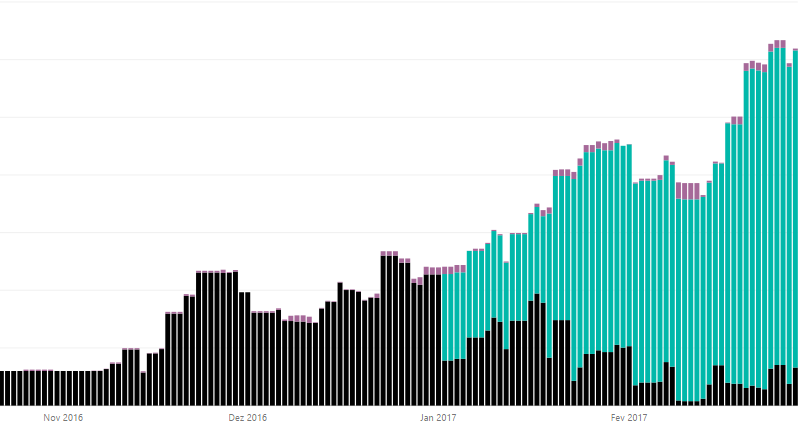
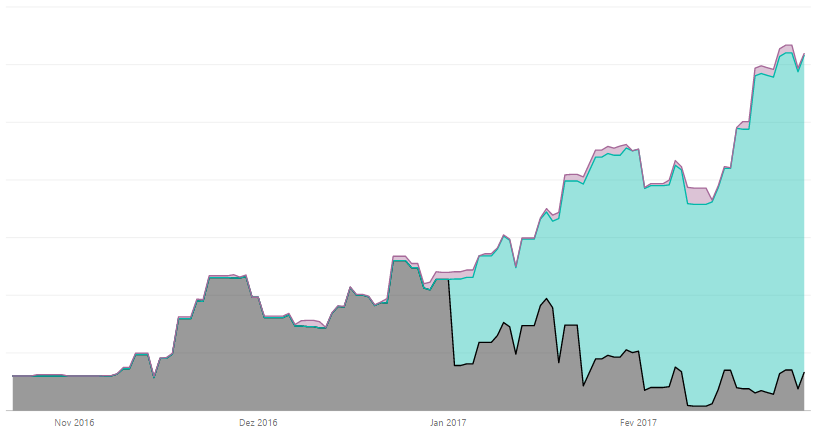


- Mark as New
- Bookmark
- Subscribe
- Mute
- Subscribe to RSS Feed
- Permalink
- Report Inappropriate Content
2nd question first - use a stacked area chart (you just have a standard area chart)
As to the 1st question, can you replace BLANK with 0 in the data? There have been other dicussions that the area/stacked are chart leaves whitespots when there is missing data - it's a "bug" that seems to be low priority to be addressed.
You could also use a stacked column chart, which will show basically the same thing as the stacked area chart, but with "gaps" in between each X value.

Hope this helps
David
- Mark as New
- Bookmark
- Subscribe
- Mute
- Subscribe to RSS Feed
- Permalink
- Report Inappropriate Content
Thanks a lot for your support.
The thing is, if you check your bank account on a day without transactions, you should still be able to see the balance (not a blank).
- Mark as New
- Bookmark
- Subscribe
- Mute
- Subscribe to RSS Feed
- Permalink
- Report Inappropriate Content
So it sounds like your value needs to be a running total? Here is a DAX pattern for running total (assume Table1 and DateTable have a Many-to-1 relationship:
RunningMeasure = CALCULATE (
    SUM ( 'Table1'[Value Column]),
    FILTER (
        ALL ( 'DateTable'[Date] ),
        'Table1'[Date] <= MAX ( 'DateTable'[Date] )
    )
)
Hope this helps
David
- Mark as New
- Bookmark
- Subscribe
- Mute
- Subscribe to RSS Feed
- Permalink
- Report Inappropriate Content
Hi,
I've figured out I must have a value for each day in my dates range for the ending balance.
Otherwise, charts and visuals in general will look terrible.
This is the expression I've managed to find:
Saldo em EUR =
IF (
    AND (
        'Consolidado'[DataCorrente] <= 'Consolidado'[DataMáxima];
        'Consolidado'[DataCorrente] >= 'Consolidado'[DataMínima]
    );
    CALCULATE (
        0 + SUM ( 'Consolidado'[Fluxo em EUR (intermédio)] );
        FILTER (
            ALL ( 'Calendário'[Data] );
            'Calendário'[Data] <= MAX ( 'Calendário'[Data] )
        )
    )
)
Initially, a simple measure but required to define intermediate calculations.
Now, the charts are looking better:
- Mark as New
- Bookmark
- Subscribe
- Mute
- Subscribe to RSS Feed
- Permalink
- Report Inappropriate Content
Thank you for a good solution! However I can't get it to work on my dataset. Would you mind to share the .pbix? It would help to get an overview of the measure.
Kind regards,
Anders

- Mark as New
- Bookmark
- Subscribe
- Mute
- Subscribe to RSS Feed
- Permalink
- Report Inappropriate Content
Is your X-Axis Continuous?

Helpful resources

FabCon & SQLCon – Barcelona 2026
Join us in Barcelona for FabCon and SQLCon, the Fabric, Power BI, SQL, and AI community event. Save €200 with code FABCMTY200.

Power BI DataViz World Championships - June 2026
A new Power BI DataViz World Championship is coming this June! Don't miss out on submitting your entry.

| User | Count |
|---|---|
| 24 | |
| 22 | |
| 20 | |
| 18 | |
| 14 |


| User | Count |
|---|---|
| 29 | |
| 23 | |
| 22 | |
| 20 | |
| 20 |


