FabCon is coming to Atlanta
Join us at FabCon Atlanta from March 16 - 20, 2026, for the ultimate Fabric, Power BI, AI and SQL community-led event. Save $200 with code FABCOMM.
Register now!- Power BI forums
- Get Help with Power BI
- Desktop
- Service
- Report Server
- Power Query
- Mobile Apps
- Developer
- DAX Commands and Tips
- Custom Visuals Development Discussion
- Health and Life Sciences
- Power BI Spanish forums
- Translated Spanish Desktop
- Training and Consulting
- Instructor Led Training
- Dashboard in a Day for Women, by Women
- Galleries
- Data Stories Gallery
- Themes Gallery
- Contests Gallery
- QuickViz Gallery
- Quick Measures Gallery
- Visual Calculations Gallery
- Notebook Gallery
- Translytical Task Flow Gallery
- TMDL Gallery
- R Script Showcase
- Webinars and Video Gallery
- Ideas
- Custom Visuals Ideas (read-only)
- Issues
- Issues
- Events
- Upcoming Events
The Power BI Data Visualization World Championships is back! Get ahead of the game and start preparing now! Learn more
- Power BI forums
- Forums
- Get Help with Power BI
- Desktop
- Re: Display duration as HH:MM:SS on Y-axis
- Subscribe to RSS Feed
- Mark Topic as New
- Mark Topic as Read
- Float this Topic for Current User
- Bookmark
- Subscribe
- Printer Friendly Page

- Mark as New
- Bookmark
- Subscribe
- Mute
- Subscribe to RSS Feed
- Permalink
- Report Inappropriate Content
Display duration as HH:MM:SS on Y-axis
I need to display a certain duration column (brought in to PBI as a duration type and correctly converted to decimal on load) on the y-axis with a format of "HH:MM:SS". The value shown will be the average of the duration over various time intervals (Year, Quarter, etc...) I've tried several suggestions found on this forum and elsewhere to no avail. Here's a screenshot of what I have:
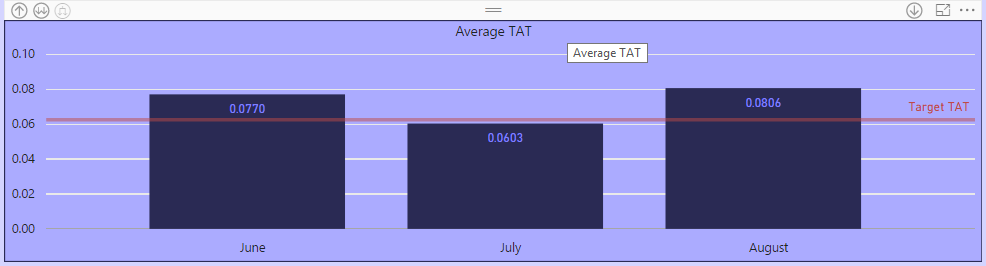
Thanks.
Solved! Go to Solution.


- Mark as New
- Bookmark
- Subscribe
- Mute
- Subscribe to RSS Feed
- Permalink
- Report Inappropriate Content
Power BI does not have a true duration type. However, I would think that you could create a measure that did your calculation and then convert that to your desired format using the technique here:
http://community.powerbi.com/t5/Community-Blog/Aggregating-Duration-Time/ba-p/22486
Follow on LinkedIn
@ me in replies or I'll lose your thread!!!
Instead of a Kudo, please vote for this idea
Become an expert!: Enterprise DNA
External Tools: MSHGQM
YouTube Channel!: Microsoft Hates Greg
Latest book!: DAX For Humans
DAX is easy, CALCULATE makes DAX hard...
- Mark as New
- Bookmark
- Subscribe
- Mute
- Subscribe to RSS Feed
- Permalink
- Report Inappropriate Content
Hi @gmarkc,
As smoupre said, currently power bi desktop not support display duration at Y-axis. smoupre's solution seems well, you can try it on your side. For your requirement, you can also vote this idea below:
In addition, you can take a look at below method(convert the time format to Numeric):
Table:

Measures:
Time(WholeNumber) = HOUR(MAX([Date]))*10000+MINUTE(MAX([Date]))*100+SECOND(MAX([Date]))
Time(Decimal) = HOUR(MAX([Date]))+MINUTE(MAX([Date]))/100+SECOND(MAX([Date]))/10000
Notice: When I use calculate column to show the value, I found the values will auto summaried on the visual, so I use measures to instead.
Create visual.
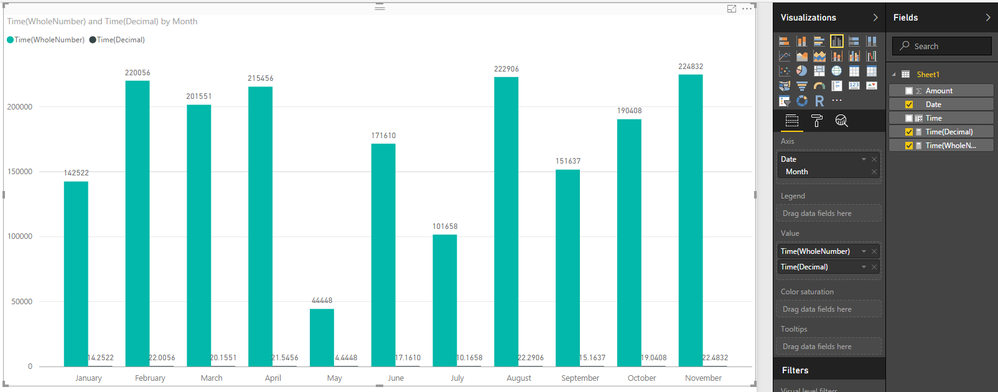
Regards,
Xiaoxin Sheng
- Mark as New
- Bookmark
- Subscribe
- Mute
- Subscribe to RSS Feed
- Permalink
- Report Inappropriate Content
Power BI does not have a true duration type. However, I would think that you could create a measure that did your calculation and then convert that to your desired format using the technique here:
http://community.powerbi.com/t5/Community-Blog/Aggregating-Duration-Time/ba-p/22486
Follow on LinkedIn
@ me in replies or I'll lose your thread!!!
Instead of a Kudo, please vote for this idea
Become an expert!: Enterprise DNA
External Tools: MSHGQM
YouTube Channel!: Microsoft Hates Greg
Latest book!: DAX For Humans
DAX is easy, CALCULATE makes DAX hard...


- Mark as New
- Bookmark
- Subscribe
- Mute
- Subscribe to RSS Feed
- Permalink
- Report Inappropriate Content
Hi @Greg_Deckler,
I have gone through your link, it is a great write. I tried it but it does not help in my purpose.
My scenario - I have to not only publish total talk time for the day, I have to aggregate it for the week, month or selected timerange and be able to aggregate for respective teams.
Calculated column Talk Time = CallTimes[Duration]/86400 to calculate duration equivalent to decimal value of HH:MM:SS and used formatting in PBI desktop.
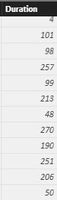
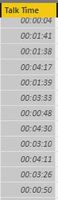
I then create a measure Call Time = SUM(CallTimes[Talk Time]) to aggregate it. Values appear as follows -
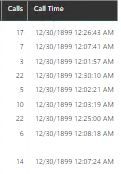
PBI does not have functionality to change format of this calculated TIME in visuals. Other than the table I have to utilize this calculated time in graph to show how many calls/call time happened for days of the week to show a trending.
Please let me know what should I be doing.
- Mark as New
- Bookmark
- Subscribe
- Mute
- Subscribe to RSS Feed
- Permalink
- Report Inappropriate Content
Try multiplying your Call Time by 1. (decimal point included). You should then have the ability to switch the format in the data model to Whole Number, Decimal Number, etc.
Call Time = SUM(CallTimes[Talk Time]) * 1.
Follow on LinkedIn
@ me in replies or I'll lose your thread!!!
Instead of a Kudo, please vote for this idea
Become an expert!: Enterprise DNA
External Tools: MSHGQM
YouTube Channel!: Microsoft Hates Greg
Latest book!: DAX For Humans
DAX is easy, CALCULATE makes DAX hard...
- Mark as New
- Bookmark
- Subscribe
- Mute
- Subscribe to RSS Feed
- Permalink
- Report Inappropriate Content
I did the following to serve my purpose -
I broke down calculation to Hours, minutes and seconds and then represent in format to be able to serve my purpose.
MEASURES -
CALLTIMES = SUM(DURATIONINSECONDS)
HRS = TRUNC([CALLTIMES]/3600)
MINS = TRUNC((([CALLTIMES]/3600)-[HRS])*60,0)
SECS = TRUNC((((([CALLTIMES]/3600)-TRUNC([CALLTIMES]/3600))*60)-[MINS])*60)
TIMING = IF(LEN([HRS])=1,"0"&[HRS],[HRS])&":"&IF(LEN([MINS])=1,"0"&[MINS],[MINS])&":"&IF(LEN([SECS])=1,"0"&[SECS],[SECS])
This works perfectly for me for any selected time range, whether it is a day/month or months/week or weeks.
- Mark as New
- Bookmark
- Subscribe
- Mute
- Subscribe to RSS Feed
- Permalink
- Report Inappropriate Content
Were you able to display the HH : MM : SS format on the Y-axis?
If so, would you please show an example screen shot of the visualization, and explain how you accomplished displaying this format on the Y-axis?
Thanks for any help!
- Mark as New
- Bookmark
- Subscribe
- Mute
- Subscribe to RSS Feed
- Permalink
- Report Inappropriate Content

- Mark as New
- Bookmark
- Subscribe
- Mute
- Subscribe to RSS Feed
- Permalink
- Report Inappropriate Content
- Mark as New
- Bookmark
- Subscribe
- Mute
- Subscribe to RSS Feed
- Permalink
- Report Inappropriate Content
Thanks for the quick reply. Sorry, being relatively new to PBI I'm going to need a little more detail to do what you suggested.
I'm not sure what you mean by, "...create a measure that did your calculation... ". I already have a column with the duration decimal value and I drag that into the Value well and choose Average as the function. Also, not sure how to use the Duration formula from the link you provided to help convert to my desired format. Can you provide a little more insight?
Thanks.
- Mark as New
- Bookmark
- Subscribe
- Mute
- Subscribe to RSS Feed
- Permalink
- Report Inappropriate Content
Hi @gmarkc,
As smoupre said, currently power bi desktop not support display duration at Y-axis. smoupre's solution seems well, you can try it on your side. For your requirement, you can also vote this idea below:
In addition, you can take a look at below method(convert the time format to Numeric):
Table:
Measures:
Time(WholeNumber) = HOUR(MAX([Date]))*10000+MINUTE(MAX([Date]))*100+SECOND(MAX([Date]))
Time(Decimal) = HOUR(MAX([Date]))+MINUTE(MAX([Date]))/100+SECOND(MAX([Date]))/10000
Notice: When I use calculate column to show the value, I found the values will auto summaried on the visual, so I use measures to instead.
Create visual.
Regards,
Xiaoxin Sheng

Helpful resources

Power BI Dataviz World Championships
The Power BI Data Visualization World Championships is back! Get ahead of the game and start preparing now!

Power BI Monthly Update - December 2025
Check out the December 2025 Power BI Holiday Recap!

FabCon Atlanta 2026
Join us at FabCon Atlanta, March 16-20, for the ultimate Fabric, Power BI, AI and SQL community-led event. Save $200 with code FABCOMM.

| User | Count |
|---|---|
| 41 | |
| 38 | |
| 36 | |
| 30 | |
| 28 |


| User | Count |
|---|---|
| 128 | |
| 88 | |
| 79 | |
| 67 | |
| 62 |


