
cancel
Showing results for 
Search instead for 
Did you mean: 

The Power BI Data Visualization World Championships is back! Get ahead of the game and start preparing now! Learn more

Reply
mohsin-raza
Helper III
Helper III

Display distance differnce in Rapport

Hello:


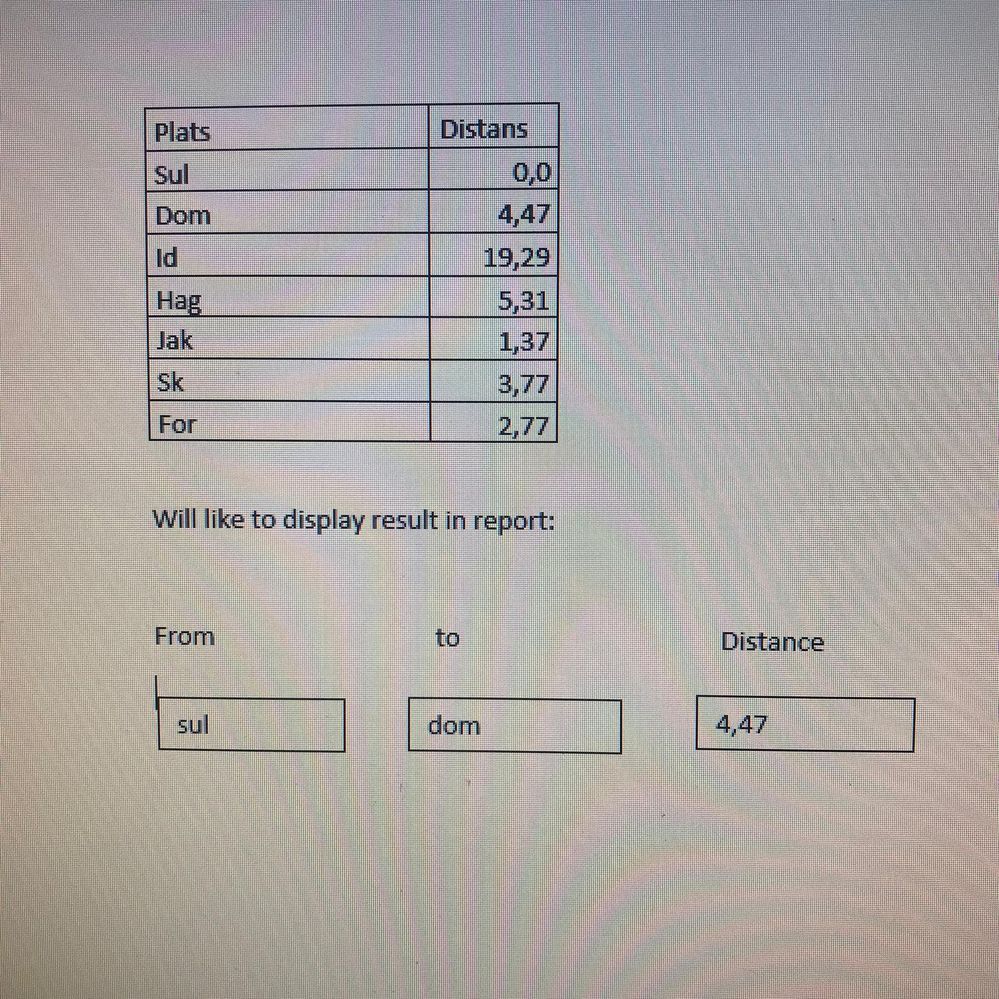
Here is an example dataset with two column. Distance column shows difference of distance from place "Sul" to "Dom" =4,47 and same from place "Dom" to "id" =19,29.

I like to show the same result in my report.


User can chose from  Drop down " sul"  to "Dom" and find distance "4,47". same with othe places

Can some body help me to solve this problem? 


with regards


 Repport.jpeg

1 ACCEPTED SOLUTION
MFelix
Super User
Super User

Hi @mohsin-raza ,


Are your distance always based on the SUL to the other location?


If yes you just need to do the following:


  • Add a text box and write the value SUL and make the title as From:
  • Add a slicer with the location and make the title as  To:
    • Make this slicer a dropdown
  • Add a card visualization with the distance value


Whenthe users change the value on the slicer the card will change accordingly.


Regards

Miguel Félix


Did I answer your question? Mark my post as a solution!

Proud to be a Super User!

Check out my blog: Power BI em Português


View solution in original post

2 REPLIES 2
Anonymous
Not applicable

Hi  @mohsin-raza ,

Here are the steps you can follow:

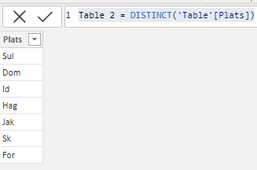
1. Create calculated table.

Table 2 = DISTINCT('Table'[Plats])

vyangliumsft_0-1643096369109.png

2. Place the [Plats] of Table2 into the first slicer and the [Plats] of Table1 into the second slicer. And put [Distans] of Table1 into Card.

vyangliumsft_1-1643096369114.png

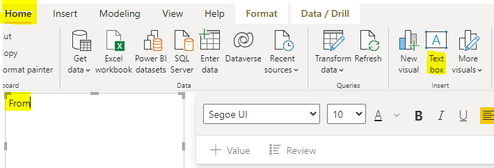
3. Home – Text box, create three Text boxes respectively, write From, to, Distance.

vyangliumsft_2-1643096369120.png

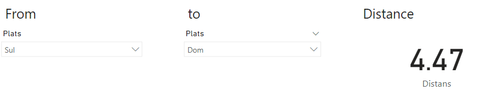
4. Result:

vyangliumsft_3-1643096369121.png


Best Regards,

Liu Yang

If this post helps, then please consider Accept it as the solution to help the other members find it more quickly

MFelix
Super User
Super User

Hi @mohsin-raza ,


Are your distance always based on the SUL to the other location?


If yes you just need to do the following:


  • Add a text box and write the value SUL and make the title as From:
  • Add a slicer with the location and make the title as  To:
    • Make this slicer a dropdown
  • Add a card visualization with the distance value


Whenthe users change the value on the slicer the card will change accordingly.


Regards

Miguel Félix


Did I answer your question? Mark my post as a solution!

Proud to be a Super User!

Check out my blog: Power BI em Português


Helpful resources

Announcements
Power BI DataViz World Championships

Power BI Dataviz World Championships

The Power BI Data Visualization World Championships is back! Get ahead of the game and start preparing now!

December 2025 Power BI Update Carousel

Power BI Monthly Update - December 2025

Check out the December 2025 Power BI Holiday Recap!

FabCon Atlanta 2026 carousel

FabCon Atlanta 2026

Join us at FabCon Atlanta, March 16-20, for the ultimate Fabric, Power BI, AI and SQL community-led event. Save $200 with code FABCOMM.