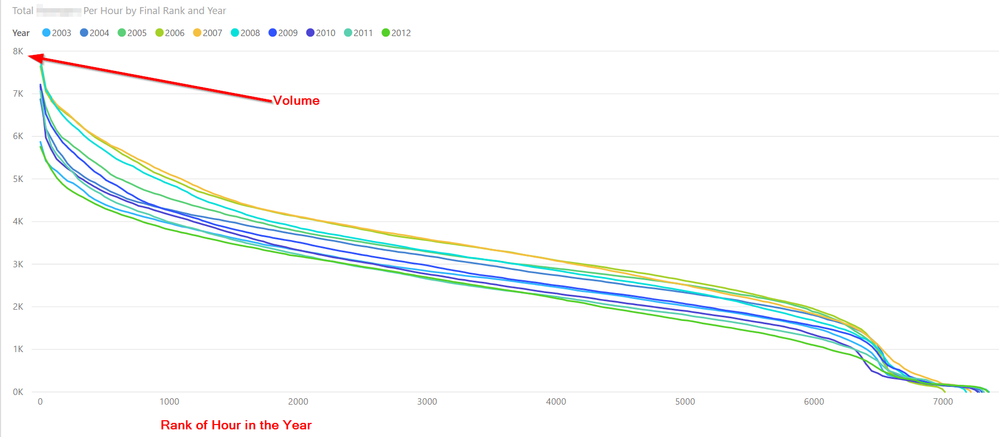
1. I'd like to display rankings (1,2,3,4, etc) across the x-axis of a line chart, with the volume (e.g. Sales) on the y-axis.
2. I'd like to retain the sort of dynamic ranking allowed by RANKX. E.g. slice by customer, location etc and still get 1,2,3,4 etc. Using a claculated column does not allow for this.
3. I'd like it to perform reasonably well across a large amount of data. My specific goal is ranking hourly volume on a yearly basis (ranks 1 to 8,760) across 15 years.
Below is the output I want, using a calculated column, but I would like to be able to slice it by other attributes and have the rankings update.
I have attempted this using a disconnected table and it appears to work with small sets of data, but will not work efficiently with 15x8,760 data points. The concept here was that I needed a column to get a value on the axis and I neded the disconnected tbale to make it dynamic. Hoping there is a better option than this.
CALCULATE (
[Sales Per Hour],
FILTER (
ALL ( 'Hour of Year Summary'[Day & Hour] ),
[Rank by Hour of Year] = [MaxRank]
)
Where:
[Sales per hour] - just a SUM
'Hour of Year Summary'[Day & Hour] - is a column of every hour in a year e.g. 1 Jan 1am, 1 Jan 2am
Rank by Hour of Year is =RANKX ( ALL('Hour of Year Summary'[Day & Hour]), [Sales],,,Dense)
Max Rank is =MaxRank = MAX(Ranking[Rank]) on a table that just lists numbers 1 to 8,760. This table has no relationship to anything else. Then I drag the column Ranking[Rank] from the disconnected table onto the axis.


