Join us at FabCon Atlanta from March 16 - 20, 2026, for the ultimate Fabric, Power BI, AI and SQL community-led event. Save $200 with code FABCOMM.
Register now!The Power BI Data Visualization World Championships is back! Get ahead of the game and start preparing now! Learn more
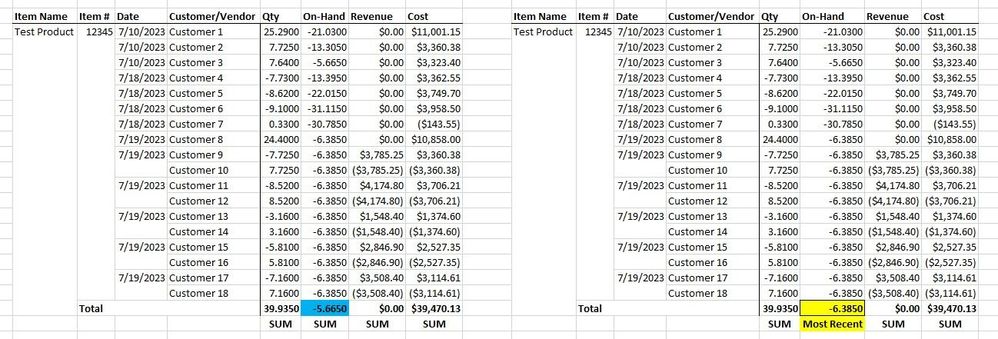
Hi, I have a matrix with 4 value columns. Is there a way for my matrix to show the most recent value as the aggregate instead of the sum? This "most recent" aggregation will be next to three other sum aggregation columns. I have attached the matrix I have now on the left, and my desired matrix on the right. Thanks in advance.
@CoopyJoe , you can use index function
Use isinscope to check that gand total get index date desc, customer asc
If(isinscope(Table[Date]), [On Hand] , CALCULATE([On Hand], keepfilters(index(1, allselected(Table[Item Name], Table[Item #], Table[Date], Table[Customer]),orderby(Table[Date],desc, Table[Customer],asc),,partitionBy(Table[Item Name], Table[Item #]) ))) )
Assuming on hand is a measure
explore Power BI Index function: Top/Bottom Performer by name and value- https://youtu.be/HPhzzCwe10U
@amitchandak Thanks for the response. I am having some trouble at the "orderby(Table[Date]," portion. The date does not pop up as an option to add to my DAX formula.
The Power BI Data Visualization World Championships is back! Get ahead of the game and start preparing now!
| User | Count |
|---|---|
| 40 | |
| 36 | |
| 34 | |
| 31 | |
| 27 |
| User | Count |
|---|---|
| 136 | |
| 103 | |
| 67 | |
| 65 | |
| 56 |