Join us at FabCon Atlanta from March 16 - 20, 2026, for the ultimate Fabric, Power BI, AI and SQL community-led event. Save $200 with code FABCOMM.
Register now!The Power BI Data Visualization World Championships is back! It's time to submit your entry. Live now!
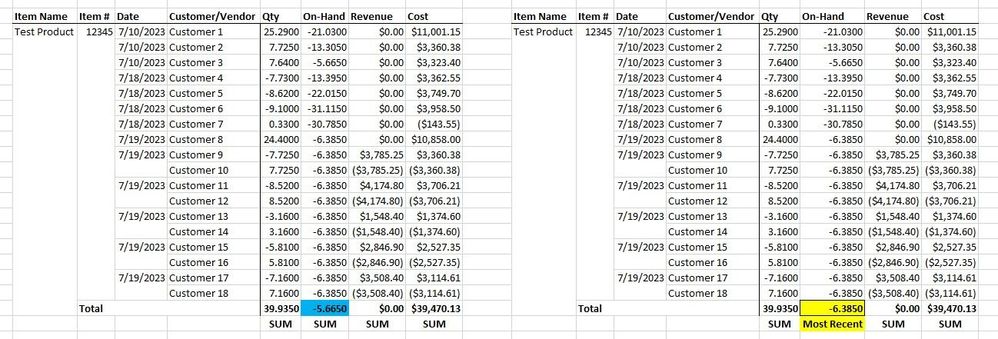
Hi, I have a matrix with 4 value columns. Is there a way for my matrix to show the most recent value as the aggregate instead of the sum? This "most recent" aggregation will be next to three other sum aggregation columns. I have attached the matrix I have now on the left, and my desired matrix on the right. Thanks in advance.
@CoopyJoe , you can use index function
Use isinscope to check that gand total get index date desc, customer asc
If(isinscope(Table[Date]), [On Hand] , CALCULATE([On Hand], keepfilters(index(1, allselected(Table[Item Name], Table[Item #], Table[Date], Table[Customer]),orderby(Table[Date],desc, Table[Customer],asc),,partitionBy(Table[Item Name], Table[Item #]) ))) )
Assuming on hand is a measure
explore Power BI Index function: Top/Bottom Performer by name and value- https://youtu.be/HPhzzCwe10U
@amitchandak Thanks for the response. I am having some trouble at the "orderby(Table[Date]," portion. The date does not pop up as an option to add to my DAX formula.
| User | Count |
|---|---|
| 56 | |
| 41 | |
| 38 | |
| 21 | |
| 21 |
| User | Count |
|---|---|
| 141 | |
| 103 | |
| 63 | |
| 36 | |
| 35 |