cancel
Showing results for 
Search instead for 
Did you mean: 

Get Fabric Certified for FREE during Fabric Data Days. Don't miss your chance! Request now

Reply
rc_stem
Frequent Visitor

Display Duration Format on Dashboard (mm:ss)

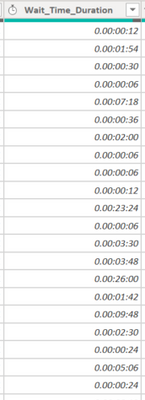
rc_stem_0-1675286204707.png

I have my wait time in (mm:ss) in the transform data, but when I go to format it in the data tab it shows up like this 

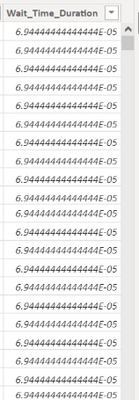
rc_stem_1-1675286305484.png

under column tools there is no option for "duration" formatting only "time" - which is not the same thing unfortunately. Let me know how I can display the data correctly as (mm:ss) or if theres a formula to show mm.ss - displayed in decimal format but still accounting for 60 sec intervals (for time) 


Thank You!

1 ACCEPTED SOLUTION
3 REPLIES 3

@amitchandak 

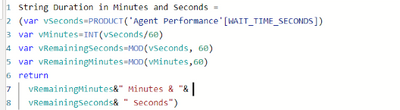
I used the first link and everything is displaying as 0, unfortuntely I'm not very familiar with DAX 

rc_stem_1-1675349638336.png


I was able to complete once I created a new column instead of measure, however it's turns it to text and won't identify the numbers because of the mm:ss format and I need to calculate averages from a span of dates.

Helpful resources

Announcements
November Power BI Update Carousel

Power BI Monthly Update - November 2025

Check out the November 2025 Power BI update to learn about new features.

Fabric Data Days Carousel

Fabric Data Days

Advance your Data & AI career with 50 days of live learning, contests, hands-on challenges, study groups & certifications and more!

FabCon Atlanta 2026 carousel

FabCon Atlanta 2026

Join us at FabCon Atlanta, March 16-20, for the ultimate Fabric, Power BI, AI and SQL community-led event. Save $200 with code FABCOMM.

Top Solution Authors