cancel
Showing results for 
Search instead for 
Did you mean: 

A new Data Days event is coming soon! This time we’re going bigger than ever. Fabric, Power BI, SQL, AI and more. Don't miss out.

Reply
pieterf
Frequent Visitor

DirectQuery: parametrizing/scripting to change datasource connections

I'm using the DirectQuery-modus in Power BI Desktop to connect multiple AAS-models. To change source connections of these datamodels (for instance from test to production) I now manually have to select the desired source (via Data Source Settings). 


Question: is it possible to automate this action? By parametrizing it in Power BI Desktop / Service, or a Power Shell script?

2 REPLIES 2
Anonymous
Not applicable

Hi @pieterf 

DirectQuery for Azure Analysis Services is a function in preview. There are many limitation for this function.

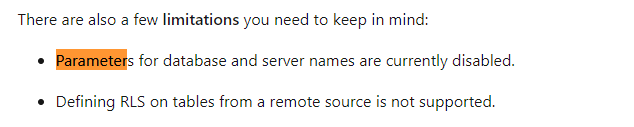
One of them is when you use directquery for Azure Analysis Services, parameters for database and server names are disabled.

1.png

For reference:

Considerations and limitations

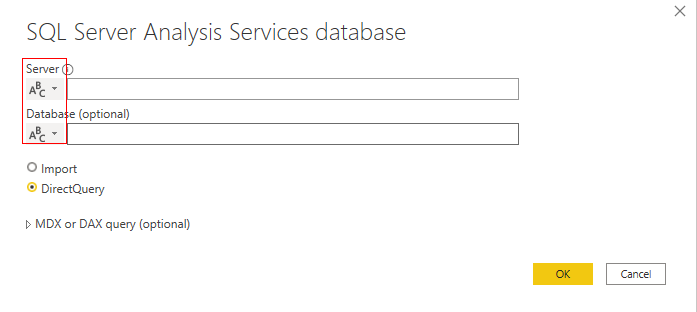
In my test if you select DirectQuery, parameter for database and server names will be grey out.

1.png

You can try Import connection mode if you want to use parameter for database and server names when you connect to AAS.

For reference: Change the Data Source dynamically in Power BI using Parameters


Best Regards,

Rico Zhou


If this post helps, then please consider Accept it as the solution to help the other members find it more quickly. 


Thank you.

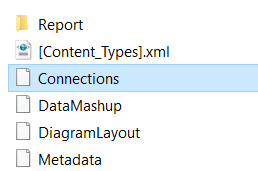
And what about the server name written off in the flat file "Connections"? Normally (in Live modus) the actual connection in PBIX is written off there, and we can pick it up in a Power Shell script.

Is it possible / are there plans on the roadmap to write off all the uses server names in the DQ-PBIX? Right now, no server names are written of in this flat file.

pieterf_0-1626938059218.png


Helpful resources

Announcements
May Power BI Update Carousel

Power BI Monthly Update - May 2026

Check out the May 2026 Power BI update to learn about new features.

Fabric SQL PBI Data Days

Data Days 2026 coming soon!

Sign up to receive a private message when registration opens and key events begin.

New to Fabric survey Carousel

New to Fabric Survey

If you have recently started exploring Fabric, we'd love to hear how it's going. Your feedback can help with product improvements.

Power BI DataViz World Championships carousel

Power BI DataViz World Championships - June 2026

A new Power BI DataViz World Championship is coming this June! Don't miss out on submitting your entry.