
cancel
Showing results for 
Search instead for 
Did you mean: 

Data Days is here! Join us now for 60+ days of learning, challenges, and connection. Learn more

Reply
Anonymous
Not applicable

Direct Query - related function

Hi Expert


i cannot get my related table calculated column to work when using direct query in my Power Bi model.. Is this possible? or is there a work around?

1 ACCEPTED SOLUTION
Anonymous
Not applicable

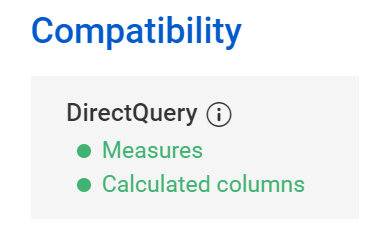
According to http://dax.guide/related, RELATED is supported in DirectQuery:

daxer_0-1623237176400.png

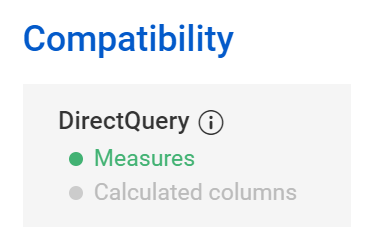
RELATEDTABLE, on the other hand, works only in measures in DirectQuery:

daxer_1-1623237233939.png

So, if you can't get it to work in the right context, it means you're doing something wrong.

View solution in original post

7 REPLIES 7
kmcaloon
New Member

RELATED is not supported with limited relationships.   see Microsoft Documentation limited relationships 

Anonymous
Not applicable

According to http://dax.guide/related, RELATED is supported in DirectQuery:

daxer_0-1623237176400.png

RELATEDTABLE, on the other hand, works only in measures in DirectQuery:

daxer_1-1623237233939.png

So, if you can't get it to work in the right context, it means you're doing something wrong.

Anonymous
Not applicable

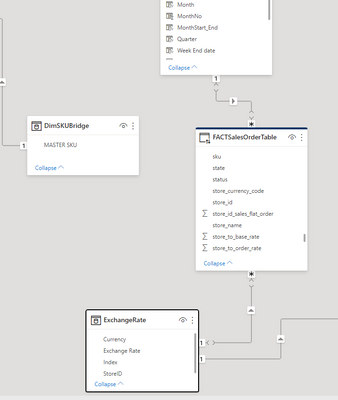
that is what i cannot work out. Exchnage rate table relationship to FACT table is store id to store id.Capture.PNG

Anonymous
Not applicable

error message when using related

Capture.PNG

I get the same all the time as well.  The workaround would be a calculated column in your target table (FactSalesOrderTable):


Exchange Rate =
CALCULATE (
AVERAGE ( 'ExchangeRate'[Exchange Rate] ),
FILTER (
'ExchangeRate',
'ExchangeRate'[Currency] = 'FACTSalesOrderTable'[Currancy]
&& 'ExchangeRate'[OtherColumn] = 'FACTSalesOrderTable'[OtherColumn]
))


It basically works like an averageifs funtion in Excel. Can also be used with a sum for a sumifs.  

It's not the best idea as it's ressource intensive and slow, as mentioned below, but this will get the job done. And not too bad if you've got limited data in your fact table. 

Anonymous
Not applicable

RELATED needs a row context to work. Do you have a row context when you use this function above? I can't even tell from what you posted what it is you're trying to achieve...


Are you maybe trying to add the rate to each row in the fact table by creating a calculated column? That would be a VERY BAD IDEA.

Hi - i know this topic is old, but can you elaborate on why this would be so bad?

Helpful resources

Announcements
Fabric Data Days is here Carousel

Fabric Data Days 2026

Don't miss out on Data Days, June 15 through August 7. Learn Fabric, Power BI, SQL, AI and more.

May Power BI Update Carousel

Power BI Monthly Update - May 2026

Check out the May 2026 Power BI update to learn about new features.

Power BI DataViz World Championships carousel

Power BI DataViz World Championships - June 2026

A new Power BI DataViz World Championship is coming this June! Don't miss out on submitting your entry.