This time we’re going bigger than ever. Fabric, Power BI, SQL, AI and more. We're covering it all. You won't want to miss it.
Learn moreJoin the FabCon + SQLCon recap series. Up next: Power BI, Real-Time Intelligence, IQ and AI, and Data Factory take center stage. All sessions are available on-demand after the live show. Register now
Hi
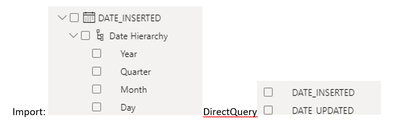
I had an Import version of PBI and now I converted to Direct Query to a SQL Server.
Once I switched to Direct query all the date columns are not showing the Date Hierarchy.
How can I convert, having in mind that I have multiple date columns in different tables and I don't have a Date Table, and even I cannot use it due to multiple relationships that I should create and most of them would be inactive, and the PBI performance would decrease?
Thank you
Solved! Go to Solution.
Hi @alianazambori ,
This a limiation when using DirectQuery.
Using DirectQuery in Power BI - Power BI | Microsoft Docs
Each auto date/time table is in fact a calculated table that generates rows of data by using the DAX CALENDAR function. Each table also includes six calculated columns: Day, MonthNo, Month, QuarterNo, Quarter, and Year. It is recommended that you create a calendar table as a dimension table.
For more details you can refer this blog.
Why there is no date hierarchy - Microsoft Power BI Community
Best Regards
Community Support Team _ chenwu zhu
If this post helps, then please consider Accept it as the solution to help the other members find it more quickly.
Hi,
Finally, this is what I did, I knew that this is the best practice, but I thought I can avoid this to have the same report as the Import file that I received and I had to convert in DQ.
Thank you
Hi @alianazambori ,
This a limiation when using DirectQuery.
Using DirectQuery in Power BI - Power BI | Microsoft Docs
Each auto date/time table is in fact a calculated table that generates rows of data by using the DAX CALENDAR function. Each table also includes six calculated columns: Day, MonthNo, Month, QuarterNo, Quarter, and Year. It is recommended that you create a calendar table as a dimension table.
For more details you can refer this blog.
Why there is no date hierarchy - Microsoft Power BI Community
Best Regards
Community Support Team _ chenwu zhu
If this post helps, then please consider Accept it as the solution to help the other members find it more quickly.
Check out the April 2026 Power BI update to learn about new features.
If you have recently started exploring Fabric, we'd love to hear how it's going. Your feedback can help with product improvements.
A new Power BI DataViz World Championship is coming this June! Don't miss out on submitting your entry.
| User | Count |
|---|---|
| 40 | |
| 37 | |
| 31 | |
| 23 | |
| 15 |
| User | Count |
|---|---|
| 76 | |
| 59 | |
| 31 | |
| 31 | |
| 25 |