Join us at FabCon Atlanta from March 16 - 20, 2026, for the ultimate Fabric, Power BI, AI and SQL community-led event. Save $200 with code FABCOMM.
Register now!The Power BI Data Visualization World Championships is back! Get ahead of the game and start preparing now! Learn more
Hi guys,
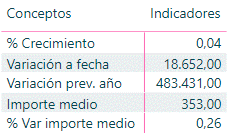
I have used a switch function to create the following table:
The switch function I have used is the next one:
Solved! Go to Solution.
@PwrBI01 ,
Create a meaure with the below DAX:
MEASURE = IF(HASONEVALUE('T_M_Tabla indicadores económicos'[Medida]);SWITCH(VALUES('T_M_Tabla indicadores económicos'[Medida]);"Variación prev. año";FORMAT([Acumulado dos años previos],"#.### $");"% crecimiento";FORMAT([Acumulado var %],"Percent");"Importe medio";FORMAT([Switch importe medio],"## $");"% Var importe medio";FORMAT([Switch importe medio % var],"Percent");"Variación a fecha";FORMAT([Acumulado var],"#.### $")))
P.S. Just replace the $ sign with Pound sign while writing this dax as per your currency requirement.
@PwrBI01 ,
Create a meaure with the below DAX:
MEASURE = IF(HASONEVALUE('T_M_Tabla indicadores económicos'[Medida]);SWITCH(VALUES('T_M_Tabla indicadores económicos'[Medida]);"Variación prev. año";FORMAT([Acumulado dos años previos],"#.### $");"% crecimiento";FORMAT([Acumulado var %],"Percent");"Importe medio";FORMAT([Switch importe medio],"## $");"% Var importe medio";FORMAT([Switch importe medio % var],"Percent");"Variación a fecha";FORMAT([Acumulado var],"#.### $")))
P.S. Just replace the $ sign with Pound sign while writing this dax as per your currency requirement.
Thank you very much @Tahreem24,
I made some changes (for no decimals in percentages and for get the local format) and it works. The measure I finally used is the next one:
@PwrBI01 Great!
Yeah, I just shared the possible workaround using Format DAX. It's nice that you changed it accordingly to your needs.
@PwrBI01 , You have to use calculation groups for that as of now
https://www.sqlbi.com/blog/marco/2020/07/15/creating-calculation-groups-in-power-bi-desktop/
Thank you very much for your answer @amitchandak but I would like to do it in a more easy way.
The Power BI Data Visualization World Championships is back! Get ahead of the game and start preparing now!
| User | Count |
|---|---|
| 39 | |
| 37 | |
| 35 | |
| 34 | |
| 27 |
| User | Count |
|---|---|
| 137 | |
| 97 | |
| 74 | |
| 66 | |
| 65 |