cancel
Showing results for 
Search instead for 
Did you mean: 

Vote for your favorite vizzies from the Power BI Dataviz World Championship submissions. Vote now!

Reply
PwrBI01
Post Patron
Post Patron

Different formats in switch function

Hi guys,


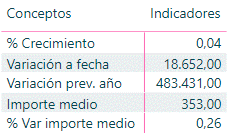
I have used a switch function to create the following table:

Tabla 1.png


The switch function I have used is the next one: 

IF(HASONEVALUE('T_M_Tabla indicadores económicos'[Medida]);SWITCH(VALUES('T_M_Tabla indicadores económicos'[Medida]);"Variación prev. año";[Acumulado dos años previos];"% crecimiento";[Acumulado var %];"Importe medio";[Switch importe medio];"% Var importe medio";[Switch importe medio % var];"Variación a fecha";[Acumulado var]))
 
Is there a way to change the formats to get a table similar to the next one:
Tabla 2.png
 
Thanks in advance.
 
Regards.
1 ACCEPTED SOLUTION
Tahreem24
Super User
Super User

@PwrBI01 ,

Create a meaure with the below DAX:

MEASURE = IF(HASONEVALUE('T_M_Tabla indicadores económicos'[Medida]);SWITCH(VALUES('T_M_Tabla indicadores económicos'[Medida]);"Variación prev. año";FORMAT([Acumulado dos años previos],"#.### $");"% crecimiento";FORMAT([Acumulado var %],"Percent");"Importe medio";FORMAT([Switch importe medio],"## $");"% Var importe medio";FORMAT([Switch importe medio % var],"Percent");"Variación a fecha";FORMAT([Acumulado var],"#.### $")))


P.S. Just replace the $ sign with Pound sign while writing this dax as per your currency requirement.

Don't forget to give thumbs up and accept this as a solution if it helped you!!!

Please take a quick glance at newly created dashboards : Restaurant Management Dashboard , HR Analytics Report , Hotel Management Report, Sales Analysis Report , Fortune 500 Companies Analysis , Revenue Tracking Dashboard

View solution in original post

5 REPLIES 5
Tahreem24
Super User
Super User

@PwrBI01 ,

Create a meaure with the below DAX:

MEASURE = IF(HASONEVALUE('T_M_Tabla indicadores económicos'[Medida]);SWITCH(VALUES('T_M_Tabla indicadores económicos'[Medida]);"Variación prev. año";FORMAT([Acumulado dos años previos],"#.### $");"% crecimiento";FORMAT([Acumulado var %],"Percent");"Importe medio";FORMAT([Switch importe medio],"## $");"% Var importe medio";FORMAT([Switch importe medio % var],"Percent");"Variación a fecha";FORMAT([Acumulado var],"#.### $")))


P.S. Just replace the $ sign with Pound sign while writing this dax as per your currency requirement.

Don't forget to give thumbs up and accept this as a solution if it helped you!!!

Please take a quick glance at newly created dashboards : Restaurant Management Dashboard , HR Analytics Report , Hotel Management Report, Sales Analysis Report , Fortune 500 Companies Analysis , Revenue Tracking Dashboard

Thank you very much @Tahreem24


I made some changes (for no decimals in percentages and for get the local format) and it works. The measure I finally used is the next one:


Switch prueba = IF(HASONEVALUE('T_M_Tabla indicadores económicos'[Medida]);SWITCH(VALUES('T_M_Tabla indicadores económicos'[Medida]);"Variación prev. año";FORMAT([Acumulado dos años previos];"#,### €");"% crecimiento";FORMAT([Acumulado var %];"#,### %");"Importe medio";FORMAT([Switch importe medio];"#,### €");"% Var importe medio";FORMAT([Switch importe medio % var];"#,### %");"Variación a fecha";FORMAT([Acumulado var];"#,### €")))
 
Regards.

@PwrBI01  Great!

Yeah, I just shared the possible workaround using Format DAX. It's nice that you changed it accordingly to your needs.

Don't forget to give thumbs up and accept this as a solution if it helped you!!!

Please take a quick glance at newly created dashboards : Restaurant Management Dashboard , HR Analytics Report , Hotel Management Report, Sales Analysis Report , Fortune 500 Companies Analysis , Revenue Tracking Dashboard
amitchandak
Super User
Super User

@PwrBI01 , You have to use calculation groups for that as of now

https://www.sqlbi.com/blog/marco/2020/07/15/creating-calculation-groups-in-power-bi-desktop/

Share with Power BI Enthusiasts: Full Power BI Video (20 Hours) YouTube
Microsoft Fabric Series 60+ Videos YouTube
Microsoft Fabric Hindi End to End YouTube

Thank you very much for your answer @amitchandak but I would like to do it in a more easy way.

Helpful resources

Announcements
Power BI DataViz World Championships

Power BI Dataviz World Championships

Vote for your favorite vizzies from the Power BI World Championship submissions!

Sticker Challenge 2026 Carousel

Join our Community Sticker Challenge 2026

If you love stickers, then you will definitely want to check out our Community Sticker Challenge!

January Power BI Update Carousel

Power BI Monthly Update - January 2026

Check out the January 2026 Power BI update to learn about new features.

FabCon Atlanta 2026 carousel

FabCon Atlanta 2026

Join us at FabCon Atlanta, March 16-20, for the ultimate Fabric, Power BI, AI and SQL community-led event. Save $200 with code FABCOMM.