cancel
Showing results for 
Search instead for 
Did you mean: 

The Power BI Data Visualization World Championships is back! Get ahead of the game and start preparing now! Learn more

Reply
SanjeevMurthy
Frequent Visitor

Different format in Target column

Hi,


I have a field [Target] which has target value for each of the Metric line item. The targets are not in the same data type format.

Example

Metric 1 - 20%

Metric 2 - 2

Metric 3 - 2.5


Request to please help with a way to store and show value in the original format.


1 ACCEPTED SOLUTION
v-xuding-msft
Community Support
Community Support

Hi @SanjeevMurthy ,

As epappu said, it can be implemented with TEXT type. For now, it is not supported to change different format and stain the original data type except text. 

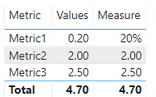
I created a measure use the function of IF and FORMAT. You can use it to show the values. When you want to calculate them, you could use the original column. 

Measure = IF(SELECTEDVALUE('Table'[Metric]) = "Metric1",FORMAT(SUM('Table'[Values]),"00%"),SUM('Table'[Values]))

6.PNG

Best Regards,

Xue Ding

If this post helps, then please consider Accept it as the solution to help the other members find it more quickly. Kudos are nice too.

Best Regards,
Xue Ding
If this post helps, then please consider Accept it as the solution to help the other members find it more quickly.

View solution in original post

5 REPLIES 5
v-xuding-msft
Community Support
Community Support

Hi @SanjeevMurthy ,

As epappu said, it can be implemented with TEXT type. For now, it is not supported to change different format and stain the original data type except text. 

I created a measure use the function of IF and FORMAT. You can use it to show the values. When you want to calculate them, you could use the original column. 

Measure = IF(SELECTEDVALUE('Table'[Metric]) = "Metric1",FORMAT(SUM('Table'[Values]),"00%"),SUM('Table'[Values]))

6.PNG

Best Regards,

Xue Ding

If this post helps, then please consider Accept it as the solution to help the other members find it more quickly. Kudos are nice too.

Best Regards,
Xue Ding
If this post helps, then please consider Accept it as the solution to help the other members find it more quickly.

Thank you all for the suggestions and help. This really helped. Thank you.

Anonymous
Not applicable

If the values are all different, try setting the data type as Text and see if that works (unless you want to do calculations on that field)

I need to do the calculation based on actual and target values.

Anonymous
Not applicable

So, since I am unable to see the dataset/data model at my end, I am assuming the following and will try give you a response accordingly. Hope this helps you.


Assuming your table is having two columns as below, you can try creating a measure with a formula to convert the value in the column Target by using VALUE function something similar to:

=DIVIDE((Actual - VALUE(Target), Actual)


Please note the above is not tested, but VALUE is supposed to convert Text to a number, so that should help your calculation, if you are looking to see the difference between Actual and Variance. You can also covert the above measure to a % in the modelling table to get the % difference.


Table:

Target (Text)Actual (Decimal)
20%15
21
2.53


Hope the above helps you.

Helpful resources

Announcements
Power BI DataViz World Championships

Power BI Dataviz World Championships

The Power BI Data Visualization World Championships is back! Get ahead of the game and start preparing now!

December 2025 Power BI Update Carousel

Power BI Monthly Update - December 2025

Check out the December 2025 Power BI Holiday Recap!

FabCon Atlanta 2026 carousel

FabCon Atlanta 2026

Join us at FabCon Atlanta, March 16-20, for the ultimate Fabric, Power BI, AI and SQL community-led event. Save $200 with code FABCOMM.