cancel
Showing results for 
Search instead for 
Did you mean: 

The Power BI Data Visualization World Championships is back! Get ahead of the game and start preparing now! Learn more

Reply
hb380
Advocate I
Advocate I

Different colours on small multiple line charts?

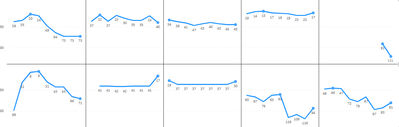
 I have a 2x5 set of line charts as small multiples and need to have a different colour for each line: 

hb380_0-1686070399030.png


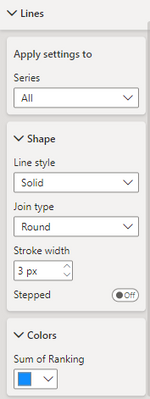
I've seen youtube videos where they do this via conditional formatting but I don't have this option - I don't have a section called "Data colors" at all, just under "Lines" I have the option to choose a colour manually which applies to every chart:

hb380_1-1686070522797.png

I do have the option to apply conditional formatting to my titles and values so it seems weird that I can't do this to my lines or bars.

Is there any work around for me to do make these lines different colours? Any help appreciated, I'm still very new. I'm using the May 2023 version of desktop.

1 ACCEPTED SOLUTION
mahenkj2
Solution Sage
Solution Sage

Hi @hb380 ,


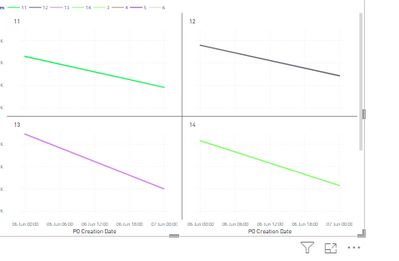
Possibly a work around here. If you would like to use same field which is used in small multiples, in legend, it does not allow. So create a duplicate column of small multiple column and use that in legend. You get different color for each line, as below:


mahenkj2_0-1686117064680.png


You also get more control to tweak the legends as well.


Hope it helps.

View solution in original post

3 REPLIES 3
mahenkj2
Solution Sage
Solution Sage

Hi @hb380 ,


Possibly a work around here. If you would like to use same field which is used in small multiples, in legend, it does not allow. So create a duplicate column of small multiple column and use that in legend. You get different color for each line, as below:


mahenkj2_0-1686117064680.png


You also get more control to tweak the legends as well.


Hope it helps.

I used this, thank you! I didn't have the option to add a legend as I had multiple measures on the Y axis (for data labelling), taking them off sorted it.

amitchandak
Super User
Super User

@hb380 , Conditional formatting is not supported in line visual. Create a measure on the field of small multiple, and use that in conditional formatting using the field value option. For that first, convert it the bar, do conditional formatting, and then change to line 


Brand Color = Switch( true(),
max('Item'[brand]) = "Brand 1" , "red",
max('Item'[brand]) = "Brand 2" , "blue",
max('Item'[brand]) = "Brand 3" , "green",
max('Item'[brand]) = "Brand 4" , "gray",
max('Item'[brand]) = "Brand 5" , "yellow",
max('Item'[brand]) = "Brand 6" , "orange",
max('Item'[brand]) = "Brand 7" , "brown",
max('Item'[brand]) = "Brand 8" , "Cyan",
max('Item'[brand]) = "Brand 9" , "Tan",
max('Item'[brand]) = "Brand 10" , "Violet",
max('Item'[brand]) = "Brand 11" , "Gold",
"silver"
)


How to do conditional formatting by measure and apply it on pie?
https://www.youtube.com/watch?v=RqBb5eBf_I4&list=PLPaNVDMhUXGYo50Ajmr4SgSV9HIQLxc8L
https://community.powerbi.com/t5/Community-Blog/Power-BI-Conditional-formatting-the-Pie-Visual/ba-p/...
https://amitchandak.medium.com/power-bi-where-is-the-conditional-formatting-option-in-new-format-pan...

Share with Power BI Enthusiasts: Full Power BI Video (20 Hours) YouTube
Microsoft Fabric Series 60+ Videos YouTube
Microsoft Fabric Hindi End to End YouTube

Helpful resources

Announcements
Power BI DataViz World Championships

Power BI Dataviz World Championships

The Power BI Data Visualization World Championships is back! Get ahead of the game and start preparing now!

December 2025 Power BI Update Carousel

Power BI Monthly Update - December 2025

Check out the December 2025 Power BI Holiday Recap!

FabCon Atlanta 2026 carousel

FabCon Atlanta 2026

Join us at FabCon Atlanta, March 16-20, for the ultimate Fabric, Power BI, AI and SQL community-led event. Save $200 with code FABCOMM.