Join us at FabCon Atlanta from March 16 - 20, 2026, for the ultimate Fabric, Power BI, AI and SQL community-led event. Save $200 with code FABCOMM.
Register now!Vote for your favorite vizzies from the Power BI Dataviz World Championship submissions. Vote now!
Hi all,
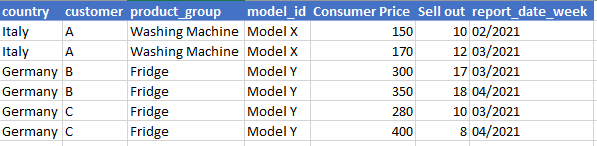
I have columns, country, customer, product_group, model_id, week, year, price, and sales (#). I have several countries, and each country has several product_groups, and each product_group has several model_ids. I have 52 weeks for 2021 and will continue like that for 2022, 2023 etc. Prices for model_ids differ.
I need to find the %difference change from the previous week for each row for price and sales (#).
Each row needs to be unique since there are several variables (country, customer, etc.)
You can check a dummy screenshot below.
How can I do this in PowerBI? Having an extra two columns which will be like "% change price week-over-week" and "% change sales # week-over-week"
Thank you!
Solved! Go to Solution.
Hi @Anonymous ,
see my pbi file. I have splitted the column Week in 2 columns (week and year) in power query.
https://1drv.ms/u/s!Aj45jbu0mDVJi0DlD5sZpcgVxDjE?e=khhDbs
If this post helps, then please consider Accept it as the solution to help the other members find it more quickly.
Hi @Anonymous ,
see my pbi file. I have splitted the column Week in 2 columns (week and year) in power query.
https://1drv.ms/u/s!Aj45jbu0mDVJi0DlD5sZpcgVxDjE?e=khhDbs
If this post helps, then please consider Accept it as the solution to help the other members find it more quickly.
Hey Mangaus,
This looks promising. I will try it now. As I can see in the measure you created, you concatenated the columns to create a unique column. In that way, the calculations will be correct even if I have 1000 rows, right?
Also, can you give me a solution for Week 1 and Week 52 issue?
Hi @Anonymous ,
I have splitted the column [report_date_week] in 2 columns, I have not done any concatenation.
Try if it works in your model.
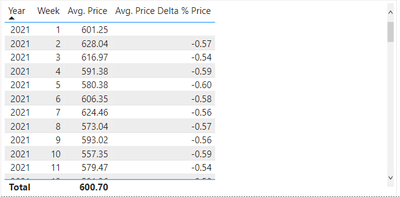
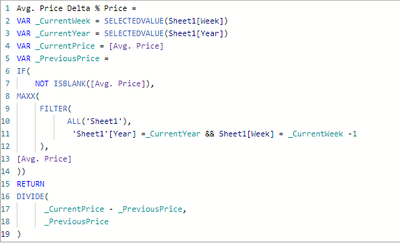
It worked the way you did, but for the % to work, I have to have all the columns in the table, which is fine. But some tables will only have year and week, for example. And I will be looking for Avg. Price, for example.
I tried to work on your script but couldn't manage 😕 Can you help?
I created Avg. Price measure as follows;
Let me know if anyone has any idea how to do it please
@Anonymous , you need have date/week table with week rank joined to you table
Have these new columns in Date Table, Week Rank is Important in Date/Week Table
Week Start date = 'Date'[Date]+-1*WEEKDAY('Date'[Date],2)+1
Week End date = 'Date'[Date]+ 7-1*WEEKDAY('Date'[Date],2)
Week Rank = RANKX(all('Date'),'Date'[Week Start date],,ASC,Dense)
OR
Week Rank RANKX(all('Date'),'Date'[Year Week],,ASC,Dense) //YYYYWW format
WeekDay = weekday([Date])
These measures can help
This Week = CALCULATE(sum('Table'[Qty]), FILTER(ALL('Date'),'Date'[Week Rank]=max('Date'[Week Rank])))
Last Week = CALCULATE(sum('Table'[Qty]), FILTER(ALL('Date'),'Date'[Week Rank]=max('Date'[Week Rank])-1))
Time Intelligence, DATESMTD, DATESQTD, DATESYTD, Week On Week, Week Till Date, Custom Period on Period,
Custom Period till date: https://youtu.be/aU2aKbnHuWs&t=145s
Power BI — Week on Week and WTD
https://medium.com/@amitchandak.1978/power-bi-wtd-questions-time-intelligence-4-5-98c30fab69d3
https://community.powerbi.com/t5/Community-Blog/Week-Is-Not-So-Weak-WTD-Last-WTD-and-This-Week-vs-Last-Week/ba-p/1051123
https://www.youtube.com/watch?v=pnAesWxYgJ8
Vote for your favorite vizzies from the Power BI World Championship submissions!
If you love stickers, then you will definitely want to check out our Community Sticker Challenge!
Check out the January 2026 Power BI update to learn about new features.
| User | Count |
|---|---|
| 57 | |
| 52 | |
| 40 | |
| 17 | |
| 16 |
| User | Count |
|---|---|
| 112 | |
| 108 | |
| 39 | |
| 34 | |
| 27 |