cancel
Showing results for 
Search instead for 
Did you mean: 

The Power BI Data Visualization World Championships is back! Get ahead of the game and start preparing now! Learn more

Reply
Anonymous
Not applicable

Difference from Previous Column/Date

Hello All!

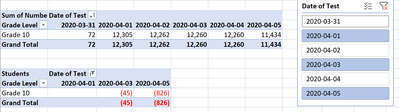
I am looking for a simple calculation in power bi that I can't seem to figure out. I am looking to get the difference from previous date. I'm not quite sure how to get this to work. I have included a picture of what I would like the end result to be in power bi.  I would like to  calculate the difference from the previous date and dynamically show every 2 days (i.e data for the 4/1/20, 4/3/20, 4/5/20 and so on). I did create a date table and created a relationship to my date column in my data table, but still haven't gotten anything to work.


Any help is appreciated!


Thank you in advance!


excel test file.png

3 REPLIES 3
amitchandak
Super User
Super User

@Anonymous , refer if these measures can help

example

Last Day Non Continous = CALCULATE(sum('order'[Qty]),filter(all('Date'),'Date'[Date] =MAXX(FILTER(all('Date'),'Date'[Date]<max('Date'[Date])),Table['Date'])))
Day behind Sales = CALCULATE(SUM(Sales[Sales Amount]),dateadd('Date'[Date],-1,Day))
Diff COlumn = datediff(maxx(filter(Table,Table[Date]<earlier(Table[Date]) && Table[Numberf]= earlier(Table[Numberf])  ),Table[Date]) ,Table[Date],Day)

This Day = CALCULATE(sum('order'[Qty]), FILTER(ALL('Date'),'Date'[Date]=max('Date'[Date])))
Last Day = CALCULATE(sum('order'[Qty]), FILTER(ALL('Date'),'Date'[Date]=max('Date'[Date])-1))


To get the best of the time intelligence function. Make sure you have a date calendar and it has been marked as the date in model view. Also, join it with the date column of your fact/s. Refer :
https://radacad.com/creating-calendar-table-in-power-bi-using-dax-functions
https://www.archerpoint.com/blog/Posts/creating-date-table-power-bi
https://www.sqlbi.com/articles/creating-a-simple-date-table-in-dax/

See if my webinar on Time Intelligence can help: https://community.powerbi.com/t5/Webinars-and-Video-Gallery/PowerBI-Time-Intelligence-Calendar-WTD-YTD-LYTD-Week-Over-Week/m-p/1051626#M184


Appreciate your Kudos.

Share with Power BI Enthusiasts: Full Power BI Video (20 Hours) YouTube
Microsoft Fabric Series 60+ Videos YouTube
Microsoft Fabric Hindi End to End YouTube
ashish_dakhare
Frequent Visitor

HI @Anonymous ,

If I understand your question correctly, You need different with the value from a day -2.

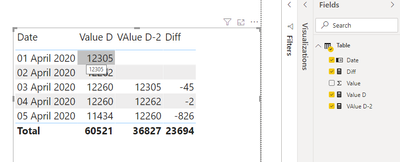
Here I have replicated the scenario. Let me know if it works for you or not.


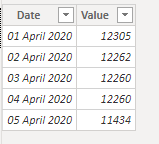
Data:

ashish_dakhare_0-1594134329479.pngashish_dakhare_1-1594134399103.png

Value D = SUM('Table'[Value])
VAlue D-2 = CALCULATE(SUM('Table'[Value]),DATEADD('Table'[Date],-2,DAY))
Diff = IF(ISBLANK([VAlue D-2]), BLANK(),[Value D]-[VAlue D-2])
 
Greg_Deckler
Community Champion
Community Champion

@Anonymous - Please first check if your issue is a common issue listed here: https://community.powerbi.com/t5/Community-Blog/Before-You-Post-Read-This/ba-p/1116882

Also, please see this post regarding How to Get Your Question Answered Quickly: https://community.powerbi.com/t5/Community-Blog/How-to-Get-Your-Question-Answered-Quickly/ba-p/38490

The most important parts are:
1. Sample data as text, use the table tool in the editing bar
2. Expected output from sample data
3. Explanation in words of how to get from 1. to 2.


Follow on LinkedIn
@ me in replies or I'll lose your thread!!!
Instead of a Kudo, please vote for this idea
Become an expert!: Enterprise DNA
External Tools: MSHGQM
YouTube Channel!: Microsoft Hates Greg
Latest book!:
DAX For Humans

DAX is easy, CALCULATE makes DAX hard...

Helpful resources

Announcements
Power BI DataViz World Championships

Power BI Dataviz World Championships

The Power BI Data Visualization World Championships is back! Get ahead of the game and start preparing now!

November Power BI Update Carousel

Power BI Monthly Update - November 2025

Check out the November 2025 Power BI update to learn about new features.

FabCon Atlanta 2026 carousel

FabCon Atlanta 2026

Join us at FabCon Atlanta, March 16-20, for the ultimate Fabric, Power BI, AI and SQL community-led event. Save $200 with code FABCOMM.