cancel
Showing results for 
Search instead for 
Did you mean: 

The Power BI Data Visualization World Championships is back! It's time to submit your entry. Live now!

Reply
Anonymous
Not applicable

Filter Name Column with Number Column

Hi people,


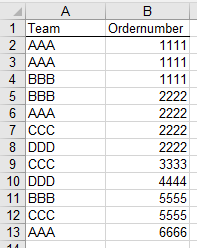
I have the following table:

UserBI404_0-1594126164462.png

I want to show in a diagram how often the teams are working with the same Ordernumber.

There are 4 Teams: AAA, BBB, CCC, DDD


Diagram 1 should show how many OrderNumbers where used by every one of the four teams independently (Just be counted when no other team used the Number. And just be counted once, even if the number appears multiple times for that Team)


Diagram 2 should show how many OrderNumbers where used by Team Combinations, e.g. by AAA and BBB together. Or by BBB, CCC and DDD together. The Number should also be counted just once, even if it appears multiple times per team.


Thanks in advance!

4 REPLIES 4
Greg_Deckler
Community Champion
Community Champion

@Anonymous - Seems like you could just put Ordernumber (no aggregation) in a table along with a count of Team. Then you could just filter on the count of Team.


If that is not sufficient, please post data as text.


Follow on LinkedIn
@ me in replies or I'll lose your thread!!!
Instead of a Kudo, please vote for this idea
Become an expert!: Enterprise DNA
External Tools: MSHGQM
YouTube Channel!: Microsoft Hates Greg
Latest book!:
DAX For Humans

DAX is easy, CALCULATE makes DAX hard...
Anonymous
Not applicable

Hi @Greg_Deckler ,


thanks for your approach! The problem that appears, when I'm doing it like this is, that it doesn't subtract numbers that appear multiple times in one team (should just be counted as "1", even if it appears 5 times for a team.


It also doesn't subtract the Ordernumbers that are used by multiple teams.


This is the data as a text

TeamOrdernumber
AAA1111
AAA1111
BBB1111
BBB2222
AAA2222
CCC2222
DDD2222
CCC3333
DDD4444
BBB5555
CCC5555
AAA6666
AAA7777
DDD7777
AAA8888
BBB9999

Its just an example I made.


Diagram 1 would show:

AAA = 2

BBB =  1

CCC =  1

DDD = 1


Diagram 2 would show:


AAA & BBB = 1

BBB & CCC = 1

AAA & DDD = 1

AAA & CCC = 0

BBB & DDD = 0

CCC & DDD = 0


AAA & BBB & CCC = 0

AAA & BBB & DDD = 0

AAA& CCC & DDD = 0

BBB & CCC & DDD = 0


AAA & BBB & CCC & DDD = 1


@Anonymous - In that case, create a measure and do a SUMMARIZE or GROUPBY by team, then just count the rows in that summarized/grouped table. That will eliminate counting teams multiple times.


Or, use DISTINCT to get the distinct teams and count the rows (COUNTROWS) returned. Same thing as SUMMARIZE or GROUPBY but perhaps cleaner.


Follow on LinkedIn
@ me in replies or I'll lose your thread!!!
Instead of a Kudo, please vote for this idea
Become an expert!: Enterprise DNA
External Tools: MSHGQM
YouTube Channel!: Microsoft Hates Greg
Latest book!:
DAX For Humans

DAX is easy, CALCULATE makes DAX hard...
Anonymous
Not applicable

Thank you @Greg_Deckler 


I think I made the right measure:


Measure = COUNTROWS(FILTER(DISTINCT(Ordernumber),CALCULATE(COUNTROWS(Table)) = 1))


But it doesn't show me the right numbers yet. I think it is because I didn't group the Teams for Diagram 2 yet. What would be the best way to do it? It seems like there is no right tool inside Power Bi to group them. Should I create a new table? I'm not sure how the rows should look like.

Helpful resources

Announcements
Power BI DataViz World Championships

Power BI Dataviz World Championships

The Power BI Data Visualization World Championships is back! It's time to submit your entry.

January Power BI Update Carousel

Power BI Monthly Update - January 2026

Check out the January 2026 Power BI update to learn about new features.

FabCon Atlanta 2026 carousel

FabCon Atlanta 2026

Join us at FabCon Atlanta, March 16-20, for the ultimate Fabric, Power BI, AI and SQL community-led event. Save $200 with code FABCOMM.