Join us at FabCon Atlanta from March 16 - 20, 2026, for the ultimate Fabric, Power BI, AI and SQL community-led event. Save $200 with code FABCOMM.
Register now!Learn from the best! Meet the four finalists headed to the FINALS of the Power BI Dataviz World Championships! Register now
Hello,
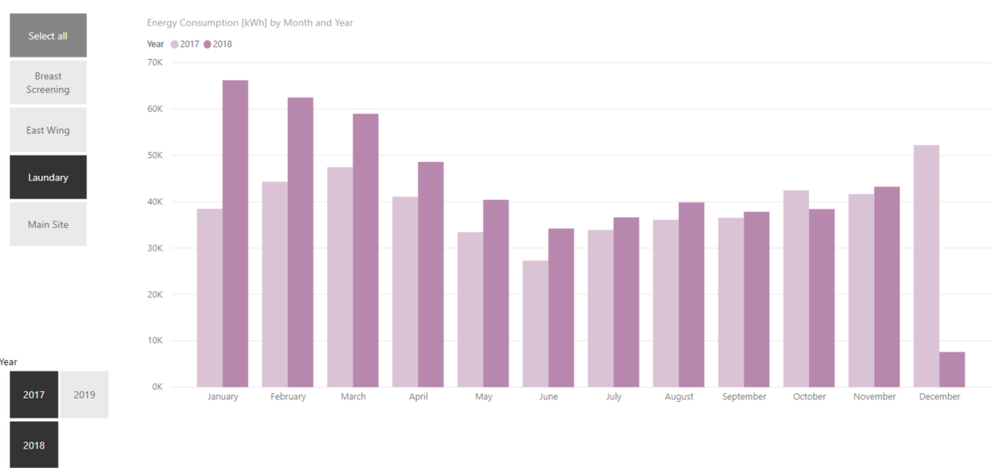
I need to know how much the value changed on monthly basis. For example, if I select "Laundary", I like to view how much annual difference percentage was between 2017 and 2018. The question is how to calculate this "new measure"?
How can I show the monthly difference percent on top of each month on this bar chart?
I need this new measure get updated based on my selection from the slicers as well.
Many Thanks
Monthly Comparison
Solved! Go to Solution.
Hi @Alirezam ,
For your requirement, we could create the measure below to achieve it.
Measure =
VAR minyear =
CALCULATE (
SUM ( Table1[Sales] ),
FILTER (
'Table1',
YEAR ( 'Table1'[Date] ) = YEAR ( MIN ( 'Table1'[Date] ) )
&& MONTH ( 'Table1'[Date] ) = MONTH ( MAX ( 'Table1'[Date] ) )
)
)
VAR maxyear =
CALCULATE (
SUM ( Table1[Sales] ),
FILTER (
'Table1',
YEAR ( 'Table1'[Date] ) = YEAR ( MAX ( 'Table1'[Date] ) )
&& MONTH ( 'Table1'[Date] ) = MONTH ( MAX ( 'Table1'[Date] ) )
)
)
RETURN
( maxyear - minyear ) / maxyear
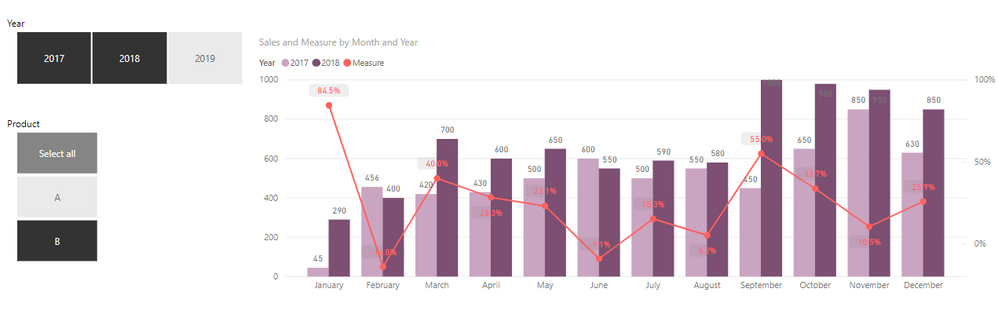
Then we could create a line and clusterd column chart like below.
More details, please refer to my attachment.
Best Regards,
Cherry
Hi @Alirezam ,
Have you solved your problem?
If you have solved, please always accept the replies making sense as solution to your question so that people who may have the same question can get the solution directly.
If you still need help, please feel free to ask.
Best Regards,
Cherry
Hi @Alirezam ,
For your requirement, we could create the measure below to achieve it.
Measure =
VAR minyear =
CALCULATE (
SUM ( Table1[Sales] ),
FILTER (
'Table1',
YEAR ( 'Table1'[Date] ) = YEAR ( MIN ( 'Table1'[Date] ) )
&& MONTH ( 'Table1'[Date] ) = MONTH ( MAX ( 'Table1'[Date] ) )
)
)
VAR maxyear =
CALCULATE (
SUM ( Table1[Sales] ),
FILTER (
'Table1',
YEAR ( 'Table1'[Date] ) = YEAR ( MAX ( 'Table1'[Date] ) )
&& MONTH ( 'Table1'[Date] ) = MONTH ( MAX ( 'Table1'[Date] ) )
)
)
RETURN
( maxyear - minyear ) / maxyear
Then we could create a line and clusterd column chart like below.
More details, please refer to my attachment.
Best Regards,
Cherry
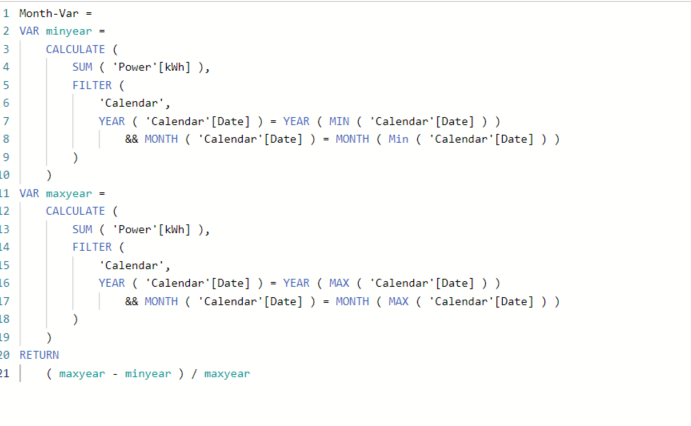
Hi, Thanks for your reply. I did what you said but still the line does not show anyting and sticks to the x-axis. Please note that I get [date] from another table named 'Calendar'
Share feedback directly with Fabric product managers, participate in targeted research studies and influence the Fabric roadmap.
Check out the February 2026 Power BI update to learn about new features.
| User | Count |
|---|---|
| 66 | |
| 60 | |
| 45 | |
| 19 | |
| 15 |
| User | Count |
|---|---|
| 108 | |
| 108 | |
| 41 | |
| 30 | |
| 27 |