This is best Fabric, Power BI, SQL and AI community event. How do we know? The last event sold out! Save €200 with code FABCMTY200.
Register nowA new Data Days event is coming soon! This time we’re going bigger than ever. Fabric, Power BI, SQL, AI and more. Don't miss out.
Hello oracle.
I am VERY new to Power BI and DAX is terrifying to me, so, please be gentle 🙂
I want to work out the amount of time (in days) between two dates. I'd like to work this out for the single dates but also looks at averages across all of the dates. Is this possible?, and is it possible to do without using DAX as I'm completely clueless there?
Solved! Go to Solution.
Hi @annejeel ,
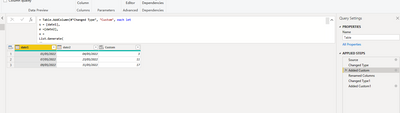
Pls test the below:(difference)
= Table.AddColumn(#"Changed Type", "Custom", each let
s = [date1],
e =[date2],
x =
List.Generate(
()=>s,
each _<=e,
each Date.AddDays(_,1)
),
l = List.Select(
x,
each Date.DayOfWeek(_,Day.Monday)<5
)
in
List.Count(l))
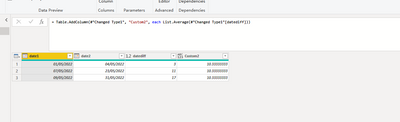
Average:
= Table.AddColumn(#"Changed Type1", "Custom2", each List.Average(#"Changed Type1"[datediff]))
Did I answer your question? Mark my post as a solution!
Best Regards
Lucien
Hi @annejeel ,
Pls test the below:(difference)
= Table.AddColumn(#"Changed Type", "Custom", each let
s = [date1],
e =[date2],
x =
List.Generate(
()=>s,
each _<=e,
each Date.AddDays(_,1)
),
l = List.Select(
x,
each Date.DayOfWeek(_,Day.Monday)<5
)
in
List.Count(l))
Average:
= Table.AddColumn(#"Changed Type1", "Custom2", each List.Average(#"Changed Type1"[datediff]))
Did I answer your question? Mark my post as a solution!
Best Regards
Lucien
Hi
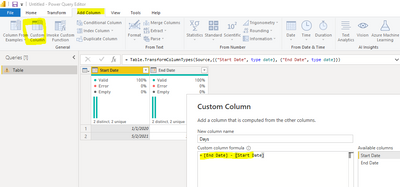
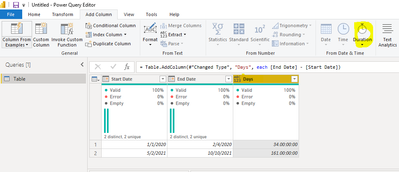
if you want to find the difference between two dates then you can achieve it in Power Query editor like below. Share some sample data and also show the expected result to help more.
Thanks
Hari
Check out the May 2026 Power BI update to learn about new features.
Sign up to receive a private message when registration opens and key events begin.
If you have recently started exploring Fabric, we'd love to hear how it's going. Your feedback can help with product improvements.
| User | Count |
|---|---|
| 29 | |
| 25 | |
| 25 | |
| 21 | |
| 14 |
| User | Count |
|---|---|
| 59 | |
| 50 | |
| 25 | |
| 20 | |
| 20 |