cancel
Showing results for 
Search instead for 
Did you mean: 

July 7 - July 17 | Round 2 of the Power BI Dataviz World Championships. Don't miss your chance! Learn more

Reply
davidr
Frequent Visitor

Dialog box text issue

Hi,


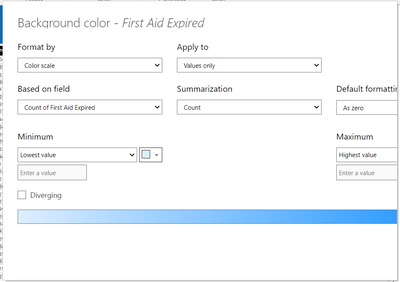
Does anyone know why PowerBI (latest version) behaves like this? For some reason it doesn't show all element fields in the dialog box? In the example below, I'm unable to apply conditional formatting because I'm unable to access the Ok button.


Restarting the desktop application doesn't work and I'd rather not go down the path of reinstallation.


unknown (1).png


Any help would be appreciated.


Thanks

1 ACCEPTED SOLUTION
Anonymous
Not applicable

Hi @davidr ,

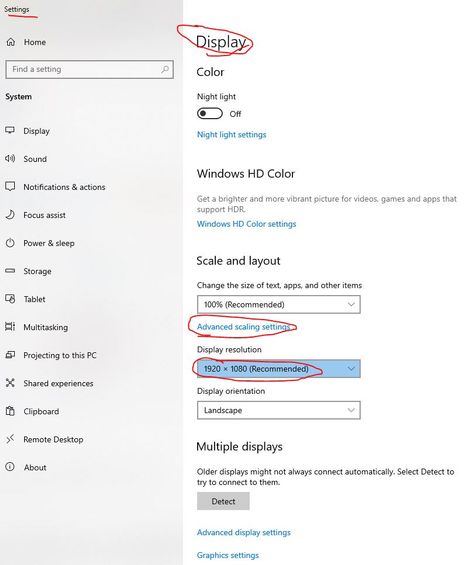
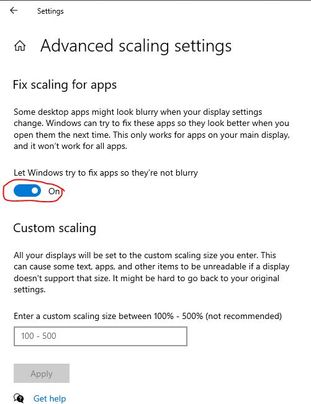
What's the version of your Power BI Desktop? According to the display setting of minimum requirements to run Power BI Desktop, at least 1440x900 or 1600x900 (16:9) is recommended. Lower resolutions such as 1024x768 or 1280x800 are not recommended, as certain controls (such as closing the startup screen) display beyond those resolutions. Please try to set computer display resolution with "1920 x 1080" just like the one in below screen shot(Settings-->System-->Display) and enable the following option (Settings > System > Display > Advanced scaling setting) and check whether popup window can dispaly normally.

resolution.JPGscalling setting.JPG

Best Regards

View solution in original post

4 REPLIES 4
dpavanrao
Regular Visitor

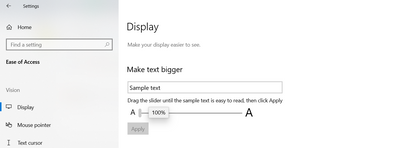
Set you system text size to 100%. 


dpavanrao_0-1692213739802.png


This resolved the issue for me.

Anonymous
Not applicable

Hi @davidr ,

What's the version of your Power BI Desktop? According to the display setting of minimum requirements to run Power BI Desktop, at least 1440x900 or 1600x900 (16:9) is recommended. Lower resolutions such as 1024x768 or 1280x800 are not recommended, as certain controls (such as closing the startup screen) display beyond those resolutions. Please try to set computer display resolution with "1920 x 1080" just like the one in below screen shot(Settings-->System-->Display) and enable the following option (Settings > System > Display > Advanced scaling setting) and check whether popup window can dispaly normally.

resolution.JPGscalling setting.JPG

Best Regards

PhilipTreacy
Super User
Super User

Hi @davidr 

Try making your creen resolution slightly bigger to see if that makes the window draw properly.

regards

Phil


Did I answer your question? Then please mark my post as the solution.
If I helped you, click on the Thumbs Up to give Kudos.


Blog :: YouTube Channel :: Connect on Linkedin


Proud to be a Super User!


Hi Phil,

Thanks for responding. Unfortunately changing the screen resolution or text size makes no difference.

Helpful resources

Announcements
FabCon and SQLCon Barcelona 2026

FabCon & SQLCon – Barcelona 2026

Join us in Barcelona for FabCon and SQLCon, the Fabric, Power BI, SQL, and AI community event. Save €200 with code FABCMTY200.

60 days of Data Days Carousel

Data Days 2026

Join Fabric Data Days 2026: 60 days of free live/on-demand sessions, challenges, study groups, and certification opportunities.

Power BI DataViz World Championships carousel

Power BI DataViz World Championships - June 2026

A new Power BI DataViz World Championship is coming this June! Don't miss out on submitting your entry.