cancel
Showing results for 
Search instead for 
Did you mean: 

Learn from the best! Meet the four finalists headed to the FINALS of the Power BI Dataviz World Championships! Register now

Reply
Pfoerster
Helper III
Helper III

Deviation Rows in Matrix

Hello,

I do not have a glue, how to transform my Excel Model into Power BI:

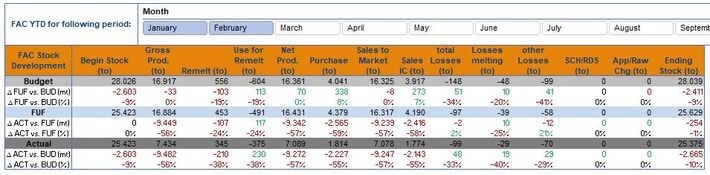
Test.JPGIn the End, this kind of Matrix I want to show to the User: He has the possibility to choose the YTD month (as shown for example January - February) and he will get as a result the 3 Scenarious Budget, FUF and Actual but also the deviations in total and in % between FUF and Budget, Act and FUF, ACT and Budget.


When I am creating in Power BI the Matrix is not a big issue:

Test2.JPG


But how can I insert the Deviation rows into the Matrix? Is it possible?

1 ACCEPTED SOLUTION
v-kelly-msft
Community Support
Community Support

Hi @Pfoerster ,


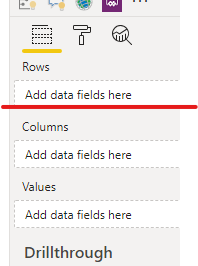
Just drag the deviation rows in "rows",when you expand rows in matrix ,you will see the sub-rows.


Annotation 2020-02-19 133247.png


Best Regards,
Kelly
 
Did I answer your question? Mark my post as a solution!

View solution in original post

2 REPLIES 2
v-kelly-msft
Community Support
Community Support

Hi @Pfoerster ,


Just drag the deviation rows in "rows",when you expand rows in matrix ,you will see the sub-rows.


Annotation 2020-02-19 133247.png


Best Regards,
Kelly
 
Did I answer your question? Mark my post as a solution!
Anonymous
Not applicable

If you put them in the Rows of your matrix you should be able to expand budget FUF and actual. If not please post your data structure (how is it saved in power bi) for better help.

Helpful resources

Announcements
Power BI DataViz World Championships carousel

Power BI DataViz World Championships - June 2026

A new Power BI DataViz World Championship is coming this June! Don't miss out on submitting your entry.

Join our Fabric User Panel

Join our Fabric User Panel

Share feedback directly with Fabric product managers, participate in targeted research studies and influence the Fabric roadmap.

March Power BI Update Carousel

Power BI Community Update - March 2026

Check out the March 2026 Power BI update to learn about new features.