Get certified for free when you join Fabric Data Days 2026 and dive into Fabric, Power BI, SQL, AI, and other essential data skills.
Join nowJuly 7 - July 17 | Round 2 of the Power BI Dataviz World Championships. Don't miss your chance! Learn more
Hello,
I do not have a glue, how to transform my Excel Model into Power BI:
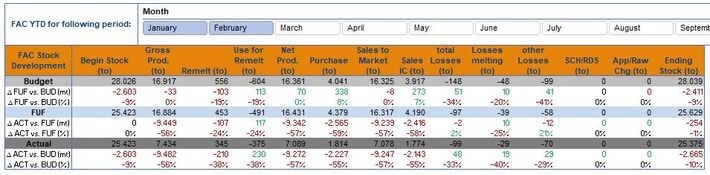
In the End, this kind of Matrix I want to show to the User: He has the possibility to choose the YTD month (as shown for example January - February) and he will get as a result the 3 Scenarious Budget, FUF and Actual but also the deviations in total and in % between FUF and Budget, Act and FUF, ACT and Budget.
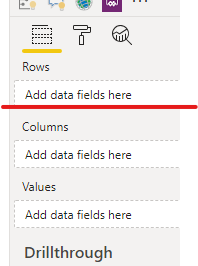
When I am creating in Power BI the Matrix is not a big issue:
But how can I insert the Deviation rows into the Matrix? Is it possible?
Solved! Go to Solution.
Hi @Pfoerster ,
Just drag the deviation rows in "rows",when you expand rows in matrix ,you will see the sub-rows.
Hi @Pfoerster ,
Just drag the deviation rows in "rows",when you expand rows in matrix ,you will see the sub-rows.
If you put them in the Rows of your matrix you should be able to expand budget FUF and actual. If not please post your data structure (how is it saved in power bi) for better help.
Join us in Barcelona for FabCon and SQLCon, the Fabric, Power BI, SQL, and AI community event. Save €200 with code FABCMTY200.
Join Fabric Data Days 2026: 60 days of free live/on-demand sessions, challenges, study groups, and certification opportunities.
| User | Count |
|---|---|
| 22 | |
| 22 | |
| 18 | |
| 17 | |
| 13 |
| User | Count |
|---|---|
| 63 | |
| 50 | |
| 46 | |
| 41 | |
| 39 |