This is best Fabric, Power BI, SQL and AI community event. How do we know? The last event sold out! Save €200 with code FABCMTY200.
Register nowA new Data Days event is coming soon! This time we’re going bigger than ever. Fabric, Power BI, SQL, AI and more. Don't miss out.
Hello,
I do not have a glue, how to transform my Excel Model into Power BI:
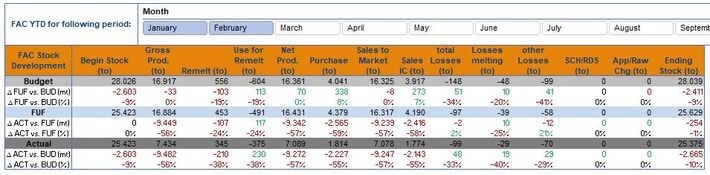
In the End, this kind of Matrix I want to show to the User: He has the possibility to choose the YTD month (as shown for example January - February) and he will get as a result the 3 Scenarious Budget, FUF and Actual but also the deviations in total and in % between FUF and Budget, Act and FUF, ACT and Budget.
When I am creating in Power BI the Matrix is not a big issue:
But how can I insert the Deviation rows into the Matrix? Is it possible?
Solved! Go to Solution.
Hi @Pfoerster ,
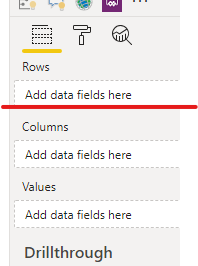
Just drag the deviation rows in "rows",when you expand rows in matrix ,you will see the sub-rows.
Hi @Pfoerster ,
Just drag the deviation rows in "rows",when you expand rows in matrix ,you will see the sub-rows.
If you put them in the Rows of your matrix you should be able to expand budget FUF and actual. If not please post your data structure (how is it saved in power bi) for better help.
Sign up to receive a private message when registration opens and key events begin.
If you have recently started exploring Fabric, we'd love to hear how it's going. Your feedback can help with product improvements.
| User | Count |
|---|---|
| 32 | |
| 26 | |
| 21 | |
| 20 | |
| 15 |
| User | Count |
|---|---|
| 63 | |
| 43 | |
| 28 | |
| 24 | |
| 22 |