Join us at FabCon Atlanta from March 16 - 20, 2026, for the ultimate Fabric, Power BI, AI and SQL community-led event. Save $200 with code FABCOMM.
Register now!The Power BI Data Visualization World Championships is back! Get ahead of the game and start preparing now! Learn more
Hi All,
I have a task that requires me to be able to define the progress of a project. Below is the scenario.
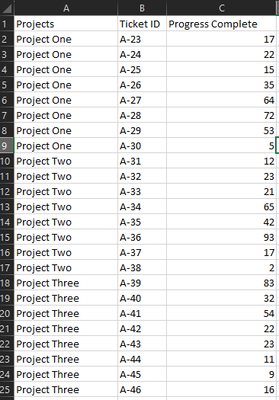
I have a data table with a column that has Project Names in it, and for each project there can be more than one task/ticket associated to it. Each task has a progress complete column with (fake data) that ranges from 0-100. The data looks something like this:
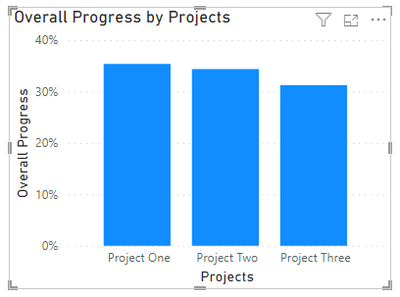
What I am seeking to do is to be able to display a total progress completion percentage for all of the tickets for each project. The percentage should total up to 100%. We have to keep in mind that the number of tasks could easily vary and isn't always the same as the screenshot shows for this sample.
Is there a way to do this using Dax? Id like to display this in a card as well.
Solved! Go to Solution.
@spatialcoder
Measure
Hi,
Share data in a format that can be pasted in an MS Excel file and show the expected result.
The solution below assisted me in the ask.
I will do so in my next post for sure.
@spatialcoder
Measure
This did help alot. I was stuck in the process of sorting the position where this should go.
Ths only other thing I do have as a question is if there is a way to control the percentages it reports?
Right now I have a total reading 0.xx % is there something in the UI to configure that will give me somewthing like 85.0 % instead of 0.85 %?
The Power BI Data Visualization World Championships is back! Get ahead of the game and start preparing now!
Check out the November 2025 Power BI update to learn about new features.
| User | Count |
|---|---|
| 59 | |
| 43 | |
| 42 | |
| 23 | |
| 17 |
| User | Count |
|---|---|
| 190 | |
| 122 | |
| 96 | |
| 66 | |
| 47 |