cancel
Showing results for 
Search instead for 
Did you mean: 

The Power BI Data Visualization World Championships is back! Get ahead of the game and start preparing now! Learn more

Reply
myti
Helper II
Helper II

Design customized reporting

Dear friends


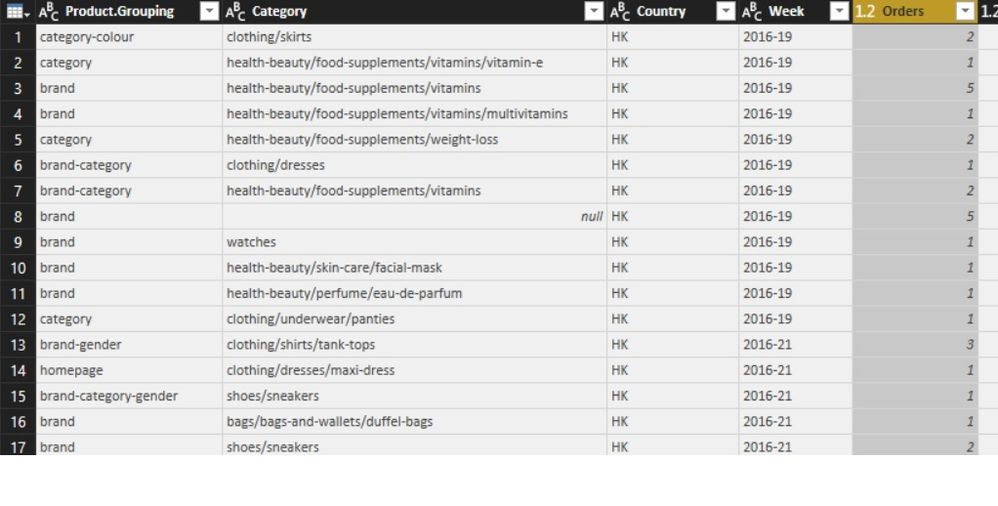
I have question regarding designing a report in power bi. Assume that we have query data table like the below picture in pbi:


Untitled.jpg

Now ,I would to create  a report to calculate numbers of orders for each "week" based on "product grouping".I have designed the report in the excel as below, do you think,this shape of report exactly can be designed  in pbi reporting as well? Actully I think the structure  of PBI can not let me to do like below ( diffrent weeks at the top),any soloution?


Untitled1.jpg

Thank you

Regards

Mehdi

1 ACCEPTED SOLUTION
Anonymous
Not applicable

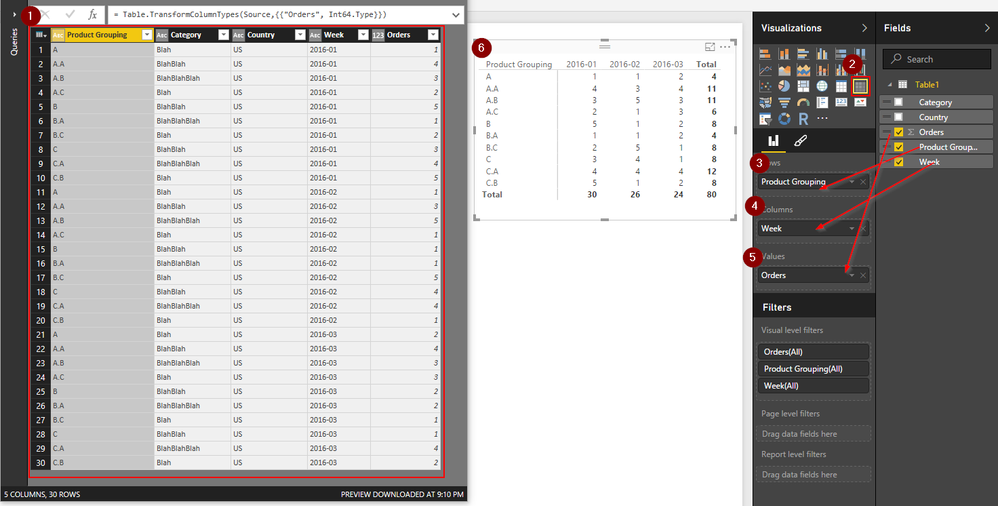
Did you Try a "Matrix" chart?  

2016-08-10 21_11_31-Start.png


View solution in original post

4 REPLIES 4
tschmidt87
Advocate I
Advocate I

What is your end goal? To create a list or to create a specific visual? And if so, what kind of visual?

I am asking, because you do not necessarily need the list in a specific format (such as your excel example) to be able to visualize something. For example, it shouldn't matter whether you have weeks as columne or rows

Thanks @tschmidt87 for your response.


The objective is to design a report in PBI similar to the excel report picture that I put  there.I know that, there is no difference if we put the weeks at left or top although the number of items in "product grouping"  are many and difficult to put all of them on the top and weeks on the left. The issue is that the  people I am working with them they get used to observe the report in the excel format like week on the top and the product grouping at the left for long time.and I was asked If i can design like their excel report.In fact, I receive comments from many people they like excel style report creation.For example,they want the ability to transpose a report table in PBI which is impossible,while you can do in excel easily.


Thank you,

Regards

Anonymous
Not applicable

Did you Try a "Matrix" chart?  

2016-08-10 21_11_31-Start.png


Thank you very much @Anonymous.


This is exactly the one I wanted.Great Help.


Regards

Myti

Helpful resources

Announcements
Power BI DataViz World Championships

Power BI Dataviz World Championships

The Power BI Data Visualization World Championships is back! Get ahead of the game and start preparing now!

December 2025 Power BI Update Carousel

Power BI Monthly Update - December 2025

Check out the December 2025 Power BI Holiday Recap!

FabCon Atlanta 2026 carousel

FabCon Atlanta 2026

Join us at FabCon Atlanta, March 16-20, for the ultimate Fabric, Power BI, AI and SQL community-led event. Save $200 with code FABCOMM.

Top Solution Authors