Share feedback directly with Fabric product managers, participate in targeted research studies and influence the Fabric roadmap.
Sign up nowGet Fabric certified for FREE! Don't miss your chance! Learn more
Hi There,
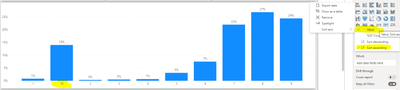
This is my chart sorted DESCENDING order
This is my chart sorted ASCENDING order
Somehow Power BI doesn't read "10" as a "10", it reads as a "1-0" ? How do I make it sorted by Descending order 10,9,8,7,6,5,4,3,2,1?
I know changing the Type to Number and sort will definitely work. But I cant do that, Because My dataset is unpivoted, so the column itself contains text and values, i can't change type to Number , my other charts will hit an error
Is there a workaround for this?
Could you please provide some more input to better understand the scenario..provide the dataset image.
Hello,
sure, check this microsoft article that would walk you through the steps.
If I answered your question, please mark my post as solution so it would appear to others, Appreciate your Kudos👍
Proud to be a Super User! | |
Hello,
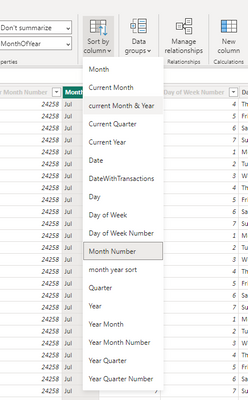
You could add a column for your sorting and sort the used column in the graph by this new sort column.
like this one
If I answered your question, please mark my post as solution so it would appear to others, Appreciate your Kudos👍
Proud to be a Super User! | |
If you love stickers, then you will definitely want to check out our Community Sticker Challenge!
Check out the January 2026 Power BI update to learn about new features.
| User | Count |
|---|---|
| 62 | |
| 61 | |
| 42 | |
| 20 | |
| 18 |
| User | Count |
|---|---|
| 122 | |
| 116 | |
| 38 | |
| 32 | |
| 29 |