cancel
Showing results for 
Search instead for 
Did you mean: 

Data Days is here! Join us now for 60+ days of learning, challenges, and connection. Learn more

Reply
Anonymous
Not applicable

Deleting the ROW Header

Hello,


Hope you are well,


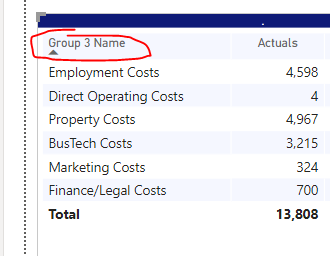
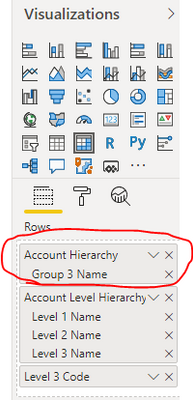
I would like to delete the first row headers name, however i couldnt find such thing. I cannot change the name to something like "-"  because it is a hierarchy.


Ahmet_Oz_0-1594894719808.png


Ahmet_Oz_1-1594894764349.png


Could you please help?


Thanks,


Ahmet


1 ACCEPTED SOLUTION
Anonymous
Not applicable

Hi @Anonymous ,


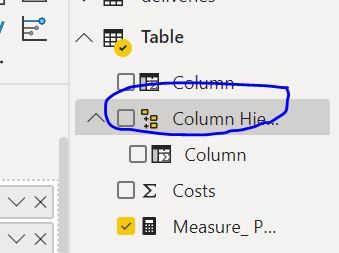
Normally you can rename the header of field when you using live connection.

However you can't rename the column header on hierachy.

4.PNG5.PNG

I'd like to suggest you to submit this idea.

https://ideas.powerbi.com/ideas/


Best Regards,

Jay

View solution in original post

4 REPLIES 4
harshnathani
Community Champion
Community Champion

Hi @Anonymous ,


1.jpg


Double Click on the Hierarch and you can change the name of the hierarchy.


Regards,

Harsh Nathani


Appreciate with a Kudos!! (Click the Thumbs Up Button)

Did I answer your question? Mark my post as a solution!

Anonymous
Not applicable

I think because i am using LIVE CUBE , i dont have that option 


Thanks anyway 


Ahmet_Oz_0-1594902167495.png


Anonymous
Not applicable

Hi @Anonymous ,


Normally you can rename the header of field when you using live connection.

However you can't rename the column header on hierachy.

4.PNG5.PNG

I'd like to suggest you to submit this idea.

https://ideas.powerbi.com/ideas/


Best Regards,

Jay

Fowmy
Super User
Super User

@Anonymous 


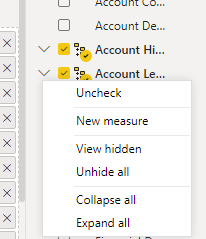
Hi, You can do it in the Fields Pane,  Right-click on the item that needs to be renamed and the hierarchy and rename.

If you are satisfied with my answer, please mark it as a solution so others can easily find it.

Don't forget to give KUDOS ? to replies that help answer your questions


Subscribe to ExcelFort: Learn Power BI, Power Query and Excel

Did I answer your question? Mark my post as a solution! and hit thumbs up


Subscribe and learn Power BI from these videos

Website LinkedIn PBI User Group

Helpful resources

Announcements
Fabric Data Days is here Carousel

Fabric Data Days 2026

Don't miss out on Data Days, June 15 through August 7. Learn Fabric, Power BI, SQL, AI and more.

May Power BI Update Carousel

Power BI Monthly Update - May 2026

Check out the May 2026 Power BI update to learn about new features.

Power BI DataViz World Championships carousel

Power BI DataViz World Championships - June 2026

A new Power BI DataViz World Championship is coming this June! Don't miss out on submitting your entry.