cancel
Showing results for 
Search instead for 
Did you mean: 

The Power BI Data Visualization World Championships is back! Get ahead of the game and start preparing now! Learn more

Reply
rhinorocks
Frequent Visitor

Defining Variables

Hi All,


I am new to Dax and currently facing issues in defining variables. 


Can we define table columns in Variable? Like I have a Table called Customer Master and I want to define a variable storing the customer ID. But the error is coming as Var is expecting a scalar value? 


Kindly help!!

1 ACCEPTED SOLUTION

I think I got the solution of this issue. I was trying to write a measure instead of the calculated column. 

View solution in original post

5 REPLIES 5
rhinorocks
Frequent Visitor

Consider the following problem posted on this forum - 


https://community.powerbi.com/t5/Desktop/Days-between-two-dates-in-different-rows/m-p/2367394#M85183...


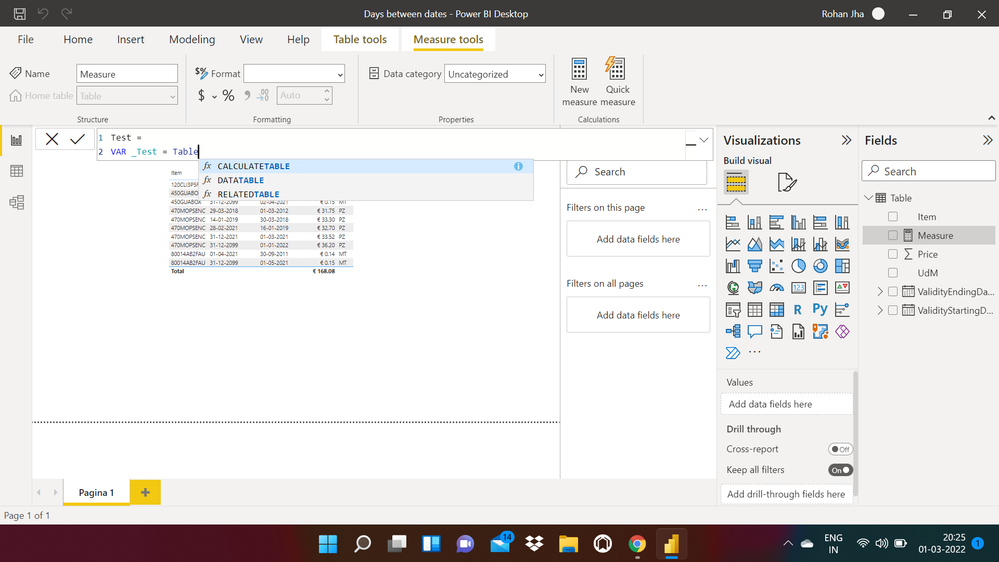
When I am trying to write this particular part of the code - 


Days between pricelists =
var _item = 'Table'[Item]
 
The tellisense is not able to detect this 'Table' hence I am not being able to proceed. Check the attached pictureIssues 1.png
While If I write the second line of the soluation, then I am getting no error. 
 
var _endDate = 'Table'[ValidityEndingDate]
 
Why is this happening?


I think I got the solution of this issue. I was trying to write a measure instead of the calculated column. 

Syk
Super User
Super User

You can work with columns in DAX but your measure has to return a scalar value. For example, in the dax below I'm storing a column in a variable but returning the sum of the column. If you reply with your specific use case, we may be able to help in more detail!

measure = 
var sales = 'sales'[sales_amount]

return sum(sales)


Hi Syk, I build similar logic, but it doesn't workCapture.PNG


@Syk wrote:

You can work with columns in DAX but your measure has to return a scalar value. For example, in the dax below I'm storing a column in a variable but returning the sum of the column. If you reply with your specific use case, we may be able to help in more detail!


measure = 
var sales = 'sales'[sales_amount]

return sum(sales)


Pragati11
Super User
Super User

Hi @rhinorocks ,


It depends on the logic and also on measure/column calculation you are trying to write using DAX.

Check this simple blog on variables:

https://www.purplefrogsystems.com/blog/2021/09/variables-in-dax/


Best Regards,

Pragati Jain


MVP logo


LinkedIn | Twitter | Blog YouTube 

Did I answer your question? Mark my post as a solution! This will help others on the forum!

Appreciate your Kudos!!

Proud to be a Super User!!

Helpful resources

Announcements
Power BI DataViz World Championships

Power BI Dataviz World Championships

The Power BI Data Visualization World Championships is back! Get ahead of the game and start preparing now!

November Power BI Update Carousel

Power BI Monthly Update - November 2025

Check out the November 2025 Power BI update to learn about new features.

FabCon Atlanta 2026 carousel

FabCon Atlanta 2026

Join us at FabCon Atlanta, March 16-20, for the ultimate Fabric, Power BI, AI and SQL community-led event. Save $200 with code FABCOMM.