cancel
Showing results for 
Search instead for 
Did you mean: 

Did you hear? There's a new SQL AI Developer certification (DP-800). Start preparing now and be one of the first to get certified. Register now

Reply
jaltoft
Resolver I
Resolver I

Define set weeks

I have a calendar (Calendar linked to my data). I want to have the ability within my data to set date ranges, for example I have a table that shows a set of data that I need to report on but I want to set it within  a couple of date ranges including prev>Sat and less than Prev Friday. Can anyone help with this and any other examples for days?

1 ACCEPTED SOLUTION
Anonymous
Not applicable

Hi @jaltoft 

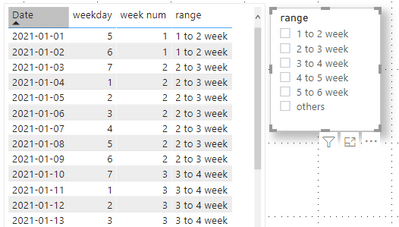
The information you provide is not very clear, so there is no way to create a sample exactly according to your needs. I created a similar sample, you can refer to it .

(1)Create a Calendar date table from “2021-01-01” to “2021-03-30” .

Calendar Date = CALENDAR(DATE(2021,01,01),DATE(2021,03,30))

(2)Create a column to return the week number for each date in Calendar date table .

week num = WEEKNUM('Calendar Date'[Date])

(3)Create a column to return the ranges by column [week num]

range = SWITCH(TRUE(),'Calendar Date'[week num]>=1 && 'Calendar Date'[week num]<2,"1 to 2 week",
                      'Calendar Date'[week num]>=2 && 'Calendar Date'[week num]<3,"2 to 3 week",
                      'Calendar Date'[week num]>=3 && 'Calendar Date'[week num]<4,"3 to 4 week",
                      'Calendar Date'[week num]>=4 && 'Calendar Date'[week num]<5,"4 to 5 week",
                      'Calendar Date'[week num]>=5 && 'Calendar Date'[week num]<6,"5 to 6 week", "others")

The final result is as shown :

Ailsamsft_0-1632896781982.png

I have attached my pbix file .


Best Regards

Community Support Team _ Ailsa Tao

If this post helps, then please consider Accept it as the solution to help the other members find it more quickly.

View solution in original post

2 REPLIES 2
Anonymous
Not applicable

Hi @jaltoft 

The information you provide is not very clear, so there is no way to create a sample exactly according to your needs. I created a similar sample, you can refer to it .

(1)Create a Calendar date table from “2021-01-01” to “2021-03-30” .

Calendar Date = CALENDAR(DATE(2021,01,01),DATE(2021,03,30))

(2)Create a column to return the week number for each date in Calendar date table .

week num = WEEKNUM('Calendar Date'[Date])

(3)Create a column to return the ranges by column [week num]

range = SWITCH(TRUE(),'Calendar Date'[week num]>=1 && 'Calendar Date'[week num]<2,"1 to 2 week",
                      'Calendar Date'[week num]>=2 && 'Calendar Date'[week num]<3,"2 to 3 week",
                      'Calendar Date'[week num]>=3 && 'Calendar Date'[week num]<4,"3 to 4 week",
                      'Calendar Date'[week num]>=4 && 'Calendar Date'[week num]<5,"4 to 5 week",
                      'Calendar Date'[week num]>=5 && 'Calendar Date'[week num]<6,"5 to 6 week", "others")

The final result is as shown :

Ailsamsft_0-1632896781982.png

I have attached my pbix file .


Best Regards

Community Support Team _ Ailsa Tao

If this post helps, then please consider Accept it as the solution to help the other members find it more quickly.

amitchandak
Super User
Super User

@jaltoft , if you are planning set default for date ranges, that is not possible as of now.


You need to have slicers like this examples column and save that on this week

Week Type = Switch( True(),
[start week]<=Today() && [end date]>=Today(),"This Week" ,
[start week]<=Today()-7 && [end date]>=Today()-7,"Last Week" ,
[Week Name]
)


Week Start date = 'Date'[Date]+-1*WEEKDAY('Date'[Date],2)+1
Week End date = 'Date'[Date]+ 7-1*WEEKDAY('Date'[Date],2)


refer if needed

Any Weekday Week - Start From Any day of Week
https://community.powerbi.com/t5/Community-Blog/Any-Weekday-Week-Decoding-Date-and-Calendar-2-5-Powe...


Share with Power BI Enthusiasts: Full Power BI Video (20 Hours) YouTube
Microsoft Fabric Series 60+ Videos YouTube
Microsoft Fabric Hindi End to End YouTube

Helpful resources

Announcements
April Power BI Update Carousel

Power BI Monthly Update - April 2026

Check out the April 2026 Power BI update to learn about new features.

Fabric SQL PBI Data Days

Data Days 2026 coming soon!

Sign up to receive a private message when registration opens and key events begin.

New to Fabric survey Carousel

New to Fabric Survey

If you have recently started exploring Fabric, we'd love to hear how it's going. Your feedback can help with product improvements.

Power BI DataViz World Championships carousel

Power BI DataViz World Championships - June 2026

A new Power BI DataViz World Championship is coming this June! Don't miss out on submitting your entry.