Join us in Barcelona for FabCon and SQLCon, September 28 - October 1, 2026.
This is best Fabric, Power BI, SQL and AI community event. How do we know? The last event sold out! Save €200 with code FABCMTY200.
Register now- Power BI forums
- Get Help with Power BI
- Desktop
- Service
- Report Server
- Power Query
- Mobile Apps
- Developer
- DAX Commands and Tips
- Custom Visuals Development Discussion
- Health and Life Sciences
- Power BI Spanish forums
- Translated Spanish Desktop
- Training and Consulting
- Instructor Led Training
- Dashboard in a Day for Women, by Women
- Galleries
- Data Stories Gallery
- Themes Gallery
- Contests Gallery
- QuickViz Gallery
- Quick Measures Gallery
- Visual Calculations Gallery
- Fabric Apps Gallery
- Notebook Gallery
- Translytical Task Flow Gallery
- TMDL Gallery
- R Script Showcase
- Webinars and Video Gallery
- Ideas
- Custom Visuals Ideas (read-only)
- Issues
- Issues
- Events
- Upcoming Events
The Fabric community is upgrading! Read all of the details including the timeline and what you can expect. Learn more
- Power BI forums
- Forums
- Get Help with Power BI
- Desktop
- Re: Decomposition Conditional Formatting
- Subscribe to RSS Feed
- Mark Topic as New
- Mark Topic as Read
- Float this Topic for Current User
- Bookmark
- Subscribe
- Printer Friendly Page


- Mark as New
- Bookmark
- Subscribe
- Mute
- Subscribe to RSS Feed
- Permalink
- Report Inappropriate Content
Decomposition Conditional Formatting
Hi Team,
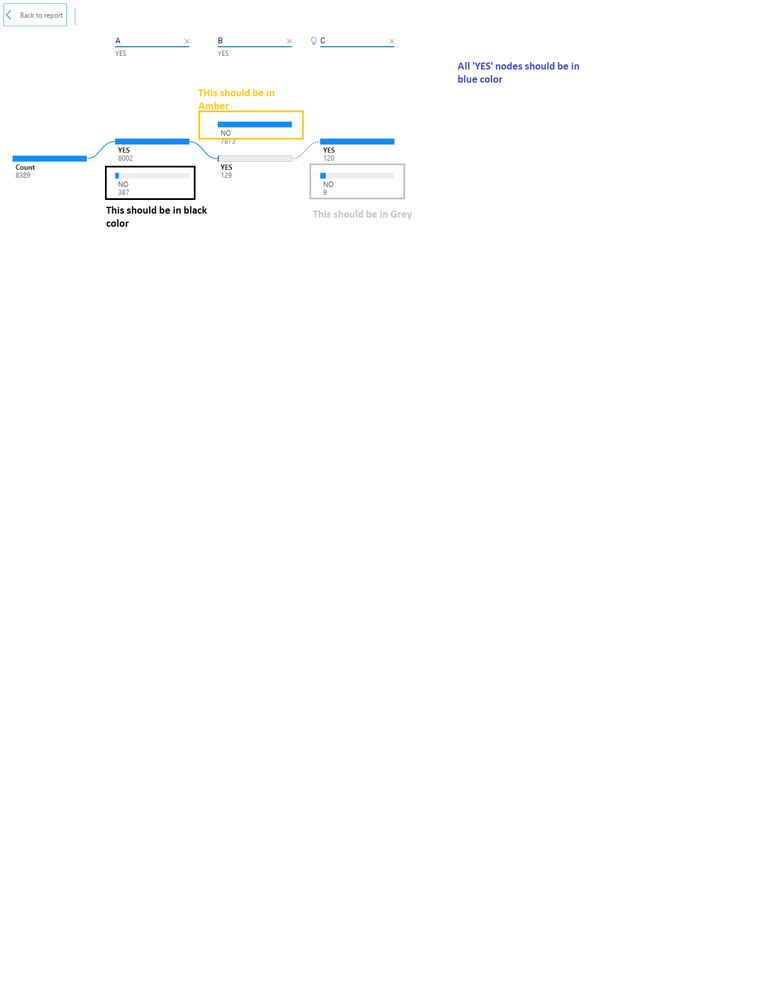
I have decomposition tree with 3 levels as shown below.
Requirement: In this hierarchy, I would need:
1. All 'Yes' nodes in Blue color
2. Level A node 'No' should be in Black
3. Level B node 'No' should be in Amber
4. Level C node 'No' should be in Grey
Sample pwbix file
https://1drv.ms/u/s!ArRkjWtfVLy-blFLsv39onMwWrQ
Solved! Go to Solution.


- Mark as New
- Bookmark
- Subscribe
- Mute
- Subscribe to RSS Feed
- Permalink
- Report Inappropriate Content
Hi @BSM1985 ,
Try to add the following custom measure:
Measure = SWITCH(
                   TRUE();
                   SELECTEDVALUE(Testing[A]) = "NO";"Black";
                   SELECTEDVALUE(Testing[B]) = "NO";"#FFC200";
                   SELECTEDVALUE(Testing[C]) = "NO";"Grey"
                 )
You can also change the Black and Grey to other custom colour codes just remember to place the # before the code.
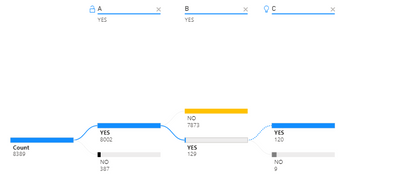
Check PBIX file attach.
Regards
Miguel Félix
Did I answer your question? Mark my post as a solution!
Proud to be a Super User!
Check out my blog: Power BI em Português

- Mark as New
- Bookmark
- Subscribe
- Mute
- Subscribe to RSS Feed
- Permalink
- Report Inappropriate Content
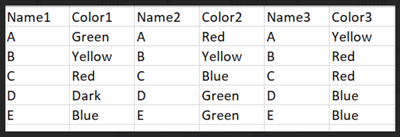
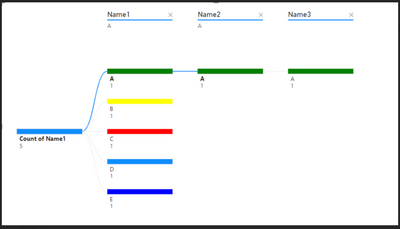
I would like to display on my decomposition tree the "Names" columns with the colors in the "Color" columns respectively.
How can I do that?
I tried with a measure like Switch(True(),Selectvalue(Name1),color) but it doesn't work for me.
- Mark as New
- Bookmark
- Subscribe
- Mute
- Subscribe to RSS Feed
- Permalink
- Report Inappropriate Content
Hi @eli9879 ,
Not sure if I understand what you mean by "Names" columns with the colors in the "Color" columns respectively.
Try to create the following measure:
Color Coding = SWITCH(TRUE(),
                    ISINSCOPE('Table'[Name3]), SELECTEDVALUE('Table'[Color3]),
                    ISINSCOPE('Table'[Name2]), SELECTEDVALUE('Table'[Color2]),
                    ISINSCOPE('Table'[Name1]), SELECTEDVALUE('Table'[Color1]))
Be carefull with the order of the columns since the switch function stops at the first result:
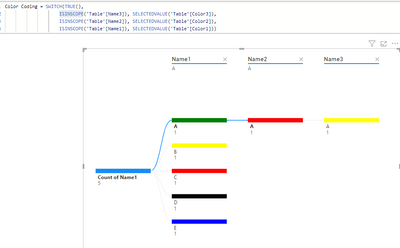
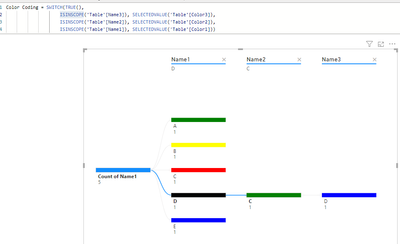
See file attach.
Regards
Miguel Félix
Did I answer your question? Mark my post as a solution!
Proud to be a Super User!
Check out my blog: Power BI em Português- Mark as New
- Bookmark
- Subscribe
- Mute
- Subscribe to RSS Feed
- Permalink
- Report Inappropriate Content
Amazing!! very helpful.
Thanks

- Mark as New
- Bookmark
- Subscribe
- Mute
- Subscribe to RSS Feed
- Permalink
- Report Inappropriate Content
Hi @MFelix,
Can you please share how the color of the parent data bars can also be changed as per a condition?
- Mark as New
- Bookmark
- Subscribe
- Mute
- Subscribe to RSS Feed
- Permalink
- Report Inappropriate Content
Hi @BSM1985 ,
Try to add the following custom measure:
Measure = SWITCH(
                   TRUE();
                   SELECTEDVALUE(Testing[A]) = "NO";"Black";
                   SELECTEDVALUE(Testing[B]) = "NO";"#FFC200";
                   SELECTEDVALUE(Testing[C]) = "NO";"Grey"
                 )
You can also change the Black and Grey to other custom colour codes just remember to place the # before the code.
Check PBIX file attach.
Regards
Miguel Félix
Did I answer your question? Mark my post as a solution!
Proud to be a Super User!
Check out my blog: Power BI em Português- Mark as New
- Bookmark
- Subscribe
- Mute
- Subscribe to RSS Feed
- Permalink
- Report Inappropriate Content
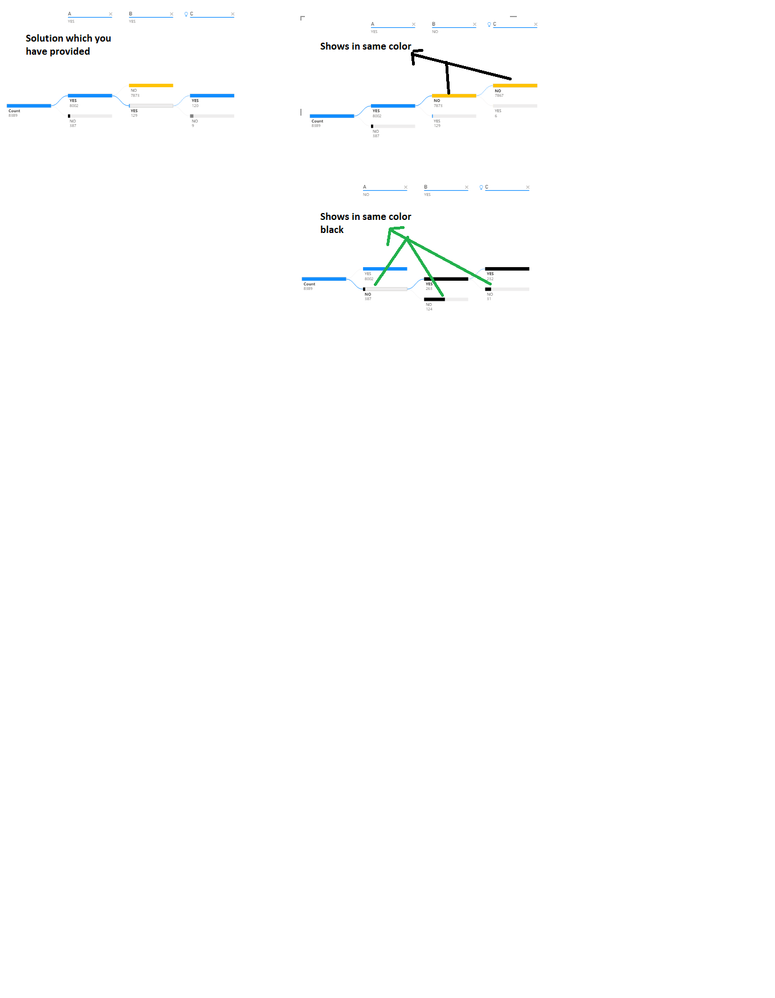
Sorry @MFelix
I was not clear. This works for one node, not for all as shown below. I would need different color for each 'No' for each node as shown in below screenshot.
- Mark as New
- Bookmark
- Subscribe
- Mute
- Subscribe to RSS Feed
- Permalink
- Report Inappropriate Content
Hi @BSM1985 ,
Believe that has to do with the order of the function try:
Measure =
SWITCH (
    TRUE ();
    SELECTEDVALUE ( Testing[C] ) = "NO"; "Grey";
    SELECTEDVALUE ( Testing[C] ) = "Yes"; "Blue";
    SELECTEDVALUE ( Testing[B] ) = "NO"; "#FFC200";
    SELECTEDVALUE ( Testing[B] ) = "Yes"; "Blue";
    SELECTEDVALUE ( Testing[A] ) = "No"; "Black";
    SELECTEDVALUE ( Testing[A] ) = "Yes"; "Blue"
)
Regards
Miguel Félix
Did I answer your question? Mark my post as a solution!
Proud to be a Super User!
Check out my blog: Power BI em Português

- Mark as New
- Bookmark
- Subscribe
- Mute
- Subscribe to RSS Feed
- Permalink
- Report Inappropriate Content
Hi @MFelix Please take a look on this
In Decomposition tree condition formation i need to change color based on 1 column value .
If it is fail then its parent also should be in red....
You can see the measure i had used in below image ..
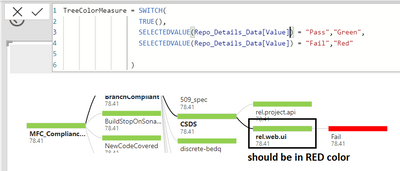
Thanks in advance ..
- Mark as New
- Bookmark
- Subscribe
- Mute
- Subscribe to RSS Feed
- Permalink
- Report Inappropriate Content
Hi @Ayappan
Can you please share some more details? If you can you please share a mockup data or sample of your PBIX file. You can use a onedrive, google drive, we transfer or similar link to upload your files.
If the information is sensitive please share it trough private message.
Regards
Miguel Félix
Did I answer your question? Mark my post as a solution!
Proud to be a Super User!
Check out my blog: Power BI em Português- Mark as New
- Bookmark
- Subscribe
- Mute
- Subscribe to RSS Feed
- Permalink
- Report Inappropriate Content
Helpful resources

FabCon & SQLCon – Barcelona 2026
Join us in Barcelona for FabCon and SQLCon, the Fabric, Power BI, SQL, and AI community event. Save €200 with code FABCMTY200.

Power BI DataViz World Championships - June 2026
A new Power BI DataViz World Championship is coming this June! Don't miss out on submitting your entry.

| User | Count |
|---|---|
| 24 | |
| 22 | |
| 20 | |
| 18 | |
| 14 |


| User | Count |
|---|---|
| 45 | |
| 38 | |
| 24 | |
| 21 | |
| 20 |


