cancel
Showing results for 
Search instead for 
Did you mean: 

View all the Fabric Data Days sessions on demand. View schedule

Reply
AnaAlbano
Helper I
Helper I

Decimals Conditional Format

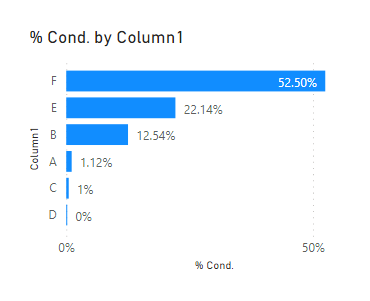
Hello – I have a bar chart where I transformed the # in show as to % of total. However categories which there are less than 1%, I want to show with two decimals, but the others, remain the round value. Is there a way to do it? I tried this way, but no success:

% Cond. = IF(([Total Employees Based on Selection])>0.01,
                  ROUND([Total Employees Based on Selection],2),
                  ROUND([Total Employees Based on Selection],0))


Thank you 🙂

2 ACCEPTED SOLUTIONS
Fowmy
Super User
Super User

@AnaAlbano 

It is actually possible using a Calculation Group. I have attached a sample file below my signature.

Fowmy_0-1622110014204.png

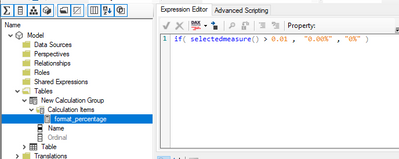
You need to create a calculation group and set the format string as follows:

Fowmy_1-1622110060887.png


Did I answer your question? Mark my post as a solution! and hit thumbs up


Subscribe and learn Power BI from these videos

Website LinkedIn PBI User Group

View solution in original post

Thank you very much Fowmy! That works, but just for scenarios where there is no option to filter, correct? I added an slicer where the user could select each region, for instance, then I assume I need to create a group for each region, right?

View solution in original post

4 REPLIES 4
Fowmy
Super User
Super User

@AnaAlbano 

It is actually possible using a Calculation Group. I have attached a sample file below my signature.

Fowmy_0-1622110014204.png

You need to create a calculation group and set the format string as follows:

Fowmy_1-1622110060887.png


Did I answer your question? Mark my post as a solution! and hit thumbs up


Subscribe and learn Power BI from these videos

Website LinkedIn PBI User Group

Thank you very much Fowmy! That works, but just for scenarios where there is no option to filter, correct? I added an slicer where the user could select each region, for instance, then I assume I need to create a group for each region, right?

@AnaAlbano 

This will work regardless of any filter applied on the measure as long as you have the same condition that you need to use, in your case it is >0.01 .  

Did I answer your question? Mark my post as a solution! and hit thumbs up


Subscribe and learn Power BI from these videos

Website LinkedIn PBI User Group

selimovd
Super User
Super User

Hey @AnaAlbano ,


you can use the round function to change the value, but the display in the bar chart stays the same for all numbers.

You could do that dynamically with the FORMAT function. But that will return a string what won't be possible to display in a bar chart:

Dynamic scaling of a measure in Power BI with DAX - What the fact.bi


You could split it into multiple measures, one for 2 decimals and one for 1 decimal and then add them to the bar chart. But I'm not sure if that's worth the effort.


For the same measure you cannot change the formatting by value for sure.


If you need any help please let me know.
If I answered your question I would be happy if you could mark my post as a solution ✔️ and give it a thumbs up 👍
 
Best regards
Denis


Helpful resources

Announcements
November Power BI Update Carousel

Power BI Monthly Update - November 2025

Check out the November 2025 Power BI update to learn about new features.

Fabric Data Days Carousel

Fabric Data Days

Advance your Data & AI career with 50 days of live learning, contests, hands-on challenges, study groups & certifications and more!

FabCon Atlanta 2026 carousel

FabCon Atlanta 2026

Join us at FabCon Atlanta, March 16-20, for the ultimate Fabric, Power BI, AI and SQL community-led event. Save $200 with code FABCOMM.

Top Solution Authors
Top Kudoed Authors