Get certified for free when you join Fabric Data Days 2026 and dive into Fabric, Power BI, SQL, AI, and other essential data skills.
Join nowJuly 7 - July 17 | Round 2 of the Power BI Dataviz World Championships. Don't miss your chance! Learn more
Hi, I need help on my accounting measures. I hope you can help me with it.
I have a General Ledger table that was formatted like this:
Book Date Trans # Acct Name Amt
Sales 1/1/20 S001 Sales -1,000
Sales 1/1/20 S001 Cash 1,000
Sales 1/2/20 S002 Sales -2,000
I have a visual table that looks like this:
Book Date Trans # Acct Name Amt
Sales 1/1/20 S001 Sales -1,000
Sales 1/2/20 S002 Sales -2,000
My visual filter is based on Acct Name, for example based on Sales.
What i want to happen is that when the user clicked on the Trans #, it will show the following details on a separate table :
Book Date Trans # Acct Name Amt
Sales 1/1/20 S001 Sales -1,000
Sales 1/1/20 S001 Cash 1,000
I cant make it work, i think because my filter is based on Sales, it will not show any other Acct Name beside that.
What measure should i create to make it work?
Thanks a lot!
Solved! Go to Solution.
Hi, @jmcph
You may try the following two ways to meet your requirments. The pbix file is attached in the end.
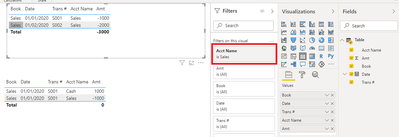
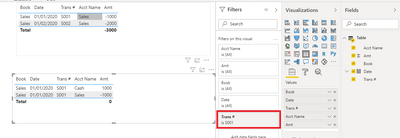
Visual level filter:
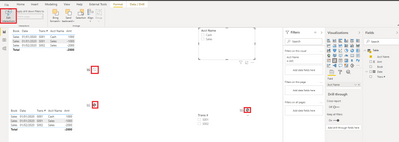
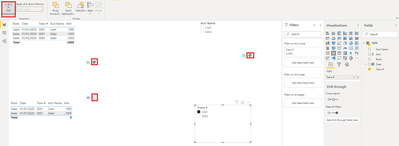
Edit interaction:
For further information, you may refer to the following documents.
Add a filter to a report in Power BI
Change how visuals interact in a Power BI report
Best Regards
Allan
If this post helps, then please consider Accept it as the solution to help the other members find it more quickly.
Hi, @jmcph
If you take the answer of someone, please mark it as the solution to help the other member0s who have same problems find it more quickly. If not, let me know and I'll try to help you further. Thanks.
Best Regards
Allan
Hi, @jmcph
You may try the following two ways to meet your requirments. The pbix file is attached in the end.
Visual level filter:
Edit interaction:
For further information, you may refer to the following documents.
Add a filter to a report in Power BI
Change how visuals interact in a Power BI report
Best Regards
Allan
If this post helps, then please consider Accept it as the solution to help the other members find it more quickly.
can you show the structure of your data is it multiple tables? can you share your relationships if more than one.
Proud to be a Super User!
Join us in Barcelona for FabCon and SQLCon, the Fabric, Power BI, SQL, and AI community event. Save €200 with code FABCMTY200.
Join Fabric Data Days 2026: 60 days of free live/on-demand sessions, challenges, study groups, and certification opportunities.
| User | Count |
|---|---|
| 22 | |
| 22 | |
| 18 | |
| 17 | |
| 13 |
| User | Count |
|---|---|
| 66 | |
| 50 | |
| 46 | |
| 41 | |
| 39 |