Join us at FabCon Atlanta from March 16 - 20, 2026, for the ultimate Fabric, Power BI, AI and SQL community-led event. Save $200 with code FABCOMM.
Register now!The Power BI Data Visualization World Championships is back! Get ahead of the game and start preparing now! Learn more
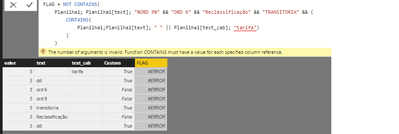
i'm doing it worng =/
I have to do a SQL query in DAX
(text not like '%ORD 9%' and text not like '%ORD 6%' and text not like '%Reclassificação%' and text not like '%TRANSITORIA%' and(text <> '' or text_cab like '%tarifa%'))
Gratz!
Solved! Go to Solution.
SEARCH("ORD 9", Table[Text], 1, -1) < 0 && SEARCH("ORD 6", Table[Text], 1, -1) < 0 && SEARCH("Reclassificação", Table[Text], 1, -1) < 0 && SEARCH("TRANSITORIA", Table[Text], 1, -1) < 0 && (Table[Text] <> "" || SEARCH("tarifa", Table[Text_Cab], 1, -1) > 0)
CONTAINS function in DAX is for searching a table for a presence of a row when certain search-columns contain the specified values. Think of this as a special version of excel's VLookup function that returns a boolean true or false value, when there is such a row.
You should be using SEARCH or FIND function in DAX for performing text contains check. SEARCH is case-insensitive and FIND is case-sensitive.
Can You Show me?
I'm a newbie in PBI.
Gratz!
SEARCH("ORD 9", Table[Text], 1, -1) < 0 && SEARCH("ORD 6", Table[Text], 1, -1) < 0 && SEARCH("Reclassificação", Table[Text], 1, -1) < 0 && SEARCH("TRANSITORIA", Table[Text], 1, -1) < 0 && (Table[Text] <> "" || SEARCH("tarifa", Table[Text_Cab], 1, -1) > 0)
The Power BI Data Visualization World Championships is back! Get ahead of the game and start preparing now!
Check out the November 2025 Power BI update to learn about new features.
| User | Count |
|---|---|
| 59 | |
| 43 | |
| 42 | |
| 23 | |
| 17 |
| User | Count |
|---|---|
| 190 | |
| 122 | |
| 96 | |
| 66 | |
| 47 |