Join us in Barcelona for FabCon and SQLCon, September 28 - October 1, 2026.
This is best Fabric, Power BI, SQL and AI community event. How do we know? The last event sold out! Save €200 with code FABCMTY200.
Register now- Power BI forums
- Get Help with Power BI
- Desktop
- Service
- Report Server
- Power Query
- Mobile Apps
- Developer
- DAX Commands and Tips
- Custom Visuals Development Discussion
- Health and Life Sciences
- Power BI Spanish forums
- Translated Spanish Desktop
- Training and Consulting
- Instructor Led Training
- Dashboard in a Day for Women, by Women
- Galleries
- Data Stories Gallery
- Themes Gallery
- Contests Gallery
- QuickViz Gallery
- Quick Measures Gallery
- Visual Calculations Gallery
- Fabric Apps Gallery
- Notebook Gallery
- Translytical Task Flow Gallery
- TMDL Gallery
- R Script Showcase
- Webinars and Video Gallery
- Ideas
- Custom Visuals Ideas (read-only)
- Issues
- Issues
- Events
- Upcoming Events
The Fabric community is now in read-only for platform upgrade. Learn more
- Power BI forums
- Forums
- Get Help with Power BI
- Desktop
- Re: Dax function is difficult
- Subscribe to RSS Feed
- Mark Topic as New
- Mark Topic as Read
- Float this Topic for Current User
- Bookmark
- Subscribe
- Printer Friendly Page

- Mark as New
- Bookmark
- Subscribe
- Mute
- Subscribe to RSS Feed
- Permalink
Dax function is difficult
Hello, I'm a beginner at Power B.I
There are seven classrooms and there should be seven people per classroom.
Then, you can receive a total of 49 people with a total of 7*7=49, and now 23 people have entered the school, so you have to fill 26 more people.
As you can see in the image, a total of 26 numbers are shown, but if you click each class, the numbers are not correct.

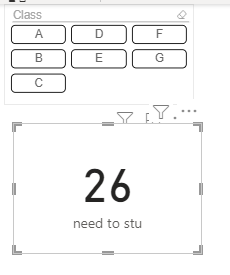
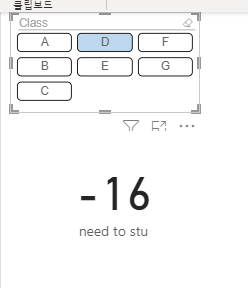
I want to get a number normally.
I need your help
Thank you.
Solved! Go to Solution.


- Mark as New
- Bookmark
- Subscribe
- Mute
- Subscribe to RSS Feed
- Permalink
Is tis what you are looking for?

Attaching the file here for your reference.
- Mark as New
- Bookmark
- Subscribe
- Mute
- Subscribe to RSS Feed
- Permalink
Glad to help 🙂
If your issue is resolved, please mark the answer as solution for others to benefit from it.
Thanks
- Mark as New
- Bookmark
- Subscribe
- Mute
- Subscribe to RSS Feed
- Permalink
You can go to the url address and download the file.
The powerbi should have a value in the 'card' part.
-> need to STU = (each class * 7) - Total number of students enrolled
And if you press each classroom, you can see the number of students that you need
For example, if you press A, the number "card" should be 5 people
It's because two people are currently in class A.
URL : https://drive.google.com/drive/folders/1DIDO3Wuw3jj0I9A03eszMfRkk5bQ31RV?usp=sharing
- Mark as New
- Bookmark
- Subscribe
- Mute
- Subscribe to RSS Feed
- Permalink
Glad to help 🙂
If your issue is resolved, please mark the answer as solution for others to benefit from it.
Thanks
- Mark as New
- Bookmark
- Subscribe
- Mute
- Subscribe to RSS Feed
- Permalink
You can go to the url address and download the file.
@PC2790
https://drive.google.com/drive/folders/1DIDO3Wuw3jj0I9A03eszMfRkk5bQ31RV?usp=sharing
You can go to the url address and download the file.
The powerbi should have a value in the 'card' part.
-> need to STU = (each class * 7) - Total number of students enrolled
And if you press each classroom, you can see the number of students that you need
For example, if you press A, the number "card" should be 5 people
It's because two people are currently in class A.

- Mark as New
- Bookmark
- Subscribe
- Mute
- Subscribe to RSS Feed
- Permalink
Can you provide your data model and sample data?
What data type is you class column?
If each class has 7 students and it is fixed then there is no need to multiply it explicitly with 7.
If your Class table contains the number of students, you can get the 7 number from there using:
Measure =
var selectedclass = Allselected(Class[Class])
var Noofstudentsinclass = Count(Filter('Class', Class[Class] = selectedclass))
return
Noofstudentsinclass - freshman[entrance into a school]
If single class has 7 students, then Noofstudentsinclass would always return 7 if one class is selected?Isn't it?
And are you sure you want to subtract freshman[entrance into a school]?
It will be easier to advice further if you can provide some sample data and your expected output.
- Mark as New
- Bookmark
- Subscribe
- Mute
- Subscribe to RSS Feed
- Permalink
Try:
Measure =
var studentsperclass = 7
return
Calculate('Class',Class[Class] * studentsperclass - freshman[entrance into a school])
Make sur eyou ahve relationship between Class and freshman table
Helpful resources

FabCon & SQLCon – Barcelona 2026
Join us in Barcelona for FabCon and SQLCon, the Fabric, Power BI, SQL, and AI community event. Save €200 with code FABCMTY200.

Power BI DataViz World Championships - June 2026
A new Power BI DataViz World Championship is coming this June! Don't miss out on submitting your entry.

| User | Count |
|---|---|
| 20 | |
| 18 | |
| 14 | |
| 13 | |
| 13 |


| User | Count |
|---|---|
| 48 | |
| 35 | |
| 24 | |
| 20 | |
| 19 |


