Join us at FabCon Atlanta from March 16 - 20, 2026, for the ultimate Fabric, Power BI, AI and SQL community-led event. Save $200 with code FABCOMM.
Register now!The Power BI Data Visualization World Championships is back! Get ahead of the game and start preparing now! Learn more
Hi All,
I Need a Dax Formual (Measure) to get the result in the below Format.
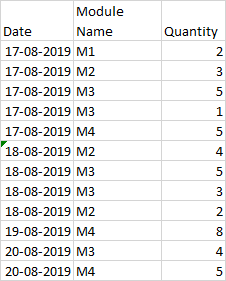
Existed Data:
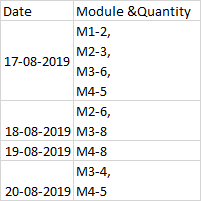
I need the Out as Date based Grouping of Quantities Along with Module Name.
Output could be like:
Please help me out this Issue.
Thanks & Regards,
Vishnu Priya
Solved! Go to Solution.
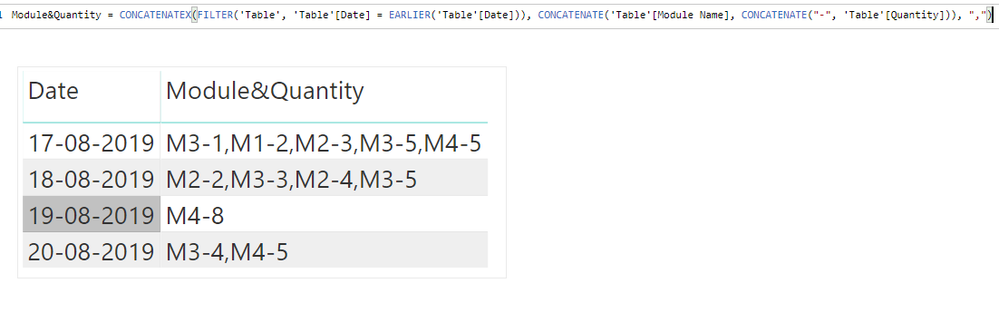
You may create a calculate column and then drag the calculate column and date column to a table visual.
Module&Quantity = CONCATENATEX(FILTER('Table', 'Table'[Date] = EARLIER('Table'[Date])), CONCATENATE('Table'[Module Name], CONCATENATE("-", 'Table'[Quantity])), ",")
Community Support Team _ Jimmy Tao
If this post helps, then please consider Accept it as the solution to help the other members find it more quickly.
Hi,
Just create a new column like this:
Column = 'Table'[module]&"-"&'Table'[Quant]
Add the field Date & the new column to a Matrix table (both fields under Rows)
And you'll get about what you want.
Hope this helps.
Robbe
You may create a calculate column and then drag the calculate column and date column to a table visual.
Module&Quantity = CONCATENATEX(FILTER('Table', 'Table'[Date] = EARLIER('Table'[Date])), CONCATENATE('Table'[Module Name], CONCATENATE("-", 'Table'[Quantity])), ",")
Community Support Team _ Jimmy Tao
If this post helps, then please consider Accept it as the solution to help the other members find it more quickly.
The Power BI Data Visualization World Championships is back! Get ahead of the game and start preparing now!
| User | Count |
|---|---|
| 38 | |
| 38 | |
| 37 | |
| 28 | |
| 25 |
| User | Count |
|---|---|
| 124 | |
| 87 | |
| 70 | |
| 66 | |
| 65 |