This time we’re going bigger than ever. Fabric, Power BI, SQL, AI and more. We're covering it all. You won't want to miss it.
Learn moreDid you hear? There's a new SQL AI Developer certification (DP-800). Start preparing now and be one of the first to get certified. Register now
I have to create the datediff between the 'project from date' and 'today' in days.
However I am not able to specify 1st date parameter column.
Is there a way I can calculate difference between 2 dates?
Solved! Go to Solution.
Hi @Anonymous ,
There are two solutions:
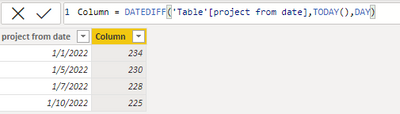
1.Please create a new column:
Column = DATEDIFF('Table'[project from date],TODAY(),DAY)
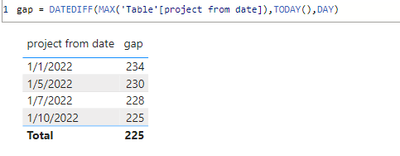
2.Please create a new measure:
gap = DATEDIFF(MAX('Table'[project from date]),TODAY(),DAY)
Best regards,
Yadong Fang
If this post helps, then please consider Accept it as the solution to help the other members find it more quickly.
Hi @Anonymous ,
Has your problem been solved? If solved, please consider Accept it as the solution to help the other members find it more quickly.
Hi @Anonymous ,
There are two solutions:
1.Please create a new column:
Column = DATEDIFF('Table'[project from date],TODAY(),DAY)
2.Please create a new measure:
gap = DATEDIFF(MAX('Table'[project from date]),TODAY(),DAY)
Best regards,
Yadong Fang
If this post helps, then please consider Accept it as the solution to help the other members find it more quickly.
@Anonymous ,Try this
DATEDIFF(TableName[Proj Start Date Column],Today(),DAY)
I tried that, but I am not able to add the first date parameter is i.e. 'Project From Date' column.
Hi @Anonymous
Please try
DATEDIFF ( SELECTEDVALUE ( TableName[Proj Start Date Column] ), Today ( ), DAY )
Check out the April 2026 Power BI update to learn about new features.
Sign up to receive a private message when registration opens and key events begin.
If you have recently started exploring Fabric, we'd love to hear how it's going. Your feedback can help with product improvements.
| User | Count |
|---|---|
| 34 | |
| 31 | |
| 25 | |
| 20 | |
| 16 |
| User | Count |
|---|---|
| 61 | |
| 49 | |
| 28 | |
| 23 | |
| 23 |