Get certified for free when you join Fabric Data Days 2026 and dive into Fabric, Power BI, SQL, AI, and other essential data skills.
Join nowJuly 7 - July 17 | Round 2 of the Power BI Dataviz World Championships. Don't miss your chance! Learn more
Hi,
I need to show data in a report for only one month. Please let me know how to set the date in the report.
Thanks.
Solved! Go to Solution.
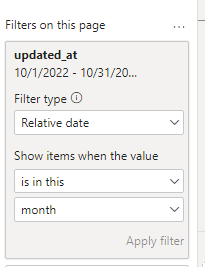
@sshiny Multiple ways to do this. One of them is to add a page filter on Date and set it to this month.
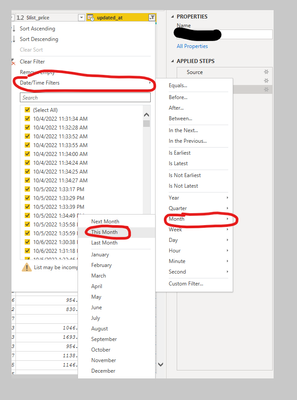
or you can filter the data in a power query.
@sshiny Multiple ways to do this. One of them is to add a page filter on Date and set it to this month.
or you can filter the data in a power query.
Add a filter visual on your report page. Add the date field in there. I personally use the hierarchy of that date.
Join us in Barcelona for FabCon and SQLCon, the Fabric, Power BI, SQL, and AI community event. Save €200 with code FABCMTY200.
Join Fabric Data Days 2026: 60 days of free live/on-demand sessions, challenges, study groups, and certification opportunities.
| User | Count |
|---|---|
| 23 | |
| 22 | |
| 18 | |
| 17 | |
| 13 |
| User | Count |
|---|---|
| 67 | |
| 50 | |
| 46 | |
| 41 | |
| 39 |