cancel
Showing results for 
Search instead for 
Did you mean: 

The Power BI Data Visualization World Championships is back! It's time to submit your entry. Live now!

Reply
sshiny
Helper II
Helper II

Date

Hi,


I need to show data in a report for only one month. Please let me know how to set the date in the report.


Thanks.

1 ACCEPTED SOLUTION
AbbasG
Memorable Member
Memorable Member

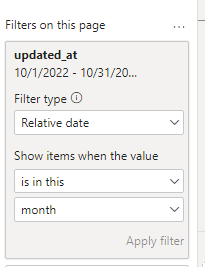
@sshiny Multiple ways to do this. One of them is to add a page filter on Date and set it to this month.

AbbasG_0-1666767773510.png

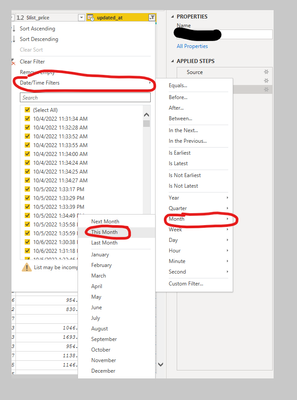
or you can filter the data in a power query.

AbbasG_1-1666767922105.png


View solution in original post

2 REPLIES 2
AbbasG
Memorable Member
Memorable Member

@sshiny Multiple ways to do this. One of them is to add a page filter on Date and set it to this month.

AbbasG_0-1666767773510.png

or you can filter the data in a power query.

AbbasG_1-1666767922105.png


AliceW
Power Participant
Power Participant

Add a filter visual on your report page. Add the date field in there. I personally use the hierarchy of that date.

Helpful resources

Announcements
FabCon Atlanta 2026 carousel

FabCon Atlanta 2026

Join us at FabCon Atlanta, March 16-20, for the ultimate Fabric, Power BI, AI and SQL community-led event. Save $200 with code FABCOMM.