Get certified for free when you join Fabric Data Days 2026 and dive into Fabric, Power BI, SQL, AI, and other essential data skills.
Join nowData Days is here! Join us now for 60+ days of learning, challenges, and connection. Learn more
I created a date dimension table using the code as below from a blog:
Looks like when I use a big range as parameter to Calendar (say 2000/2025), it is only generating weekly values for dates. It seems to work between 2009 and 2025 and correctly generates for each date value. Perhaps I am missing something.
Date =
ADDCOLUMNS (
CALENDAR (DATE(2000;1;1); DATE(2025;12;31));
"DateAsInteger"; FORMAT ( [Date]; "YYYYMMDD" );
"Year"; YEAR ( [Date] );
"Monthnumber"; FORMAT ( [Date]; "MM" );
"YearMonthnumber"; FORMAT ( [Date]; "YYYY/MM" );
"YearMonthShort"; FORMAT ( [Date]; "YYYY/mmm" );
"MonthNameShort"; FORMAT ( [Date]; "mmm" );
"MonthNameLong"; FORMAT ( [Date]; "mmmm" );
"DayOfWeekNumber"; WEEKDAY ( [Date] );
"DayOfWeek"; FORMAT ( [Date]; "dddd" );
"DayOfWeekShort"; FORMAT ( [Date]; "ddd" );
"Quarter"; "Q" & FORMAT ( [Date]; "Q" );
"YearQuarter"; FORMAT ( [Date]; "YYYY" ) & "/Q" & FORMAT ( [Date]; "Q" )
)
Solved! Go to Solution.
Hi @sanimesa,
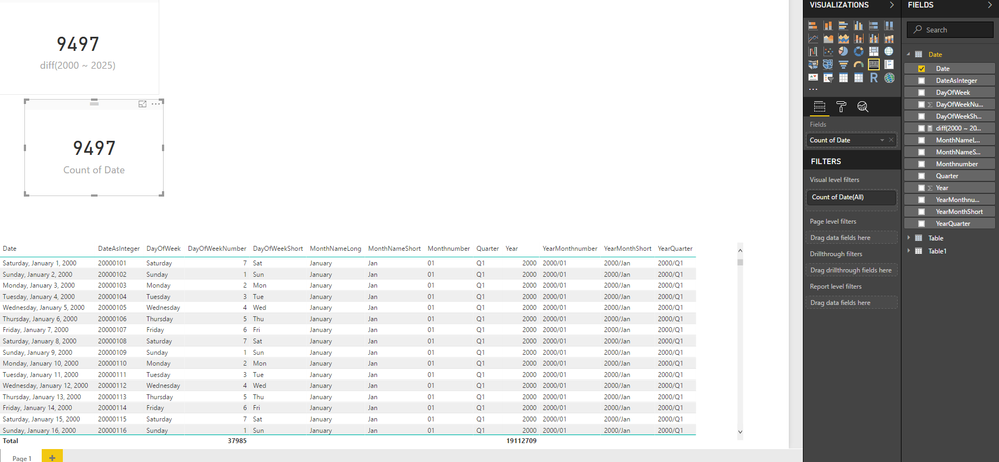
You formula works properly on my side, it will generate 9497 rows.
I also drag date to card with summary mode 'count', it can shows the correct result.
Can you please provide more detail informations?
Regards,
Xiaoxin Sheng
Hi @sanimesa,
You formula works properly on my side, it will generate 9497 rows.
I also drag date to card with summary mode 'count', it can shows the correct result.
Can you please provide more detail informations?
Regards,
Xiaoxin Sheng
@Anonymous Thanks, must have missed something.
Don't miss out on Data Days, June 15 through August 7. Learn Fabric, Power BI, SQL, AI and more.
Check out the May 2026 Power BI update to learn about new features.
| User | Count |
|---|---|
| 23 | |
| 23 | |
| 21 | |
| 17 | |
| 13 |
| User | Count |
|---|---|
| 58 | |
| 51 | |
| 39 | |
| 29 | |
| 24 |