Get certified for free when you join Fabric Data Days 2026 and dive into Fabric, Power BI, SQL, AI, and other essential data skills.
Join nowJuly 7 - July 17 | Round 2 of the Power BI Dataviz World Championships. Don't miss your chance! Learn more
I created a date dimension table using the code as below from a blog:
Looks like when I use a big range as parameter to Calendar (say 2000/2025), it is only generating weekly values for dates. It seems to work between 2009 and 2025 and correctly generates for each date value. Perhaps I am missing something.
Date =
ADDCOLUMNS (
CALENDAR (DATE(2000;1;1); DATE(2025;12;31));
"DateAsInteger"; FORMAT ( [Date]; "YYYYMMDD" );
"Year"; YEAR ( [Date] );
"Monthnumber"; FORMAT ( [Date]; "MM" );
"YearMonthnumber"; FORMAT ( [Date]; "YYYY/MM" );
"YearMonthShort"; FORMAT ( [Date]; "YYYY/mmm" );
"MonthNameShort"; FORMAT ( [Date]; "mmm" );
"MonthNameLong"; FORMAT ( [Date]; "mmmm" );
"DayOfWeekNumber"; WEEKDAY ( [Date] );
"DayOfWeek"; FORMAT ( [Date]; "dddd" );
"DayOfWeekShort"; FORMAT ( [Date]; "ddd" );
"Quarter"; "Q" & FORMAT ( [Date]; "Q" );
"YearQuarter"; FORMAT ( [Date]; "YYYY" ) & "/Q" & FORMAT ( [Date]; "Q" )
)
Solved! Go to Solution.
Hi @sanimesa,
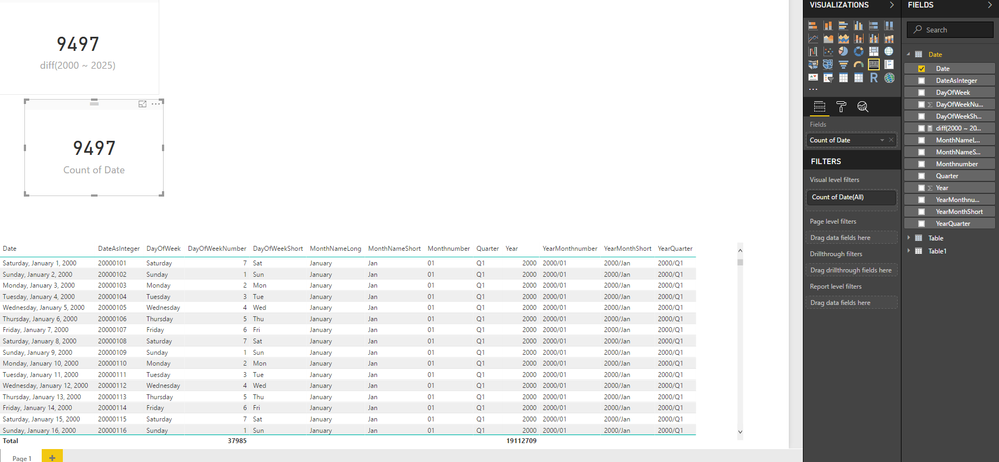
You formula works properly on my side, it will generate 9497 rows.
I also drag date to card with summary mode 'count', it can shows the correct result.
Can you please provide more detail informations?
Regards,
Xiaoxin Sheng
Hi @sanimesa,
You formula works properly on my side, it will generate 9497 rows.
I also drag date to card with summary mode 'count', it can shows the correct result.
Can you please provide more detail informations?
Regards,
Xiaoxin Sheng
@Anonymous Thanks, must have missed something.
Join us in Barcelona for FabCon and SQLCon, the Fabric, Power BI, SQL, and AI community event. Save €200 with code FABCMTY200.
If you love stickers, then you will definitely want to check out our community sticker challenge, Barcelona edition!
Check out the July 2026 Power BI update to learn about new features.
| User | Count |
|---|---|
| 30 | |
| 28 | |
| 23 | |
| 23 | |
| 16 |
| User | Count |
|---|---|
| 45 | |
| 32 | |
| 18 | |
| 16 | |
| 16 |