cancel
Showing results for 
Search instead for 
Did you mean: 

Get Fabric Certified for FREE during Fabric Data Days. Don't miss your chance! Request now

Reply
lehmberg
Advocate II
Advocate II

Date slicer and page level filter not showing correct information at report load

Hello all,


I am using Power BI embedded with direct query to vislualize data in my web app.

I want to have a dashboard containing data from the last 30 days and am running into some problems.

I have created a table in my database with an entry for each day of the year called data. I have also created a measure on that table called days ago looking like this Days Ago = DATEDIFF('Date'[Date],TODAY(),DAY)

I have a slicer on the date field and a Page level filter that says Days Ago >= 0 and Days Ago <= 30

It works in the sense that that date slicer shown the correct date span - the last 30 days - but the rest of the visuals don't reflelct this. They show data form the entire period in the database. Only if I just move the date slider slighty do they refresh to show the correct information.

What can I do so that the data is correct when the page loads?

Best regards

Alex

2 REPLIES 2
v-sihou-msft
Microsoft Employee
Microsoft Employee


@lehmberg


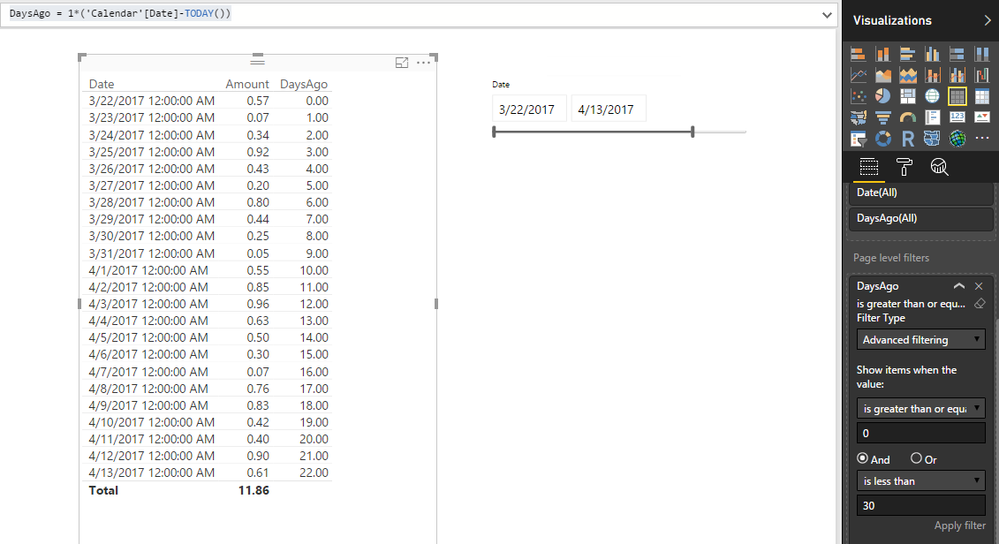
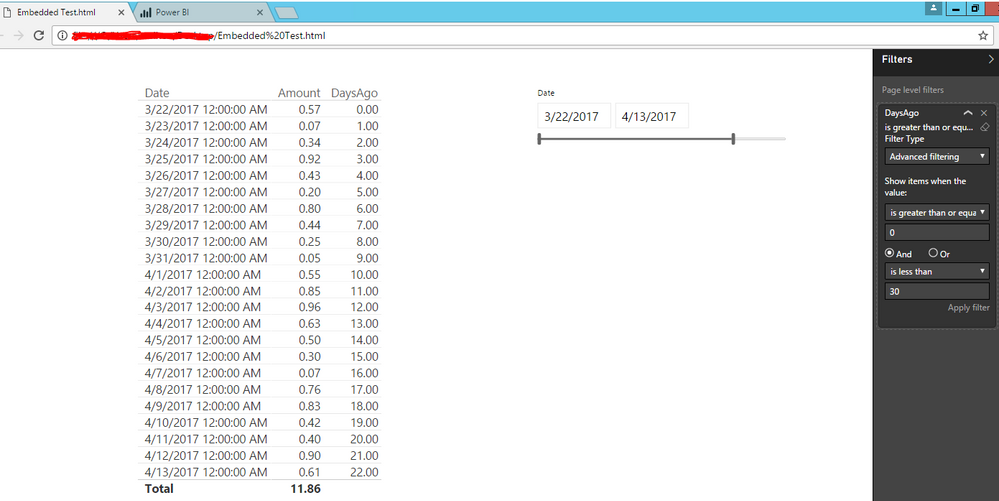
I can't reproduce this issue. Then Page Level Filter and date slicer are applied properly when integrated into my web page.


I created a calculated column instead of measure for the date difference.


DaysAgo = 1*('Calendar'[Date]-TODAY())

9.PNG


It shows same thing in my embedded web page.


2.PNG


Regards,

Thanks for a very elaborate reply - greatly appreciated


I checked again and I can get the same behavior you have.


The problem comes on tables when you have visualizations on the page that are not using the Date table directly.

I have another table that is linked to my Date table via the Days Ago relationsship and that does not filter based on the date slider until I move the slider and it refreshes the visuals.

I wonder if this can have something to do with the days ago field being a measure.

You can see the two tables and the relationsship here:

https://screencast.com/t/8T6yluGzAI

Helpful resources

Announcements
Fabric Data Days Carousel

Fabric Data Days

Advance your Data & AI career with 50 days of live learning, contests, hands-on challenges, study groups & certifications and more!

October Power BI Update Carousel

Power BI Monthly Update - October 2025

Check out the October 2025 Power BI update to learn about new features.

FabCon Atlanta 2026 carousel

FabCon Atlanta 2026

Join us at FabCon Atlanta, March 16-20, for the ultimate Fabric, Power BI, AI and SQL community-led event. Save $200 with code FABCOMM.

Top Solution Authors