Join us in Barcelona for FabCon and SQLCon, September 28 - October 1, 2026.
This is best Fabric, Power BI, SQL and AI community event. How do we know? The last event sold out! Save €200 with code FABCMTY200.
Register now- Power BI forums
- Get Help with Power BI
- Desktop
- Service
- Report Server
- Power Query
- Mobile Apps
- Developer
- DAX Commands and Tips
- Custom Visuals Development Discussion
- Health and Life Sciences
- Power BI Spanish forums
- Translated Spanish Desktop
- Training and Consulting
- Instructor Led Training
- Dashboard in a Day for Women, by Women
- Galleries
- Data Stories Gallery
- Themes Gallery
- Contests Gallery
- QuickViz Gallery
- Quick Measures Gallery
- Visual Calculations Gallery
- Fabric Apps Gallery
- Notebook Gallery
- Translytical Task Flow Gallery
- TMDL Gallery
- R Script Showcase
- Webinars and Video Gallery
- Ideas
- Custom Visuals Ideas (read-only)
- Issues
- Issues
- Events
- Upcoming Events
The Fabric community is upgrading! Read all of the details including the timeline and what you can expect. Learn more
- Power BI forums
- Forums
- Get Help with Power BI
- Desktop
- Re: Date range on visualization
- Subscribe to RSS Feed
- Mark Topic as New
- Mark Topic as Read
- Float this Topic for Current User
- Bookmark
- Subscribe
- Printer Friendly Page

- Mark as New
- Bookmark
- Subscribe
- Mute
- Subscribe to RSS Feed
- Permalink
- Report Inappropriate Content
Date range on visualization
Greetings! Please tell me how I can add to the visualization tools dashboards date range, as well as the opportunity to compare the two ranges and display the percentage difference?
Solved! Go to Solution.
- Mark as New
- Bookmark
- Subscribe
- Mute
- Subscribe to RSS Feed
- Permalink
- Report Inappropriate Content
Hi @Velias,
You can write the following formulas to calculate percent difference. For mor details, please review the example in the attached PBIX file.
1. Create a measure that calculate sessions between 2016,9,5 and 2016,9,7.
Sessionsum = CALCULATE(SUM(Table2[Sessions]), DATESBETWEEN(Table2[Date],DATE(2016,9,5), DATE(2016,9,7)))
2. Create a measure that calculate sessions difference between two date ranges.
Session difference = CALCULATE(SUM(Table2[Sessions]), DATESBETWEEN(Table2[Date],DATE(2016,9,9), DATE(2016,9,11)))-CALCULATE(SUM(Table2[Sessions]), DATESBETWEEN(Table2[Date],DATE(2016,9,5), DATE(2016,9,7)))
3. Create a measure that calculate percent difference and format the measure using the following percentage option.
Percent difference = DIVIDE([Session difference],[Sessionsum])
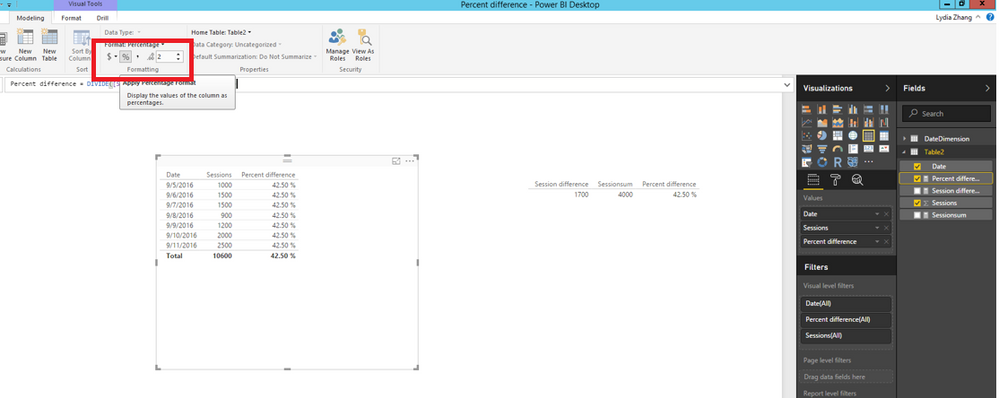
Thanks,
Lydia Zhang
- Mark as New
- Bookmark
- Subscribe
- Mute
- Subscribe to RSS Feed
- Permalink
- Report Inappropriate Content
Greetings! Please tell me how I can add to the visualization tools dashboards date range, as well as the opportunity to compare the two ranges and display the percentage difference?
- Mark as New
- Bookmark
- Subscribe
- Mute
- Subscribe to RSS Feed
- Permalink
- Report Inappropriate Content
Hi @Velias,
Based on your description, it’s difficult for us to provide detailed solution. Could you please share sample data of your scenario and post expected result here?
In addition, if you just need a date range selector to filter data in your report, you can use the Timeline custom visual.
Thanks,
Lydia Zhang
- Mark as New
- Bookmark
- Subscribe
- Mute
- Subscribe to RSS Feed
- Permalink
- Report Inappropriate Content
Thanks @Anonymous!
Timeline custom visual - good thing.
To solve their problems I need to compare periods. For example a visit to the site 09.05.2016 - 11.09.2016 compared with 29/08/2016 - 09/04/2016 or 08/09/2016 compared to 04/08/2016. Need a percentage of the difference of the two periods specified manually.
Example: site visits in the period 05.09.2016 - 11.09.2016 up 25 percent of visits to the site 08/29/2016 - 04/09/2016
Sorry for my English 😞
- Mark as New
- Bookmark
- Subscribe
- Mute
- Subscribe to RSS Feed
- Permalink
- Report Inappropriate Content
- Mark as New
- Bookmark
- Subscribe
- Mute
- Subscribe to RSS Feed
- Permalink
- Report Inappropriate Content
| Date | Sessions |
| 05.09.2016 | 1000 |
| 06.09.2016 | 1500 |
| 07.09.2016 | 1500 |
| 08.09.2016 | 900 |
| 09.09.2016 | 1200 |
| 10.09.2016 | 2000 |
| 11.09.2016 | 2500 |
for example: 09.09.2016 - 11.09.2016 above 43% than 05.09.2016 - 07.09.2016 etc.
- Mark as New
- Bookmark
- Subscribe
- Mute
- Subscribe to RSS Feed
- Permalink
- Report Inappropriate Content
Hi @Velias,
You can write the following formulas to calculate percent difference. For mor details, please review the example in the attached PBIX file.
1. Create a measure that calculate sessions between 2016,9,5 and 2016,9,7.
Sessionsum = CALCULATE(SUM(Table2[Sessions]), DATESBETWEEN(Table2[Date],DATE(2016,9,5), DATE(2016,9,7)))
2. Create a measure that calculate sessions difference between two date ranges.
Session difference = CALCULATE(SUM(Table2[Sessions]), DATESBETWEEN(Table2[Date],DATE(2016,9,9), DATE(2016,9,11)))-CALCULATE(SUM(Table2[Sessions]), DATESBETWEEN(Table2[Date],DATE(2016,9,5), DATE(2016,9,7)))
3. Create a measure that calculate percent difference and format the measure using the following percentage option.
Percent difference = DIVIDE([Session difference],[Sessionsum])
Thanks,
Lydia Zhang

Helpful resources

FabCon & SQLCon – Barcelona 2026
Join us in Barcelona for FabCon and SQLCon, the Fabric, Power BI, SQL, and AI community event. Save €200 with code FABCMTY200.

Power BI DataViz World Championships - June 2026
A new Power BI DataViz World Championship is coming this June! Don't miss out on submitting your entry.

| User | Count |
|---|---|
| 27 | |
| 22 | |
| 20 | |
| 18 | |
| 14 |


| User | Count |
|---|---|
| 25 | |
| 20 | |
| 20 | |
| 20 | |
| 20 |


