cancel
Showing results for 
Search instead for 
Did you mean: 

The Power BI Data Visualization World Championships is back! Get ahead of the game and start preparing now! Learn more

Reply
noorkhan
Regular Visitor

Date problem

I have data in which year, month number and week number and day number of week is mentioned in separate column. how can i combine all these column to get date. 


Thanks

1 ACCEPTED SOLUTION
Anonymous
Not applicable

So your data looks like this, except the Date column?
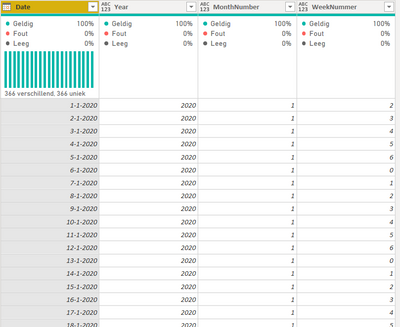
 

OfTheHair_0-1659618592094.png


Is this data your Date table or part of your Facts table?


My quick and dirty solution would be to either merge your data with a Date Table that does contain dates, joining on Year, MonthNumber and Weeknummer. Or, alternatively, create a Date Table from scratch.


Here's the M-code for a Date Table that automatically generates dates for a period of 6 years centered on the current year.

let
    Bron = {Int64.From(Date.StartOfYear(Date.AddYears(Date.From(DateTime.LocalNow()), -3)))..Int64.From(Date.EndOfYear(Date.AddYears(Date.From(DateTime.LocalNow()),3)))},
    #"Geconverteerd naar tabel" = Table.FromList(Bron, Splitter.SplitByNothing(), null, null, ExtraValues.Error),
    #"Type gewijzigd" = Table.TransformColumnTypes(#"Geconverteerd naar tabel",{{"Column1", type date}}),
    #"Namen van kolommen gewijzigd" = Table.RenameColumns(#"Type gewijzigd",{{"Column1", "Date"}}),
    #"Aangepaste kolom toegevoegd" = Table.AddColumn(#"Namen van kolommen gewijzigd", "Year", each Date.Year([Date])),
    #"Aangepaste kolom toegevoegd1" = Table.AddColumn(#"Aangepaste kolom toegevoegd", "MonthNumber", each Date.Month([Date])),
    #"Aangepaste kolom toegevoegd2" = Table.AddColumn(#"Aangepaste kolom toegevoegd1", "WeekNummer", each Date.DayOfWeek([Date])),
    #"Type gewijzigd1" = Table.TransformColumnTypes(#"Aangepaste kolom toegevoegd2",{{"Date", type date}, {"Year", Int64.Type}, {"MonthNumber", Int64.Type}, {"WeekNummer", Int64.Type}})
in
    #"Type gewijzigd1"

View solution in original post

3 REPLIES 3
Anonymous
Not applicable

Hi @noorkhan ,


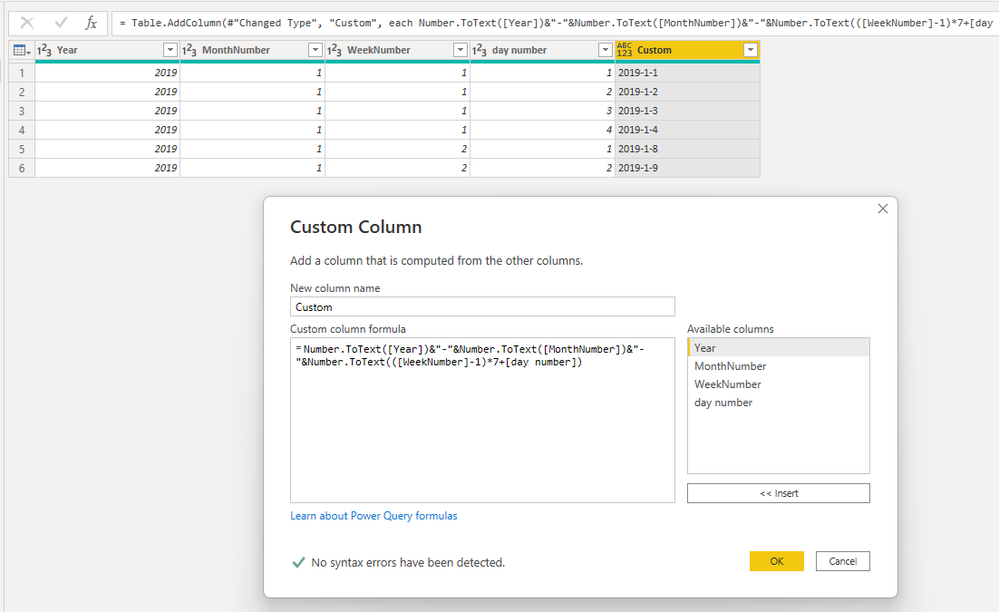
Try to add a custom column like

= Number.ToText([Year])&"-"&Number.ToText([MonthNumber])&"-"&Number.ToText(([WeekNumber]-1)*7+[day number])

ShundaSteph_0-1660123753739.png

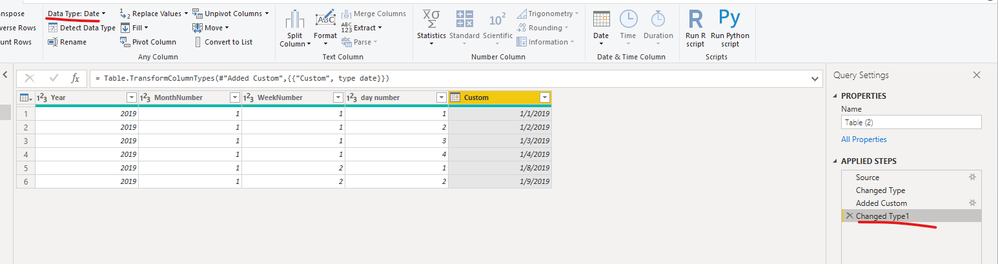
You can change the type to date.

ShundaSteph_1-1660123781256.png


Best Regards,

ShundaSteph


Anonymous
Not applicable

So your data looks like this, except the Date column?


OfTheHair_0-1659618592094.png


Is this data your Date table or part of your Facts table?


My quick and dirty solution would be to either merge your data with a Date Table that does contain dates, joining on Year, MonthNumber and Weeknummer. Or, alternatively, create a Date Table from scratch.


Here's the M-code for a Date Table that automatically generates dates for a period of 6 years centered on the current year.

let
    Bron = {Int64.From(Date.StartOfYear(Date.AddYears(Date.From(DateTime.LocalNow()), -3)))..Int64.From(Date.EndOfYear(Date.AddYears(Date.From(DateTime.LocalNow()),3)))},
    #"Geconverteerd naar tabel" = Table.FromList(Bron, Splitter.SplitByNothing(), null, null, ExtraValues.Error),
    #"Type gewijzigd" = Table.TransformColumnTypes(#"Geconverteerd naar tabel",{{"Column1", type date}}),
    #"Namen van kolommen gewijzigd" = Table.RenameColumns(#"Type gewijzigd",{{"Column1", "Date"}}),
    #"Aangepaste kolom toegevoegd" = Table.AddColumn(#"Namen van kolommen gewijzigd", "Year", each Date.Year([Date])),
    #"Aangepaste kolom toegevoegd1" = Table.AddColumn(#"Aangepaste kolom toegevoegd", "MonthNumber", each Date.Month([Date])),
    #"Aangepaste kolom toegevoegd2" = Table.AddColumn(#"Aangepaste kolom toegevoegd1", "WeekNummer", each Date.DayOfWeek([Date])),
    #"Type gewijzigd1" = Table.TransformColumnTypes(#"Aangepaste kolom toegevoegd2",{{"Date", type date}, {"Year", Int64.Type}, {"MonthNumber", Int64.Type}, {"WeekNummer", Int64.Type}})
in
    #"Type gewijzigd1"
SpartaBI
Community Champion
Community Champion

@noorkhan you don't have the day in the month maybe? :))

Helpful resources

Announcements
Power BI DataViz World Championships

Power BI Dataviz World Championships

The Power BI Data Visualization World Championships is back! Get ahead of the game and start preparing now!

November Power BI Update Carousel

Power BI Monthly Update - November 2025

Check out the November 2025 Power BI update to learn about new features.

FabCon Atlanta 2026 carousel

FabCon Atlanta 2026

Join us at FabCon Atlanta, March 16-20, for the ultimate Fabric, Power BI, AI and SQL community-led event. Save $200 with code FABCOMM.