Don't miss your chance to take the Fabric Data Engineer (DP-600) exam for FREE! Find out how by watching the DP-600 session on-demand now through April 28th.
Learn moreJoin the FabCon + SQLCon recap series. Up next: Power BI, Real-Time Intelligence, IQ and AI, and Data Factory take center stage. All sessions are available on-demand after the live show. Register now
I have data in which year, month number and week number and day number of week is mentioned in separate column. how can i combine all these column to get date.
Thanks
Solved! Go to Solution.
So your data looks like this, except the Date column?
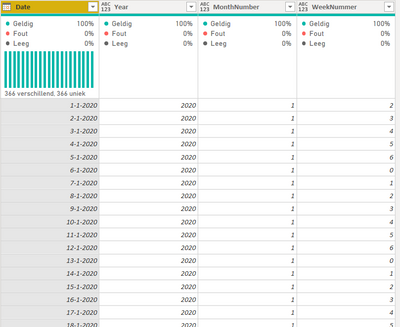
Is this data your Date table or part of your Facts table?
My quick and dirty solution would be to either merge your data with a Date Table that does contain dates, joining on Year, MonthNumber and Weeknummer. Or, alternatively, create a Date Table from scratch.
Here's the M-code for a Date Table that automatically generates dates for a period of 6 years centered on the current year.
let
Bron = {Int64.From(Date.StartOfYear(Date.AddYears(Date.From(DateTime.LocalNow()), -3)))..Int64.From(Date.EndOfYear(Date.AddYears(Date.From(DateTime.LocalNow()),3)))},
#"Geconverteerd naar tabel" = Table.FromList(Bron, Splitter.SplitByNothing(), null, null, ExtraValues.Error),
#"Type gewijzigd" = Table.TransformColumnTypes(#"Geconverteerd naar tabel",{{"Column1", type date}}),
#"Namen van kolommen gewijzigd" = Table.RenameColumns(#"Type gewijzigd",{{"Column1", "Date"}}),
#"Aangepaste kolom toegevoegd" = Table.AddColumn(#"Namen van kolommen gewijzigd", "Year", each Date.Year([Date])),
#"Aangepaste kolom toegevoegd1" = Table.AddColumn(#"Aangepaste kolom toegevoegd", "MonthNumber", each Date.Month([Date])),
#"Aangepaste kolom toegevoegd2" = Table.AddColumn(#"Aangepaste kolom toegevoegd1", "WeekNummer", each Date.DayOfWeek([Date])),
#"Type gewijzigd1" = Table.TransformColumnTypes(#"Aangepaste kolom toegevoegd2",{{"Date", type date}, {"Year", Int64.Type}, {"MonthNumber", Int64.Type}, {"WeekNummer", Int64.Type}})
in
#"Type gewijzigd1"
Hi @noorkhan ,
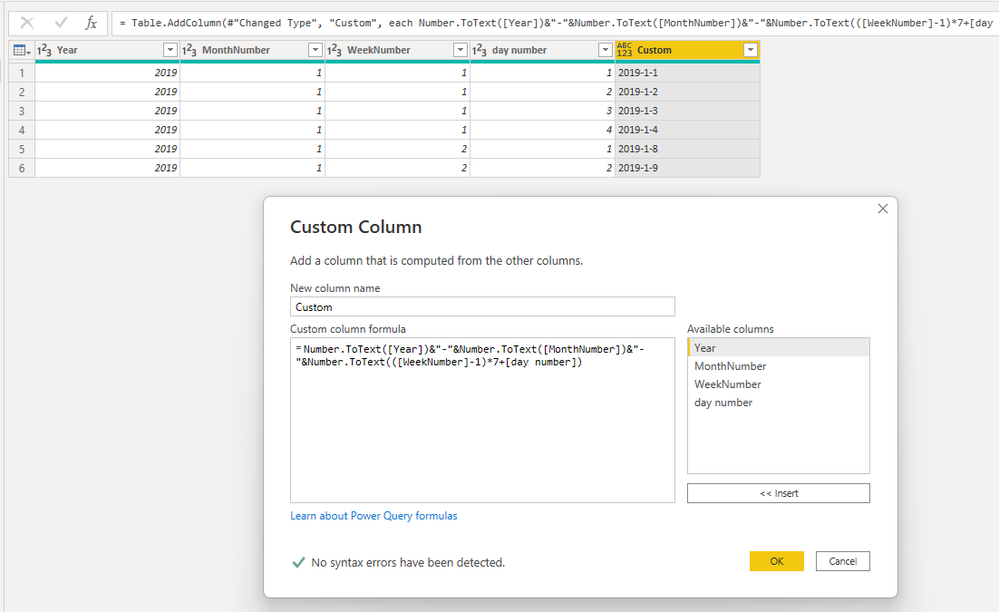
Try to add a custom column like
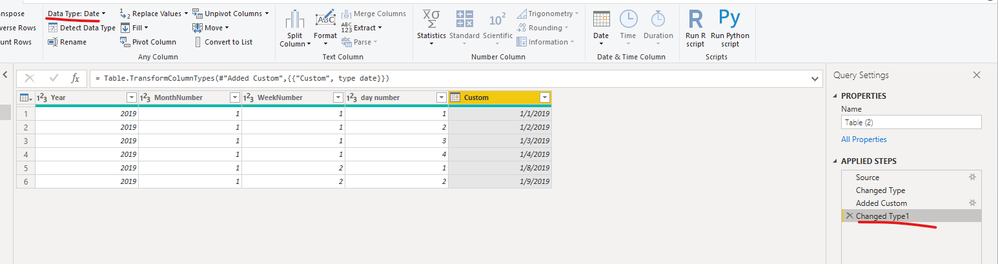
= Number.ToText([Year])&"-"&Number.ToText([MonthNumber])&"-"&Number.ToText(([WeekNumber]-1)*7+[day number])You can change the type to date.
Best Regards,
ShundaSteph
So your data looks like this, except the Date column?
Is this data your Date table or part of your Facts table?
My quick and dirty solution would be to either merge your data with a Date Table that does contain dates, joining on Year, MonthNumber and Weeknummer. Or, alternatively, create a Date Table from scratch.
Here's the M-code for a Date Table that automatically generates dates for a period of 6 years centered on the current year.
let
Bron = {Int64.From(Date.StartOfYear(Date.AddYears(Date.From(DateTime.LocalNow()), -3)))..Int64.From(Date.EndOfYear(Date.AddYears(Date.From(DateTime.LocalNow()),3)))},
#"Geconverteerd naar tabel" = Table.FromList(Bron, Splitter.SplitByNothing(), null, null, ExtraValues.Error),
#"Type gewijzigd" = Table.TransformColumnTypes(#"Geconverteerd naar tabel",{{"Column1", type date}}),
#"Namen van kolommen gewijzigd" = Table.RenameColumns(#"Type gewijzigd",{{"Column1", "Date"}}),
#"Aangepaste kolom toegevoegd" = Table.AddColumn(#"Namen van kolommen gewijzigd", "Year", each Date.Year([Date])),
#"Aangepaste kolom toegevoegd1" = Table.AddColumn(#"Aangepaste kolom toegevoegd", "MonthNumber", each Date.Month([Date])),
#"Aangepaste kolom toegevoegd2" = Table.AddColumn(#"Aangepaste kolom toegevoegd1", "WeekNummer", each Date.DayOfWeek([Date])),
#"Type gewijzigd1" = Table.TransformColumnTypes(#"Aangepaste kolom toegevoegd2",{{"Date", type date}, {"Year", Int64.Type}, {"MonthNumber", Int64.Type}, {"WeekNummer", Int64.Type}})
in
#"Type gewijzigd1"
Check out the April 2026 Power BI update to learn about new features.
If you have recently started exploring Fabric, we'd love to hear how it's going. Your feedback can help with product improvements.
A new Power BI DataViz World Championship is coming this June! Don't miss out on submitting your entry.
| User | Count |
|---|---|
| 42 | |
| 35 | |
| 35 | |
| 22 | |
| 15 |
| User | Count |
|---|---|
| 65 | |
| 58 | |
| 28 | |
| 27 | |
| 25 |